1
Pre-Installation
™
1
Find the best exterior location for the Door
Station. See “Mounting Tips” below.
2
Door Station - Exterior
Setup Guide
Install the Door Station Back Box. See the Door
Station Back Box Installation Guide for details.
3
Determine which network and power options
to use (see “Network Options” and “Power
Options”).
4
(WiFi only). Before the Door Station is fully
installed, Control4 recommends to test the
WiFi signal strength in Composer Pro’s System
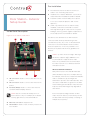
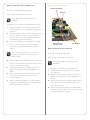
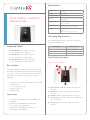
Inside Panel Description
Manager; a strong, robust signal is required. See
the Composer Pro User Guide for details.
Figure 2. Door Station, Inside Panel
This device uses an Ethernet or WiFi network
3
1
connection and can be powered using Power
over Ethernet (PoE), AC, or DC. A wired network
connection is recommended for the best Video
Intercom experience. If it is not possible to use
Ethernet, then please follow these guidelines for
wireless.
NOTES: (1) Video Intercom usage. Although
this device supports b/g/n, 802.11 b is not
recommended or supported for Video
Intercom. (2) Wireless-N is recommended
for Video Intercom. See “Wireless Network
Limitations” below.
Wireless Network Limitations
5
1
2
3
Many WiFi Access Points handle Multicasts
2
4
AC connection. Used to connect the wires for AC
(WiFi simultaneously sent to multiple devices,
for example, when the Door Station broadcasts
video to all stations) by slowing down
power.
transmission speed to the 1 Mb basic rate. This
DC connection. Used to connect the wires for DC
can cause overall WiFi congestion in the WiFi
power.
network during the broadcast. Video Intercom
Contacts/Relays. Used to connect the wires for
response times and images may degrade at
Control4 and third-party devices.
each device.
NOTE: Use the contacts and relays for non-
If a home requires a large number of WiFi
secure devices only. For example, don’t attach
Video Intercom devices, ensure that you have
security gate wires to this terminal block.
a robust WiFi network (possibly consisting of
multiple access points).
4
Ethernet connection. Supports PoE.
5
Reset Button. Used to reset or factory restore the
Door Station.
2