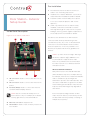
1
Mounting Tips
Please read the next sections, “Power Options”
> “Network and Power Installations” to choose an
Follow these tips for the best results.
installation option that works best with the system
1
before installing the Door Station.
Install the Door Station in a place where it will be
protected from water (e.g., rain, sprinklers, etc.).
2
Do not expose the Door Station to direct
Power Options
sunlight. If the sun hits the Door Station, Control4
3
recommends to purchase the Satin Nickel
CAUTION! Do not attempt to use PoE, AC, and
model (C4-DCS-EN-SN) to reduce fading and
DC power at the same time. Choose only one
degradation of the Door Station.
power option.
Find the best exterior location for the Door
Station. See the Door Station Back Box
ATTENTION! Ne pas tenter d’utiliser PoE,
Installation Guide for back box installation.
AC et DC en même temps. Choisir une seule
a
option d’alimentation.
Mount the Door Station where the video
camera is aimed at an average person’s
b
4
height so the person inside the building gets
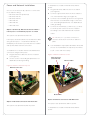
The Door Station can be powered using one of these
a good view of the person calling in.
three (3) options:
Mount the Door Station so that the caller
• Power over Ethernet (PoE). The Ethernet
can comfortably speak into the microphone
network connection for the Door Station is
(about two (2) feet away or 60 cm).
provided through the PoE Injector. No additional
Control4 does not recommend using wireless
(WiFi) networking for an exterior installation.
wiring is needed.
• AC or DC. Used to power the Door Station when
If you must use WiFi, however, follow these
using an Ethernet (not PoE) or WiFi network
guidelines:
connection.
• The wireless access protocol (WAP) broadcast to
the exterior location must be strong.
• Use Composer Pro’s System Manager to test the
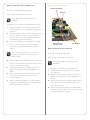
NOTE: Ethernet cable. Install the ferrite clamp
on the Ethernet cable inside the back box.
wireless signal after you’ve installed the Door
Station, and then verify that the signal works
Backlit Button Indicator
correctly. See the Composer Pro User Guide for
details.
The Door Station button’s light can be turned on or
off depending on what is required for the installation.
Network Options
The backlit button may make it easier to see the
The Door Station can be connected using one of
button when it is dark outside. Normally, the light on
these network types:
the button remains on or off depending on how it is
• Standard Ethernet. For best results, this is the
preferred option. Connect the Door Station to
configured in the system, however, it is also used to
convey device status during certain times.
the RJ-45 LAN port on using the RJ-45 Ethernet
cable.
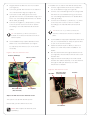
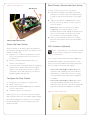
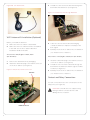
• WiFi. The WiFi antenna will communicate with
When the device is first powered on, the button will
blink slowly until the device is ready to be used in
the LAN’s WAP. If the LAN has a WAP set up, no
the system. If the button continues to blink slowly for
additional wiring is needed except for power. See
over 3 minutes, then the device may be experiencing
“WiFi Antennas” for details.
a problem and should be factory restored. During a
factory restore process the button will blink rapidly.
IMPORTANT! (1) Control4 recommends to use
an Ethernet connection rather than WiFi for
the best communication with the Control4
system. (2) WiFi requires an antenna (sold
separately).
3