1
3
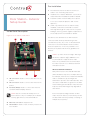
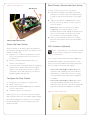
Figure 10. 3m Antenna Kit
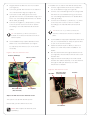
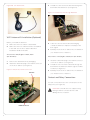
Thread the other end of the antenna through the
back wall of the back box (see Figure 12).
Figure 12. Thread Antenna Through Back Box
WiFi Antenna Kit Installation (Optional)
Before you install the antenna:
1
Make sure the Door Station is assembled.
2
Make sure the Door Station back box is installed
in the wall. See the Door Station Back Box
Installation Guide for details.
4 Leave the other end of the antenna hanging
outside the back box. Adjust it vertically for the
best signal.
5
Carefully insert the Door Station into the back box
(see “Attach the Door Station”).
Antenna Kit—WiFi/ZigBee 2.4GHz, 26cm
(C4-AK-26cm)
1
Remove the antenna from its packaging.
2
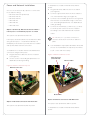
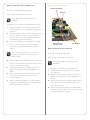
Attach the antenna’s plug to the RSMA connector
on the Door Station (see Figure 11).
Figure 11. Antenna to RSMA Connector
Antenna
Antenna Kit— WiFi/ZigBee 2.4GHz, 3m (C4-AK-3M)
1
Attach the antenna’s plug to the RSMA connector
on the Door Station (see Figure 11).
2
Thread the other end of the antenna through the
back wall of the back box and through the wall as
needed (see Figure 12).
3
Carefully insert the Door Station into the back box
(see “Attach the Door Station”).
Contact and Relay Connections
You can connect devices to the contact ports or the
relay ports (see Figure 13).
CAUTION! Control4 does not support using
earth ground for Contacts as this could
damage the Door Station.
RSMA Connector
8