1
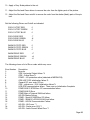
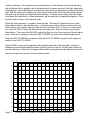
10. Apply a Gray Scale pattern to the set.
11. Adjust the Red and Green drives to remove the color from the lighter parts of the picture.
12. Adjust the Red and Green cutoffs to remove the color from the darker (black) parts of the picture.
Set the following Drives and Cutoffs as indicated.
COOL CUTOFF RED
COOL CUTOFF GREEN
COOL CUTOFF BLUE
0
0
0
COOL DRIVE RED
COOL DRIVE GREEN
COOL DRIVE BLUE
-7
-6
0
WARM CUTOFF RED
WARM CUTOFF GREEN
WARM CUTOFF BLUE
0
0
0
WARM DRIVE RED
WARM DRIVE GREEN
WARM DRIVE BLUE
+7
+4
-6
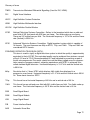
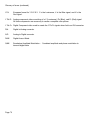
The following shows a list of Error codes which may occur.
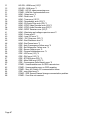
Error Number
0
2
3
4
5
6
7
9
10
11
12
13
14
15
16
17
18
19
Description
No error
GDE -Horizontal Output failure.*3
GDE - Critical Error*3
PEMG - +5V protection active (detected at MSP34XXX)
GDE-HOP POR Initialization failure.*3
General I2C error main I2C bus
GDE - critical error , DAC Initialization failure*3
HCS-GDE communication failure. There was no Initialization Complete.
PEMG NVM IC STM24xxx I2C communication failure
PEMG NVM ID Error
PEMG Main uP Internal RAM test failure
HD-DW Startup Failure.
PEMG - Sound IC MSP34xx I2C failure
PEMG - SRAM IC uPD431000A-B test failure
PEMG - HD-DW Communication Failure.
HD-DW - ADC error *1
HD-DW - Scalar error (I2C)*1
HD-DW - Audio Source Select Error *1
Page 66