1
HARDWARE DESCRIPTION
CONNECTORS
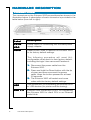
The connectors on the Ericsson W20 are positioned as shown in the
illustration below. A description of each connector is provided in the
table below (from left to right):
Label
Description
10-28
VDC
Power input for connecting the included power
supply adapter.
Reset
Reset button used to restore the Ericsson W20
to its factory default settings.
The following procedure will reset ALL
configurable values back to their factory default,
including the login User name and Password:
1 . Disconnect the power cable from the
Ericsson W20.
2 . Press and hold the Reset button with the tip
of a pen and then reconnect the power
cable. Keep the button pressed for at least
20 seconds.
3 . The Ericsson W20 will restart and come
online with the factory default settings.
8
USB
USB connectors, for connecting the Ericsson W20
to USB devices (for printer and file sharing).
LAN 1-4
Ethernet LAN connectors (RJ45), for connecting
the Ericsson W20 to client PCs or an Ethernet
switch/hub.
Hardware Description