1
SECTION 5
TROUBLESHOOTING
SECTION 5 – Troubleshooting Guide
Troubleshooting Guides are provided to assist you in solving any problems that might occur with the
Printer or its software. We tried to make them as complete as possible. The best advice we can offer is to
make sure that the system is setup properly, plugged in, that it has an adequate supply of ink before
attempting to troubleshoot any problem.
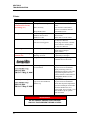
HP Inkjet Print Cartridges
CONDITION
PROBLEM
SOLUTION
Black streaks in text
Lint or paper dust on Printhead.
Clean Cartridge Nozzles with a
clean lint-free cloth moistened
with distilled water.
Cartridge will not print
Sheet is blank even after
running under Cartridge(s).
Check to make sure protective
tape is removed from Printhead.
Remove and reinsert Cartridge
into Carriage Holder.
Install new Print Cartridge.
White streaks in text or
graphics
Lint or dust blocking
Printhead holes.
Clean Cartridge Nozzles with a
clean lint-free cloth moistened
with distilled water.
Clean Interconnects.
Remove and reinsert Cartridge
into Holder.
Insert new Print Cartridge.
Poor contact between Printhead
and Printhead Holder.
27