1
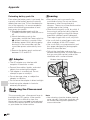
Installing the Battery to
Remote Control (Not Supplied)
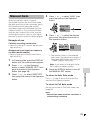
1
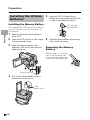
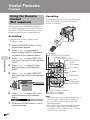
Hold the remote control facing down,
and pull out the battery holder while
pressing the tab toward the centre.
Tab
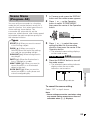
2
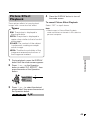
Insert the CR 2025 type lithium
battery into the battery holder with
the H side of the battery facing the
m side of the holder.
CAUTION: Danger of explosion if
battery is incorrectly replaced. For
camcorder, replace only with same or
equivalent type CR1216, for remote
control unit, replace only with same or
equivalent type CR2025, both recommended by the equipment manufacturer.
X KEEP THIS BATTERY
AWAY FROM CHILDREN. IF SWALLOWED, CONSULT A PHYSICIAN
IMMEDIATELY FOR EMERGENCY
TREATMENT.
Z BATTERY MAY EXPLODE
IF MISUSED OR INSTALLED WITH
POLARITY REVERSED. DO NOT
RECHARGE, DISASSEMBLE OR
DISPOSE OF IN FIRE.
Preparation
The remote control (RRMCGA149WJSA)
is not supplied with this camcorder.
Contact the nearest SHARP service
centre or your dealer for purchasing as
specified part.
The CR 2025 type lithium battery is used
to power the remote control unit.
Notes on the Use of the Lithium
battery
• Do not short-circuit, recharge, disassemble,
or heat the lithium battery.
• Should the lithium battery leak, wipe the
battery compartment clean, and then insert a
new battery.
• The lithium batteries will last about one year
under normal usage.
H side, CR 2025 type
lithium battery
“m” side
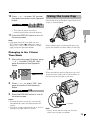
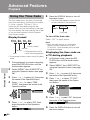
3
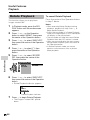
Insert the battery holder back into
position.
11