1
Chapter 4. Implementation
receiver
sender
HE 1
IT 1
55
receiver
sender
receiver
sender
IT 1
HE 1
IT 1
HE 1
HE 2
HE 2
IT 2
IT 3
network 1
network 2
network 3
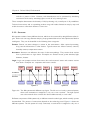
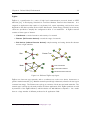
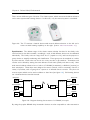
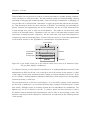
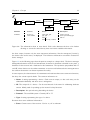
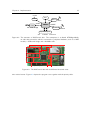
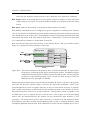
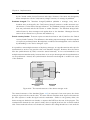
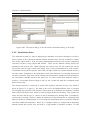
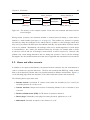
Figure 4.16.: Three different HA networks with connections between IT and HE devices.
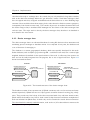
one of the difficulties of protocol translation: The on/off-code of the default transmitter can
change further receivers and trigger other protocol translations. When network 3 receives a
message from “IT 1”, there are two protocol translations and transmitter “HE 3” and “IT 3”
are triggered. To allow infinite connection chains, the database is searched recursively for further
connections. The search is aborted if no more connections are found or infinite loops occur. For
example, network 3 will loop if transmitter “IT 1” and “IT 3” are the same. All in all, the protocol
translation offers an easy connection method between devices of different HA systems, because
they can be connected by simply assigning them as connected in the database. However, this type
of connecting has its drawbacks: A protocol translation will always cause at least one additional
message to be sent. In case of larger connections, a high number of messages are sent, which can
block the transmission channel for a certain amount of time. Therefore, the HA system should be
designed in a way that avoids high numbers of connections for single devices.
4.5. Visualization
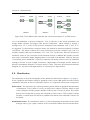
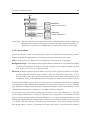
The visualization node is the last member of the abstraction chain shown in figure 3.4 on page 31.
It has a graphical user interface (GUI) for graphical control over the HA system and offers various
visualisation functions as well as a namespace service. It is composed of three main components:
Scene menu: The scene menu is a class for generating scenes, which are graphical representations
of namespaces. They consist of a name, an image and a number of devices, which are part
of the namespace and they usually describe locations, such as rooms or places. As a result,
devices can be separated in groups and controlled by their location. This is useful for larger
networks, as information becomes more readable and devices from unwanted locations can
be filtered.
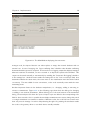
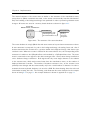
Visualization menu: The visualization menu is a class for displaying the database of the device
manager node to give a quick overview of the connections between devices and their state.