1
8.6
Basic operations
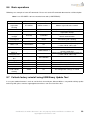
Followings are examples of some AT commands. Please refer to the AT command document for a full description.
Note: Issue AT+CMEE=1 to have extended error code (+CME ERROR)
Description
AT commands
Modem response
Network
registration
checking
AT+CREG?
CREG=<mode>,1
Modem registered to the network
CREG=<mode>,2
Registration lost, re-registration attempt
Modem not registered on the network, no
registration attempt
The first parameter has to be at least 15 for
normal communication
CREG=<mode>,0
Receiving signal
strength
Receiving an
incoming call
Make a call
AT+CSQ
+CSQ:20,0
RING
An incoming call is waiting
ATA
OK
ATD1234567;
OK
Answer the call
Communication established (Don’t forget the
“;” at the end for “voice” call)
PIN code not entered (with +CME=1 mode)
AOC credit exceeded or a communication is
already established
Communication established (Don’t forget the
“;” at the end for “voice” call)
+CME ERROR: 11
+CME ERROR: 3
Make an
emergency call
Communication
loss
Hang up
Enter PIN code
Saves parameters
in non-volatile
memory
8.7
Comments
ATD 112;
OK
NO CARRIER
ATH
AT+CPIN=1234
OK
OK
+CME ERROR: 16
+CME ERROR: 3
PIN Code accepted
Incorrect PIN code (with +CME=1 mode)
PIN already entered (with +CME=1 mode)
AT&W
OK
The configuration settings are stored
Failsafe factory reinstall using USB Binary Update Tool
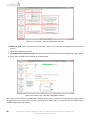
In case your modem firmware is crash or can’t be flash via Serial port, Maestro Wireless can provide a binary update
tool using USB, please contact [email protected] to receive those files.
Confidential, the whole document is the sole property of Maestro Wireless Solutions ltd.
[email protected]
33