1
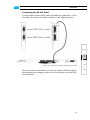
Atomix HDMI Installation Guide 3.1.4 Finishing the Installation This step of installing the Atomix HDMI board is the last step to be performed. To finish the hardware installation do the following: Close the computer casing. Connect all cables to the computer system again. Connect your audio and video equipment to the Atomix HDMI connectors. After this start the computer system. Once the computer system has finished the loading of the operating system, the installation of the hardware of Atomix HDMI is complete. To use the board and activate its features you have to install the DVS software as well (see section “Software Installation” on page 3-11). 3-10