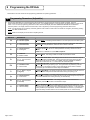
1
6 Programming the DP-Hub (continued)
2
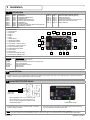
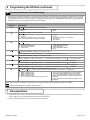
Operating Parameters (Troubleshooting)
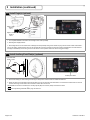
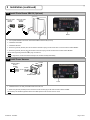
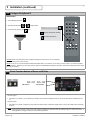
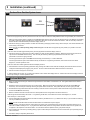
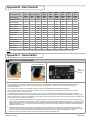
1. The second set of parameters provides a set of real-time operating parameters for troubleshooting. These displays are available only to view, with
no user interaction possible. They merely provide the operating status of the system. The chart below shows these displays. Once one of these
operating parameters has been selected, the display will remain active on that parameter and NOT time out, thus NOT saving any programmed
parameters until one of the programming parameters has been selected.
DISPLAYS
Dr
DESCRIPTION
Display Relay – Displays the active DP-Hub relay(s):
Ac - Activation
Sf - Safety
DD
Display Door – Displays current state of door:
op - Opening
Do - Opened
ho - Hold Open (3-position switch in ‘H/O’ position)
Mn - Manual (door(s) was pushed open manually)
DS
Dc - Closed
cL - Closing
oF - Off (3-position switch in ‘OFF’ position)
nc - Not Closed
nL - Not Learned
Display Sensors – Displays which sensor(s) are in detection:
AE - Activation Eagle
AP - Activation Push Plate/AUX
AS - Activation Door Mounted
ho - Home Switch
d
SS - Stall
-- - None
S1 - Safety Side Door Mounted 1
S2 - Safety Side Door Mounted 2
SB - Safety BodyGuard
SP - Safety Photoelectric Beams
-- - None
Display Door 1 Position – Displays current position of door 1:
00 to 99 - Degrees or “─ digit” = 100 to 109 or “─ ─” = greater than 109, example: ─ 2 = 102
d
Display Door 2 Position – Displays current position of door 2:
00 to 99 - Degrees or “─ digit” = 100 to 109 or “─ ─” = greater than 109, example: ─ 2 = 102
d
Display Door Mounted 1 Position – Displays learned position of detection of safety side Door Mounted Sensor 1:
00 to 99 - Degrees or “─ digit” = 100 to 109 or “─ ─” = greater than 109, example: ─ 2 = 102
D
-- - Not learned
Display Door Mounted 2 Position – Displays learned position of detection of safety side Door Mounted Sensor 2:
00 to 99 - Degrees or “─ digit” = 100 to 109 or “─ ─” = greater than 109, example: ─ 2 = 102
dE
-- - Only one door system
-- - Not learned
Display Learn Errors – Displays errors generated during door(s) learn:
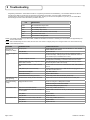
For further explanation of the error codes and corrective actions, please refer to Section 8 - Troubleshooting.
E1 - EDPS 1 baseline too low
E2 - EDPS 1 baseline too high
E3 - EDPS 2 baseline too low
E4 - EDPS 2 baseline too high
E5 - Door 1 door opened degrees too low (80 minimum)
E6 - Door 1 door opened degrees too high (110 maximum)
E7 - Door 2 door opened degrees too low (80 minimum)
E8 - Door 2 door opened degrees too high (110 maximum)
E9 - Safety Side Door Mounted 1 detection degrees too low
(65 minimum)
EA - Safety Side Door Mounted 2 detection degrees too low
(65 minimum)
NOTE: Remember when troubleshooting, these displays can be extremely helpful in quickly identifying possible error conditions.
NOTE: Make sure the display shows dp before completing all work.
7 Documentation
1. D
ocument all work. For future reference, be sure to record the DP-Hub serial number on your work order. It is also a good idea to record all
function settings (on your work ticket) that were programmed into the DP-Hub.
2. Be sure to obtain signatures on your work order for all work accomplished.
75.5652.03 20130617
Page 11 of 16