1
5 Installation (continued)
10
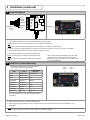
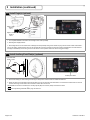
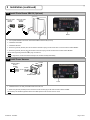
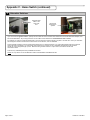
Install Eagle(s) (optional)
Eagle 1 Cable
Route to
‘EG 1’
RED
BLACK
WHITE
GREEN
Eagle 2 Cable
Route to
‘EG 2’
1
2
3
4
5
POWER
POWER
COM
N.O.
N.C.
Eagle 1
Eagle 2
1. For complete installation instructions refer to Eagle User’s Guide (75.0058).
2. Wire Eagle as displayed above.
3. Mount Eagle Sensor to door header and route Eagle harness (20.5096) through door header and plug into DP-Hub at location marked ‘EG1’.
For two way traffic, repeat the steps above on the opposite side of the door and plug into DP-Hub at location marked ‘EG2’ and make sure that
the Eagle is installed beyond the swing of the door so that the normal operation of the door does not trigger the Eagle.
11
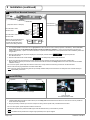
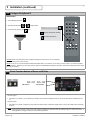
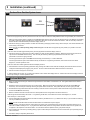
Install Auxiliary/Push Plate(s) (optional)
Push Plate Wire
Route to ‘AUX’
COM
NO
NC
Auxiliary/Push Plate
1. Mount Push Plate(s) or other Knowing Act device(s) to wall, jamb or desired location accessible to traffic flow.
2. Route two wires from Push Plate to DP-Hub and fasten one leg of Push Plate at the first location of screw terminal marked ‘AUX’ on DP-Hub
and the second leg of Push Plate to second location marked ‘AUX’ on DP-Hub.
NOTE: Make sure the device is wired to the normally-opened (NO) and common (COM) contacts of the device.
NOTE: See Programming Parameter FA on page 10 section 6-1.
Page 6 of 16
75.5652.03 20130617