1
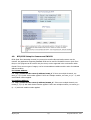
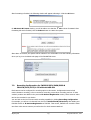
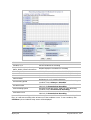
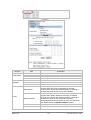
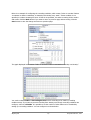
FlexWATCH® Web Admin
User’s Manual
Version 4.14
April 12, 2012
Seyeon Technology Co., Ltd
http://www.seyeon.co.kr/
http://www.flexwatch.com/
M4029-08
M4029-08
1
Seyeon Tech Co., Ltd
Index
1.
2.
3.
Admin Menu of FLEXWATCH Servers ........................................................................................... 6
1.1.
Entering Admin Menu ................................................................................................... 9
1.2.
Admin Menu Structure ............................................................................................... 10
Quick Configuration.................................................................................................................. 13
2.1.
Step 1: Changing Server Name ................................................................................... 13
2.2.
Step 2: Time Setup .................................................................................................... 13
2.3.
Step 3: Network Setup ............................................................................................... 13
2.4.
Step 4: IP-CCTV DNS ................................................................................................. 13
2.5.
Step 5: IP Devices Registration for FWNVR series ........................................................ 13
2.6.
Step 6: Recording Configuration for FWNVR series....................................................... 13
2.7.
Finish ........................................................................................................................ 13
System Configuration Menu ...................................................................................................... 14
3.1.
Server Name Setup .................................................................................................... 14
3.2.
Date & Time .............................................................................................................. 14
3.3.
Admin Password ........................................................................................................ 15
3.4.
Access Control ........................................................................................................... 16
3.5.
User Registration ....................................................................................................... 16
3.5.1.
Add.................................................................................................................... 16
3.5.2.
Edit.................................................................................................................... 17
3.5.3.
Delete ................................................................................................................ 17
3.6.
IP Devices Registration .............................................................................................. 18
3.6.1.
4.
Adding VS Module ID (IP Devices) ....................................................................... 18
Network Configuration ............................................................................................................. 21
4.1.
Network Configuration ............................................................................................... 21
4.1.1.
Static IP Configuration ........................................................................................ 21
4.1.2.
DHCP Client Configuration ................................................................................... 22
4.1.3.
PPPoE Configuration ........................................................................................... 22
4.2.
Wireless LAN Configuration ........................................................................................ 22
4.2.1.
ESSID ................................................................................................................ 23
4.2.2.
Authentication Mode & Encryption ....................................................................... 23
4.3.
Network Ports............................................................................................................ 24
4.4.
Bandwidth Control Configuration ................................................................................ 24
4.5.
View Network Status .................................................................................................. 25
4.6.
Network Status Notify ................................................................................................ 26
4.7.
IP-CCTV DNS Setup ................................................................................................... 27
4.8.
Port Forwarding & UPnP ............................................................................................. 28
4.9.
RTP/RTSP Setup ........................................................................................................ 29
M4029-08
2
Seyeon Tech Co., Ltd
5.
Device Configuration ................................................................................................................ 32
5.1.
Serial Ports ................................................................................................................ 32
5.1.1.
Serial Input Mode ............................................................................................... 32
5.1.2.
Serial Output Mode ............................................................................................. 33
5.1.3.
Transparent Mode .............................................................................................. 34
5.1.4.
PTZ Mode........................................................................................................... 34
5.1.5.
PTZ Mode for FW1160/1161/1177/1178 ............................................................... 37
5.2.
Privacy Zone.............................................................................................................. 40
5.3.
Camera & Motion ....................................................................................................... 43
5.3.1.
Camera & Motion for FW1170/1173/1175/1176 .................................................... 43
5.3.2.
Camera & Motion for FW3170/1161/1177/1178 .................................................... 49
5.3.3.
Camera & Motion for FW3470/5470 ..................................................................... 53
5.3.4.
Camera & Motion for FW3850/5850/5870 ............................................................ 56
5.3.5.
Camera Setting for FW5071 ................................................................................ 59
5.3.6.
Built-in Camera Control for FW1130/1131/1132/1173/1175 ................................... 60
5.3.7.
Mega Pixel Camera Control for FW1173-MM/1175-MM/1176-MM오류
오류!
오류 책갈피가 정의되어 있지 않
5.4.
6.
DI (Sensor Input) / DO (Alarm Output) ....................................................................... 61
5.4.1.
DI/DO for FW3450/5450/5470............................................................................. 61
5.4.2.
DI/DO for FW3850/5850/5870............................................................................. 63
5.4.3.
DI/DO for FW1130/1131/1132/1161/3150/1173/1175/1177/3170 ......................... 64
5.4.4.
DI/DO for FW5071 .............................................................................................. 64
Advanced Configuration ........................................................................................................... 66
6.1.
Advanced Services ..................................................................................................... 67
6.1.1.
E-mail Service Configuration ................................................................................ 67
6.1.2.
FTP (Buffered) Service Configuration ................................................................... 71
6.1.3.
FTP (Periodic) Service Configuration .................................................................... 73
6.1.4.
Sensor Notification Service Configuration ............................................................. 75
6.1.5.
Sensor Notification Service Configuration for Each Input ....................................... 76
6.1.6.
Alarm Output Service Configuration ..................................................................... 76
6.1.7.
Alarm Output Service Configuration for each Output ............................................. 77
7. Recording Configuration for FW5071/5450/5850/5870 & FW1170/1173/1175/1176 with microSD
Slot 78
7.1.
HDD Configuration ..................................................................................................... 78
7.2.
microSD Configuration ............................................................................................... 81
7.3.
Recording Configuration for FW5050/5071/5450/5850 & FW1170/1173/1175/1176 with
microSD Slot ............................................................................................................................ 83
7.4.
View Recording Profile ............................................................................................... 90
7.5.
Recording Mode......................................................................................................... 90
7.6.
HDD Status Report .................................................................................................... 91
M4029-08
3
Seyeon Tech Co., Ltd
8.
7.7.
Clear Recording Configuration .................................................................................... 92
7.8.
Delete Recorded Data ................................................................................................ 92
Utilities .................................................................................................................................... 94
8.1.
System Log ............................................................................................................... 94
8.2.
Save Configuration..................................................................................................... 94
8.3.
Reboot ...................................................................................................................... 95
8.4.
Factory Default .......................................................................................................... 95
8.5.
System Update .......................................................................................................... 96
1.1.1.
All (Kernel, RAM disk, System, Web) Update ........................................................ 97
1.1.2.
System and Web Update ..................................................................................... 98
1.1.3.
Web Only Update ............................................................................................... 98
1.1.4.
PTZ Device Driver Update ................................................................................... 98
1.1.5.
Sensor Device Driver Update ............................................................................. 100
1.1.6.
Flexible Extra system ........................................................................................ 100
M4029-08
4
Seyeon Tech Co., Ltd
FlexWATCH® Admin User’s Manual
Document Part Number: M4029-08
Document Version: 4.14
Revised: April 13, 2012
About This Document
This document is prepared for users of FlexWATCH products supplied by Seyeon Tech Co., Ltd. It is
assumed that the users are familiar with network equipment such as LAN, Hub, router, and having
basic knowledge of network terminologies. If you have any questions regarding network installations,
please contact your network equipment vendor or network administrator or Internet service providers.
For updated contents, detailed features and other applications from Seyeon Tech, please refer to the
user’s manual in CD-ROM provided with the product you purchased, or visit Seyeon Tech’s Internet
homepage at http://www.flexwatch.com/.
Copyright Notice
Copyright © 2012 Seyeon Tech Co., Ltd. All rights reserved.
No part of this document may be reproduced in any form or by any means without the prior written
permission of Seyeon Tech Co., Ltd.
Disclaimer
Seyeon Tech Co., Ltd. (Seyeon Tech) Makes no representations or warranties with respect to the
contents hereof. In addition, information contained herein is subject to change without notice. Every
precaution has been taken in the preparation of this manual, nevertheless, Seyeon Tech assumes no
responsibility for errors or omissions or any damages resulting from the use of the information
contained in this document.
Trademarks
FlexWATCH® and FlexWATCH® Logo are trademarks of Seyeon Tech Co., Ltd.
Internet Explorer is a trademark of Microsoft Corporation.
Firefox is a trademark of Mozilla Foundation.
All other trademarks belong to their respective owners.
Technical Support
For technical support call, email, or visit our web site.
Telephone: +82-2-2192-6840~1
Email:
[email protected]
Web site: http://www.flexwatch.com or http://www.seyeon.co.kr
M4029-08
5
Seyeon Tech Co., Ltd
Contents
1.
2.
3.
Admin Menu of FLEXWATCH Servers ........................................................................................... 9
1.1.
Entering Admin Menu ................................................................................................... 9
1.2.
Admin Menu Structure ............................................................................................... 10
Quick Configuration.................................................................................................................. 13
2.1.
Step 1: Changing Server Name ................................................................................... 13
2.2.
Step 2: Time Setup .................................................................................................... 13
2.3.
Step 3: Network Setup ............................................................................................... 13
2.4.
Step 4: IP-CCTV DNS ................................................................................................. 13
2.5.
Step 5: IP Devices Registration for FWNVR series ........................................................ 13
2.6.
Step 6: Recording Configuration for FWNVR series....................................................... 13
2.7.
Finish ........................................................................................................................ 13
System Configuration Menu ...................................................................................................... 14
3.1.
Server Name Setup .................................................................................................... 14
3.2.
Date & Time .............................................................................................................. 14
3.3.
Admin Password ........................................................................................................ 15
3.4.
Access Control ........................................................................................................... 16
3.5.
User Registration ....................................................................................................... 16
3.5.1.
Add.................................................................................................................... 16
3.5.2.
Edit.................................................................................................................... 17
3.5.3.
Delete ................................................................................................................ 17
3.6.
IP Devices Registration .............................................................................................. 18
3.6.1.
4.
Adding VS Module ID (IP Devices) ....................................................................... 18
Network Configuration ............................................................................................................. 21
4.1.
Network Configuration ............................................................................................... 21
4.1.1.
Static IP Configuration ........................................................................................ 21
4.1.2.
DHCP Client Configuration ................................................................................... 22
4.1.3.
PPPoE Configuration ........................................................................................... 22
4.2.
Wireless LAN Configuration ........................................................................................ 22
4.2.1.
ESSID ................................................................................................................ 23
4.2.2.
Authentication Mode & Encryption ....................................................................... 23
4.3.
Network Ports............................................................................................................ 24
4.4.
Bandwidth Control Configuration ................................................................................ 24
4.5.
View Network Status .................................................................................................. 25
4.6.
Network Status Notify ................................................................................................ 26
4.7.
IP-CCTV DNS Setup ................................................................................................... 27
4.8.
Port Forwarding & UPnP ............................................................................................. 28
4.9.
RTP/RTSP Setup for Cameras and FW3170.................................................................. 29
4.10.
SNMP Setup for Cameras and FW3170 ........................................................................ 30
M4029-08
6
Seyeon Tech Co., Ltd
5.
Device Configuration ................................................................................................................ 32
5.1.
Serial Ports ................................................................................................................ 32
5.1.1.
Serial Input Mode ............................................................................................... 32
5.1.2.
Serial Output Mode ............................................................................................. 33
5.1.3.
Transparent Mode .............................................................................................. 34
5.1.4.
PTZ Mode........................................................................................................... 34
5.1.5.
PTZ Mode for FW1177/1178 ................................................................................ 37
5.2.
Privacy Zone.............................................................................................................. 40
5.3.
Camera & Motion ....................................................................................................... 43
5.3.1.
Camera & Motion for FW1170-VO/FW1173-MS/FW1173-FS/FW1174-VC/FW1174-
MC/FW1175-MS/FW1175-FS/FW1176-MS/FW1176-FS/FW1177-FP/FW1179-MV/FW1179-FS
(All “-E” model) ................................................................................................................ 43
5.3.2.
Camera & Motion for FW3170/FW1173-DS/FW1175-DS/FW1176-DS/FW1177-
DE/FW1178-DP (All “-E” model) ......................................................................................... 49
5.3.3.
Camera & Motion for FW3470/FW5470 ................................................................ 53
5.3.4.
Camera & Motion for FW3870/5870 ..................................................................... 56
5.3.5.
Camera Setting for FW5071/FW5072 ................................................................... 59
5.3.6.
Built-in Camera Control for FW1130/1131/1132/1173/1175 ................................... 60
5.4.
DI (Sensor Input) / DO (Alarm Output) ....................................................................... 61
5.4.1.
DI/DO for FW3450/FW5470 ................................................................................ 61
5.4.2.
DI/DO for FW3870/FW5870 ................................................................................ 63
5.4.3.
DI/DO for FW3170/FW1170-VO/FW1173-DS/FW1173-MS/FW1173-FS/FW1175-
DS/FW1175-MS/FW1175-FS/FW1176-DS/FW1176-MS/FW1176-FS/FW1177-DE/FW1177FP/FW1178-DP (All “-E” model) ......................................................................................... 64
5.4.4.
6.
Advanced Configuration ........................................................................................................... 66
6.1.
7.
DI/DO for FW5071/FW5072 ................................................................................ 64
Advanced Services ..................................................................................................... 67
6.1.1.
E-mail Service Configuration ................................................................................ 67
6.1.2.
FTP (Buffered) Service Configuration ................................................................... 71
6.1.3.
FTP (Periodic) Service Configuration .................................................................... 73
6.1.4.
Sensor Notification Service Configuration ............................................................. 75
6.1.5.
Sensor Notification Service Configuration for Each Input ....................................... 76
6.1.6.
Alarm Output Service Configuration ..................................................................... 76
6.1.7.
Alarm Output Service Configuration for each Output ............................................. 77
Recording Configuration ........................................................................................................... 78
7.1.
HDD Configuration ..................................................................................................... 78
7.2.
microSD Configuration ............................................................................................... 81
7.3.
Recording Configuration for FW5050/5071/5450/5850 & FW1170/1173/1175/1176 with
microSD Slot ............................................................................................................................ 83
7.4.
M4029-08
View Recording Profile ............................................................................................... 90
7
Seyeon Tech Co., Ltd
8.
7.5.
Recording Mode......................................................................................................... 90
7.6.
HDD Status Report .................................................................................................... 91
7.7.
Clear Recording Configuration .................................................................................... 92
7.8.
Delete Recorded Data ................................................................................................ 92
Utilities .................................................................................................................................... 94
8.1.
System Log ............................................................................................................... 94
8.2.
Save Configuration..................................................................................................... 94
8.3.
Reboot ...................................................................................................................... 95
8.4.
Factory Default .......................................................................................................... 95
8.5.
System Update .......................................................................................................... 96
1.1.1.
All (Kernel, RAM disk, System, Web) Update ........................................................ 97
1.1.2.
System and Web Update ..................................................................................... 98
1.1.3.
Web Only Update ............................................................................................... 98
1.1.4.
PTZ Device Driver Update ................................................................................... 98
1.1.5.
Sensor Device Driver Update ............................................................................. 100
1.1.6.
Flexible Extra system ........................................................................................ 100
M4029-08
8
Seyeon Tech Co., Ltd
1. Admin Menu of FLEXWATCH Servers
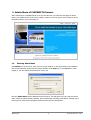
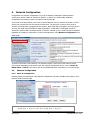
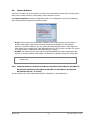
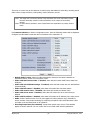
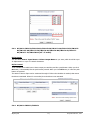
After connecting to a FlexWATCH server on the web browser, you’ll find the web page as shown
below. The rightmost item of the menu is Admin, where you can set up the most of features in the
FlexWATCH Server you’re connecting to.
1.1.
Entering Admin Menu
Click Admin item of the menu, then you’ll see a login window. In the login window, enter root for
both ID and password as they are the factory defaults. Press Enter key or click OK button. Once
logged in, you can change the password to a new one.
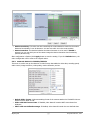
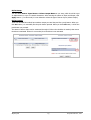
Now the Admin Menu will be displayed as shown below. This will guide you to the top level menu
items, which are Quick, System, Network, Device, Advanced, Recording, and Utilities. Clicking any of
these top level menu items will display submenu items and brief descriptions.
M4029-08
9
Seyeon Tech Co., Ltd
1.2.
Admin Menu Structure
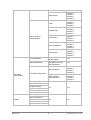
The following table shows the hierarchy of the Admin menu structure that we’re going to deal with in
this manual.
Category
Main Menu
Level 1 Sub-Menu
Level 2 Sub-Menu
n/a
n/a
Step 1
Step 2
Step 3
Quick configuration
Step 4
Step 5
Step 6
Finish
Server Name
Date & Time
System
Configuration
Admin. Password
n/a
Access Control
n/a
User Registration
IP Devices Registration
IP Device 0 ~ 15
Network Configuration
Network Ports
Bandwidth Control
View Network Status
Network
Configuration
Network Status Notify
n/a
n/a
IP-CCTV DNS™
Port Forwarding & UPnP
RTP/RTSP
SNMP
Serial Input Mode
Device Configuration
Serial ports
Serial Output Mode
n/a
Transparent Mode
M4029-08
10
Seyeon Tech Co., Ltd
Privacy Zone
PTZ Mode
Built-in module 0
Built-in module 1
n/a
n/a
Camera Control
Camera & Motion
Motion Detection
Primary stream
n/a
Secondary stream
Camera & Motion
Built-in module 0
(FW3470/5470)
DI/DI
DI Status / DO Control
Camera & Motion
Built-in module 1
( FW3870/5870)
DI/DI
DI Status / DO Control
n/a
Camera
Camera
Camera
Camera
1
2
3
4
n/a
DI/DI
DI Status / DO Control
n/a
n/a
E-mail
Camera 1
Camera 2
FTP(Buffered)
Camera 1
Camera 2
FTP(Periodic)
Camera 1
Camera 2
Sensor Notification
Camera 1
Camera 2
Alarm Output
Camera 1
Camera 2
E-mail
Camera
Camera
Camera
Camera
1
2
3
4
FTP(Buffered)
Camera
Camera
Camera
Camera
1
2
3
4
FTP(Periodic)
Camera
Camera
Camera
Camera
1
2
3
4
Sensor Notification
Camera 1
Camera 2
Camera 3
Advanced
Configuration
Built-in module 0
(FW3470/5470)
M4029-08
1
2
3
4
Camera
Camera
Camera
Camera
Advanced Services
(Network cameras)
1
2
3
4
Camera
Camera
Camera
Camera
11
n/a
Seyeon Tech Co., Ltd
Camera 4
Alarm Output
Camera
Camera
Camera
Camera
1
2
3
4
E-mail
Camera
Camera
Camera
Camera
1
2
3
4
FTP(Buffered)
Camera
Camera
Camera
Camera
1
2
3
4
FTP(Periodic)
Camera
Camera
Camera
Camera
1
2
3
4
Sensor Notification
Camera
Camera
Camera
Camera
1
2
3
4
Alarm Output
Camera
Camera
Camera
Camera
1
2
3
4
SD Configuration
SD Status & Format
SD Information
n/a
HDD Configuration
HDD Mode
HDD Status & Format
HDD Information
n/a
Built-in Module 0
Camera
Camera
Camera
Camera
1
2
3
4
Built-in Module 1
(registered cam)
Camera
Camera
Camera
Camera
1
2
3
4
n/a
n/a
n/a
n/a
Built-in module 1
(FW3870/5870)
Recording
Configuration
Recording Configuration
Recording Profile
Recording Mode
SD Status Report
HDD Status Report
Clear Recording Config.
Delete Recorded Data
System Log
Save Configuration
Utilities
Reboot
Factory Default
System Update
M4029-08
12
Seyeon Tech Co., Ltd
2.
Quick Configuration
In Quick Configuration, you will be able to set up many of the essential
parts of the configuration in a simple manner without going into details.
Selecting Quick Configuration gives you the menu as below. You can
perform each setup by clicking the one you would like to configure.
2.1.
Step 1: Changing Server Name
Click Server Name on System Configuration menu, then Server Name Setup windows will be displayed.
See the section 3.1 Server Name Setup in page 14 to see how to change the server name.
2.2.
Step 2: Time Setup
Click Date & Time on System Configuration menu, then Local Date & Time Configuration window will
be displayed. See the section 3.2 Date & Time in page 14 to see how to set up.
2.3.
Step 3: Network Setup
To make a connection to the Internet, it is required to figure out the type of the Internet service
you’re using. See the section 4.1 Network Configuration in page 21 to see how to set up.
2.4.
Step 4: IP-CCTV DNS
When FlexWATCH Server is used in a Dynamic IP environment, it is required to utilize IP-CCTV DNS
feature. See the section 4.7 IP-CCTV DNS Setup in page 27 to see how to set up.
2.5.
Step 5: IP Devices Registration for FWNVR series
You can add any of NVS (Network Video Server) and NCS (Network Camera Server) to NVR (Network
Video Recorder) devices as a remote server device. See the section 3.6 IP Devices Registration in
page 18 to see how to set up.
2.6.
Step 6: Recording Configuration for FWNVR series
Each camera can be configured for recording option in this section.
See the section 7.3 Recording Configuration for FW5050/5071/5450/5850/5870 NVR series
in page 83 for detail.
2.7.
Finish
You need to save all the changes to the Flash Memory after finishing the configuration. The changes
made to FlexWATCH Server will be permanent by this step. Click Finish on Quick Configuration
menu.
Click Save Configuration button. This will write the new settings to the system’s flash memory. If
you don’t want to save them, click Back button.
M4029-08
13
Seyeon Tech Co., Ltd
3.
System Configuration Menu
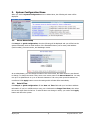
When you click on System Configuration item on Admin Menu, the following sub menu will be
displayed.
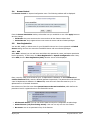
3.1.
Server Name Setup
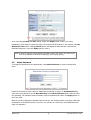
Click Step 1 on Quick Configuration, then the following will be displayed and you will find out the
system information such as model number of the FlexWATCH Server, server name, MAC address
(serial number), firmware version, and Webimage version.
As an administrator, you can change the name of the server name, but other values are not allowed
to change. To change the server name, enter a new server name in the Server Name filed. You may
use up to 21 alphanumeric or up to 10 Unicode characters. Tab or any other special characters are
not allowed. Click Apply button to save the setting and it will take effect immediately.
3.2.
Date & Time
Click Step 2 on Quick Configuration. Fill the Date and Time fields with your local time and date
information. If you're in a different time zone, put a checkmark on Change Time Zone, then select
the correct region from the list box. To take the time zone change in effect, you need to click Apply
button and reboot the system.
M4029-08
14
Seyeon Tech Co., Ltd
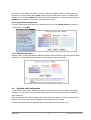
If you only changed Date and Time setting, simply click Apply button to take it into effect
immediately. If you want to retrieve the exact current time from NTP server on the network, click Get
NTP Server Time button. Clicking Refresh button will display the date and time retrieved from
FlexWATCH® Server. Then click Apply button to save it.
Note: In order to retrieve Time and Date information from a NTP server, you need to put
NTP server address in advance of setting up, such as pool.ntp.org.
3.3.
Admin Password
To change the password for the administrator, click Admin Password on System Configuration
menu.
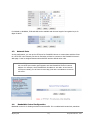
Default ID for admin account is fixed as “root” and not allowed to change. In Old Password field,
enter the current password. In both New Password and Confirm Password fields, enter the same
new password. The password must be between 4 and 23 alphanumeric letters. Click Apply button to
put it into effect.
Because you have replaced the password with a new one, the existing network connection made with
old password to FlexWATCH Server is lost now. You will have to reconnect to the FlexWATCH server
using new password.
M4029-08
15
Seyeon Tech Co., Ltd
3.4.
Access Control
Click Access Control on System Configuration menu. The following windows will be displayed.
From the Access Permission window, select either one you would like to use. Click Apply button to
save the change.
• Full Access: Any user can access the server and use all the features without limit.
• Limited Access: Only registered users can access the server and have limited privileges.
3.5.
User Registration
You can add, modify, or delete users for your FlexWATCH Server here. Once registered as Limited
Access setting, the user can access the FlexWATCH Server with some limited privileges.
3.5.1. Add
When Add is selected, you can add users and define their passwords, names, and access permission
levels respectively. To add a user, click User Registration on System Configuration menu. Next,
select Add, then the User Registration (Add) selection screen will be displayed.
Enter a user ID, which must consist of up to 23 alphanumeric characters. In both Password and
Confirm Password fields, enter the identical password respectively. The password must be between
4 and 23 alphanumeric characters. In Name filed, enter the user’s name that must be up to 31
alphanumeric or 15 Unicode characters.
Now select one of the four items from System Resource Access Permission, which defines the
permission level for registered users to the FlexWATCH server.
• All Channels Access: User can use all the features except for Configuration in Admin Page.
• General Access (only live viewing access): User can use only use Live View feature.
• No Access: User is not permitted of any of the features.
M4029-08
16
Seyeon Tech Co., Ltd
• Selective Access: User is allowed to use only the selected features. With this item selected,
user can now configure the details under the menu.
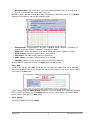
FlexWATCH Server can have multiple VS modules registered in it. When user ticks on any of Enable
checkboxes, other fields in that row are enabled to select.
• VS Module ID: The registered user can select VS Modules that are available. (VS Module is a
network device that has been registered in FlexWATCH® Server)
• Camera No.: Among the cameras of VS Module, select one to set up. (between 1 and 4)
• Alarm Control: Determine if Alarm control is to be allowed.
• PTZ Control: Determine if PTZ Control is to be allowed.
• Audio Control: Determine if Audio Control is to be allowed.
• Playback: Determine if searching can be done by recording conditions.
After finishing the registration process, click Apply button to add the user.
3.5.2. Edit
To edit a user account, select Edit. In this part, you can modify the existing user’s name, password,
and access permission. User ID is not allowed to change. Once selecting a user ID for edit, the usage
is the same as in Add section.
To see existing users, click Select UserId, and select a user to be edited. Then change the password,
name, or access permission, and click Apply button to save the setting. Setup of Access Permission
can be done the same way as in Add section.
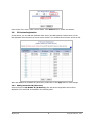
3.5.3. Delete
To delete an existing user, select Delete.
M4029-08
17
Seyeon Tech Co., Ltd
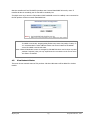
From the list of the users, select a user to delete. Click Delete button to confirm the deletion.
3.6.
IP Devices Registration
In this section, you can add NVS (Network Video Server) and NCS (Network Camera Server) to the
NVR (Network Video Recorder) as remote server devices. You can delete them from the server as well.
After each addition of VS Module ID (IP Devices), make sure to click Apply button to save settings.
3.6.1. Adding VS Module ID (IP Devices)
Select an item from VS Module ID (ID Devices), then the device configuration screen will be
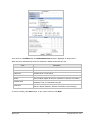
displayed. Fill in each field as described in the following table.
M4029-08
18
Seyeon Tech Co., Ltd
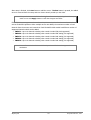
Item
Description
Vendor
Vendor’s name of the server
Model
Number of the channels to be added
Name
Name of the server
IP Address
IP Address of the server
VS Module ID
Applicable to FlexWATCH only. Enter 0 for other vendor’s models. For
FW3850, FW5071, FW5450, FW5470,FW5850, or FW5870, you can
enter the value from 0 to 16.
Service Port
Web port number of the server
Login ID
Password / Confirm
Password
User’s ID
User ID and Password of the server
Now select the video resolution of the server to add. Put check marks on the resolutions supported by
the server you’re adding here. If PTZ functionality is provided by the server, put check marks on
Camera 1 to 4 on PTZ Installation Status. Then you will be able to control each camera’s PTZ in
Live Viewer.
M4029-08
19
Seyeon Tech Co., Ltd
After setup is finished, click Save button to add the server. If Delete button is pressed, the added
server is removed from the setup and Live Viewer doesn’t provide you the video.
Note: After you’re back to the IP Device Registration menu by clicking Save button,
make sure to click Apply button to take the changes into effect.
FlexWATCH Server supports vendors such as Axis, Panasonic, Vivotek and more than 10 others as
well as FlexWATCH products. When multiple servers are added, the maximum number of total
channels from the servers can’t exceed 16. Each FlexWATCH NVR model has different number of
supported channels which can be added.
• FW5071: Up to 16 channels including other vendor’s model (3M pixel supported)
• FW5450: Up to 16 channels including other vendor’s model and analog (D1 supported)
• FW5470: Up to 16 channels including other vendor’s model and analog (D1 supported)
• FW5850: Up to 16 channels including other vendor’s model and analog (D1 supported)
• FW5870: Up to 16 channels including other vendor’s model and analog (D1 supported)
Note: Please refer to the User’s Manual of each product to find out the supported
resolutions.
M4029-08
20
Seyeon Tech Co., Ltd
4.
Network Configuration
Configuration the network is dependent on how an IP address is assigned in Ethernet-based
environment, which is static IP, dynamic IP (DHCP), or PPPoE. For wireless LAN, additional
configuration is necessary to have a connection with wireless AP.
In the case of wireless models, users have to choose between wired or wireless connection. In other
words, both connections can’t be used at the same time. The way how to choose one of them is
whether wired LAN cable is plugged into the product. When LAN cable is plugged in for longer than 5
seconds, the wired LAN is activated for data transmission. If LAN cable is unplugged more than
5secconds, wireless LAN is activated instead. If PPPoE is selected by user, wired LAN will be activated
regardless of condition of LAN cable. For network configuration, select Network configuration from
Admin page.
To make a connection to the Internet, it is required to figure out the type of the Internet service
you’re using. Depending on the service type, the network configuration can be in any of Static IP,
DHCP Client, or PPPoE. You need to set up the FlexWATCH Server according to your network type.
4.1.
Network Configuration
4.1.1. Static IP Configuration
Selecting Network Configuration under Network configuration will show variables. Below picture is for
products without wireless LAN.
Note: For wireless models, additional options will be shown. Please refer to 오류! 참조
원본을 찾을 수 없습니다.오류! 참조 원본을 찾을 수 없습니다..
M4029-08
21
Seyeon Tech Co., Ltd
For static IP, select static IP and input values for IP address, NetMask, Gateway, DNS1, DNS2 and
click apply for saving settings. After apply, program will ask closing web brower for updates, which
will take 20~30 seconds. If Back button is pushed while configuration, all values will be discarded. If
Refresh button is pushed, the program will load previous values.
4.1.2. DHCP Client Configuration
For DHCP, DHCP server must exist in the network environment. Select DHCP Client from Network
Configuration, click Apply.
4.1.3. PPPoE Configuration
PPPoE is used to connect FlexWATCH products to PPPoE modem provided by ISP. Since PPPoE needs
verification, ID and password are necessary to access network. Type ID and PW.
4.2.
Wireless LAN Configuration
To use wireless LAN function, detailed information of AP (Access Point) such as ESSID, Auth Mode,
Encryption, etc should be exactly provided. Please make sure that wired LAN and wireless LAN will
work exclusively.
Static IP and DHCP client will be available for wireless LAN. When PPPoE is selected, wireless LAN is
disabled. Even though LAN cable is unplugged, wireless LAN won’t be enabled.
Wireless LAN models will show additional options under Network Configuration menu.
M4029-08
22
Seyeon Tech Co., Ltd
4.2.1. ESSID
ESSID(or SSID) stands for an dedicated name of AP(Access Point). Whether typing name of AP
manually or select from results after scanning nearby AP.
To scan nearby AP, click Scan IP, which will pop up a new window. After a few seconds, results will
be shown. Click desired AP from list.
Note: Access points that are set to hide ESSID information for security won’t be scanned
by this method.
4.2.2. Authentication Mode & Encryption
Every AP has authentication process for security reasons. FW products support “Open, Shared,
WPAPSK, WPA2PSK” authentication modes. Per each modes, encryptions such as WEP, TKIP, AES can
be set. Relationships between authentication and encryption are listed below.
Authentication Mode
Supported encryption
Open, Shared
N.A or WEP
WPAPSK, WPA2PSK
TKIP, AES
For WEP, 64bit or 128bit mode can be selected and length of encryption key will be different. For
WEP 64bit, 5 digits of ASCII or 10 digits of hex characters will be required. For WEP 128bit, 13 digits
of ASCII or 26 digits of hex characters. Among 4 keys, appropriate key should be chosen according to
key of AP.
M4029-08
23
Seyeon Tech Co., Ltd
For WPASK or WPA2PSK, TKIP and AES can be available and the max length of encryption key is 63
digits of ASCII.
4.3.
Network Ports
In this configuration, you set up the HTTP port for FlexWATCH Server to communicate with the Client
PC. HTTP Port is the network port that is used when a Client PC connects to the FlexWATCH Server’s
Web page. It can be assigned between 80 and 65535 and the default value is 80.
Note: If the HTTP port number is changed to other value than default (80), make sure
the new HTTP port number goes together with the FlexWATCH Server's Internet
address. For example, when FlexWATCH's IP address is 192.168.1.00 and set the
HTTP port to 8080, you will have to enter http://192.168.1.100:8080 to connect to
the server.
4.4.
Bandwidth Control Configuration
Bandwidth control is for limiting maximum network traffic. If it is enabled with certain limit, maximum
M4029-08
24
Seyeon Tech Co., Ltd
data size transferred from FlexWATCH products won’t exceed bandwidth limit set by users. If
transferred data is exceeded, part of data will be randomly lost
If multiple users try to access a FW product which bandwidth control is enabled, users connected to
the FW product will share network bandwidth limit.
Note: This bandwidth control feature works fairly well in M-JPEG video transmission. But,
for MPEG-4 and H.264, dropping data packets may cause low quality of video, so
it is recommended to utilize CBR and frame rate control instead of bandwidth
control for MPEG-4 and H.264 video.
Note: Network Bandwidth control is managed by FlexWATCH Server and it drops any data
packets if required, thus you may experience slow connection to the server when
the feature is enabled.
4.5.
View Network Status
This menu shows network status of FW products. Wireless LAN status will be added for wireless
models.
M4029-08
25
Seyeon Tech Co., Ltd
4.6.
Network Status Notify
This feature helps to send updated network status information to registered email address if any
changes happen. This function will work under DHCP or PPPoE.
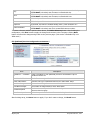
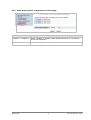
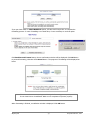
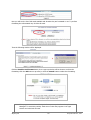
If Network Status Notify is set to Enable, FlexWATCH Server’s network status will be emailed to a
specific person in case of the following events:
• When it is set to Dynamic IP on Network Configuration menu, and the FlexWATCH server has
been given a new dynamic IP address and connected to the network.
Or,
• When it is set to PPP Client on WAN-Modem menu, and the FlexWATCH server has been
connected to the network with ISP or PPP server.
To configure, click Network Status Notify on Network Configuration menu. The following window
will be shown.
M4029-08
26
Seyeon Tech Co., Ltd
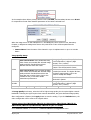
First, select Enable to use the feature. Then enter the address of the SMTP server which is needed
for email service. If your SMTP server requires a user ID and a password for authentication, you will
have to get them from ISP or network admin. Enter the ID and password.
In Sender field, enter your email address or other meaningful words that will show the message was
sent from the FlexWATCH server as a notification. Now enter the email addresses of the recipients in
the Recipient fields, up to 3 persons. In the User-Defined Message box, you may put a message
to explain why the message was sent. After finishing the setup, click Apply to save
Mail Notification
Enable: Send email
Disable: Do not send email
SMTP Server
SMTP Server address for email service
User ID
Password
Sender
1st / 2nd / 3rd Recipient
Enable: user ID and password are required for SMTP
server
Disable: user ID and password are not required
User ID for SMTP server
Password for SMTP server
Email address of Sender
Email Addresses of the Recipients (up to 3 persons)
User Defined Message
Message to be included in the Notification email
Authentication Login
4.7.
settings.
IP-CCTV DNS Setup
IP- CCTV DNS service provides a static & public domain name to help users access FlexWATCH
products even though their IP address is changed or they are used in local network. For proper
function of IP-CCTV DNS service, products should be accessible through internet.
To use IP-CCTV DNS, users have to create ID from IP-CCTV DNS server(http://www.ipcctvdns.com)
and register FlexWATCH products with MAC address and Product Key. Those information can be
M4029-08
27
Seyeon Tech Co., Ltd
found from IP-CCTV DNS Setup menu. Enable service and click Apply. If it is configured properly,
you can check the result by clicking Confirm button.
.
Note: Refer to IP-CCTV DNS™ User’s Manual for further details of the configuration.
4.8.
Port Forwarding & UPnP
UPnP(Universal Plug and Play) is a kind of network protocol to help users to find and configure
network products in same local network area. Port forwarding is to assign a certain network port to a
network product Proper so as users can access it from outside of Local Area Network. Generally, port
forwarding can be configured from network router.
UPnP port forwarding is made up with finding available network port, assigning it to a FlexWATCH
product and reporting overall network configuration of a FlexWATCH product to IP-CCTV DNS server.
Users have to register products to IPCCTVDNS server and IP-CCTV DNS service should be enabled.
There are 3 options in UPNP Port Forwarding.
• Manual: User Assigned Port is used when users can access network router(hub) and manually
assign available network port to FlexWATCH products. In this case, users have to type alreadyassigned network port under User Assigned port
• UPnP: User Assigned Port is used when users want FlexWATCH products to configure port
forwarding menu of network hub with user-assigned network port. If it fails, try to change userassigned port
• UPnP: Auto Selected Port is used to let FlexWATCH products deal with all network
configuration automatically..
Please notice that network router should support UPnP Port Forwarding and there is a limit for
maximum UPnP devices. If it is properly configured, results will be appeared under UPnP status.
M4029-08
28
Seyeon Tech Co., Ltd
4.9.
RTP/RTSP Setup for Cameras and FW3170
RTSP (Real-Time Streaming Protocol) is a protocol to transfer video and audio stream over the
network. Any application supporting Standard RTSP can be used for FlexWATCH server. Quick Time
Player or VLC program can be used for this, but it may not be supported in the environment within
firewall. There are two types of usages, one for Unicast address condition and the other for Multicast
address condition.
For Unicast Address:
Use “rtsp://network video server ip address/cam0_0”. If there are multiple channels, use
cam0_x, x (0~3) with each number applied. If there are multiple modules, use camx_0 x (0 ~ 3) with
each module number applied.
For Multicast Address:
Use “rtsp://network video server ip address/mcam0_0”. If there are multiple channels, use
mcam0_x, x (0~3) with each channel number applied. If there are multiple modules, use mcamx_0 x
(0 ~ 3) with each module number applied.
M4029-08
29
Seyeon Tech Co., Ltd
Service
RTSP Port
Enable: Start RTSP service
Disable: Stop RTSP service
In normal case, use default port number 554 to connect to RTSP service.
If not using port 554, enter the port number you want to use.
e.g.) port number 445==> rtsp:// network video server ip
address:445/cam0_0
RTP Start Port
The starting number of the port for video transfer. Each time video
transfer connection is made, the port number also increases.
Multicast
Address
Address for multicast video transfer.
The multicast address 0.0.0.0 is for stopping multicast.
Multicast Port
Port number for viewing the video with a multicast address
To use ONVIF protocol, RTP/RTSP must be enabled.
4.10. SNMP Setup for Cameras and FW3170
SNMP (Simple Network Management Protocol) is a protocol to monitor and configure network status
of a network device. SNMP V1 and V2 are supported over MIB2 standard, and few functions are not
supported.
SNMP Trap can function when SNMP V1/V2 is enabled.
M4029-08
30
Seyeon Tech Co., Ltd
SNMP V1/V2
Enable: Start SNMP service
Disable: Stop SNMP service
Trap
Enable: Start SNMP Trap service
Disable: Stop SNMP Trap service
Destination IP
Address
IP Address to receive SNMP Trap messages.
Trap Community
Key value used in SNMP Trap e.g.) public
Available Traps
Type of SNMP Trap message
1. Cold Start : When SNMP starts
2. Authentication Failure : When key value of SNMP query is wrong
M4029-08
31
Seyeon Tech Co., Ltd
5.
Device Configuration
You set up the connection between FlexWATCH Server and the camera in this part of configuration.
That includes Video data, external devices, Input / Output, Alarm control, and etc.
5.1.
Serial Ports
There are two serial ports configurable in the system, COM and AUX. COM port is primarily used for
console, and AUX is for PTZ control, but they both can be used for other purposes when necessary.
5.1.1. Serial Input Mode
When serial ports are in Serial Input Mode, FlexWATCH Server can be triggered by the external
sensors to send images from the camera by email, or FTP. It can also activate Alarm Output by
input from sensors inputs. For example in a real life, if a dam’s water level comes to a pre-defined
value, the server can send the images of the dam’s water level meter from cameras. Another example
is, when a car running on highway exceed the speed limit, it can send the picture of the car.
To configure, click Serial Ports on Device Configuration. In COM Port or AUX Port, select Serial
Input and click Apply button to apply the change. The system will reboot then.
After rebooting, open the Serial Ports window in Device Configuration menu again. Select the
Serial Input Mode, then the Serial Input Mode Configuration windows will be displayed as
shown below.
• Current Port: This shows the name of the port currently configured.
• Current Protocol: This shows the protocol being used. (only RS-232 can be displayed)
• Serial Input Model: You can select the sensor’s model number to use for Serial Input.
Note: If additional sensors need to be added, it will require installation of the device
drivers.
M4029-08
32
Seyeon Tech Co., Ltd
The following example is when a speed sensor, AGILIS-HE820-SINGAPORE, is selected.
• Upper Limit: The highest value in the range to assign
• Lower Limit: The lowest value in the range to assign
• Initial String Length: The length of initial string from sensor
• Initial String Data: The initial string from sensor
• (Speed) Delay: select Enable if sensor input needs delay
• Internal process delay: The amount of delay for sensor input
• Sensor Aiming Position: The position for sensor to aim
• Camera Aiming Position: The position for camera to aim
• Add Vehicle length to calculate delay time: The length of vehicle for applying delay time
5.1.2. Serial Output Mode
Using Serial Output Mode, you can send UART device commands to FlexWATCH® Server in order to
control PTZ devices, Multiplexer, Access control box, X10 Protocol, z256 protocol by RS-232 or RS485/422 communication. In the picture below, serial output mode can be selected among By-Pass,
X10, or Z256.
M4029-08
33
Seyeon Tech Co., Ltd
5.1.3. Transparent Mode
When there are two FlexWATCH Servers present on the network, they can act like a transparent
interface between two different UART devices so that the communication between the UART devices
can be made transparently without a flaw.
• Line Mode: The type of communication protocol
• Baud Rate: Data transfer rate
• Data Bit: The number of bits in data
• Stop Bit: The number of stop bit
• Parity Bit: Parity bit characteristic
• Network Protocol: The type of protocol used to send data
• Peer IP: IP address of other FlexWATCH server
• Network Port: Network port number of the server
• Data Start Pattern: Data start pattern (Not used if unchecked)
• Data Size: Data size in single transfer (Not used if unchecked)
5.1.4. PTZ Mode
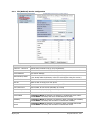
With the PTZ camera’s RS-485 cable wired to FlexWATCH Server’s COM or AUX port, select the proper
PTZ model in PTZ Mode Configuration screen, then click Apply button to save the change.
M4029-08
34
Seyeon Tech Co., Ltd
After selecting the proper PTZ model from the pull-down list, click Module 0 to activate the camera
channel and finish the configuration.
Note: Before pFlxwatchhasing receivers or PTZ cameras, please contact Seyeon Tech or
distributor to find out if the product’s protocol is supported by FlexWATCH server.
Note: When a PTZ model is selected from the list, Current Protocol and Current Baud rate
will be set to the default values. You can change them if required.
Note: The table below shows the PTZ protocols supported by FlexWATCH. (Currently 43
types of PTZ models are supported and subject to change in the future.)
M4029-08
35
Seyeon Tech Co., Ltd
Pelco-D : Spectra Dome
Pelco-P : Spectra Dome
Seyeon Tech : SRX-500/SPT-102
Seyeon Tech : FSD-230/270
Seyeon Tech : FSD-301
ELMO : ELDOME
SANTEC : Santec Dome
Honeywell : HSDN-230/251(H)
Honeywell : HSDN-251(P)
SAMSUNG : SCC641/643A
SAMSUNG : SCC641/643A(RS422)
SAMSUNG : MRX-1000
VICON : V-1311RB
VICON : Surveyor-1000/2000
SAMSUNG Techwin : SPD1600
SAMSUNG Techwin : SRX-100B
SAMSUNG Techwin : SRX-100R
American Dynamics : DELTA DOME
KALATEL : CYBER DOME(KTA-xxxx)
Panasonic : WV-CS854
SONY : EVI-D30
CANON : VC-C4
RNK : RNK-DOME
ERNITEC : BDR-510
Inter-M : VSD-640/625L
KODICOM : KRE-301
FINE : CRR-1600I
Dongyang : DY-XXXX
Bosch : Auto Dome
Sungjin : SJ2000/3000RX
Honeywell : HRX-2000
Inter-M : VRX-2201
LG : Speed Dome
Lilin PIH-7000 Dome
Yujin YRX-5000S(Pelco-D)
INTPLUS : Pelco-P PTZ 1
VICON : V-1311RB-600
Pelco-D : SK-D106
Pelco-D : YuJin
Pelco-D-AUX : HUVIRON
Pelco-P-AUX : ONE KING
Pelco-D-AUX : Probe
Honeywell : HSDN-P 251(H)
Base Address should be matched to the address of the PTZ camera or the receiver used here. (Base
Address = PTZ Camera’s Base Address – 1). For example, if PTZ camera’s address is 1, then the base
address becomes 0. You can find out the PTZ camera’s address from its user’s manual.
After put a checkmark on the channel that is connected to PTZ camera or receiver, click Save button
to apply the change. The picture above is the example of PTZ camera wired to Channel 1 only.
If the PTZ camera or receiver has a Preset function, click Camera 1 to configure the Preset Name
and the camera location. With Preset function, you can move the camera directly to previously
configured position promptly.
Up to 32 different Preset can be configured and saved. The picture above shows the example of four
different Presets made. After configuring Preset is done, click Save button to take effect.
To preset the camera position, click Preset & Menu, then the video monitoring screen will appear as
shown below. Control the camera’s position as you desire, and click Set button.
After all the Preset items are set up, click Close button to exit the configuration.
M4029-08
36
Seyeon Tech Co., Ltd
5.1.5. PTZ Mode for FW1177/1178
These FlexWATCH Servers are Speed Dome models, which are all-in-one type network cameras and
have PTZ configuration part. It’s possible to set Preset, Swing, Group, and Tour functionalities in
those servers and further detailed parts can be configured by use of OSD. Below is steps for
configuration.
Click Devices Configuration > Serial Ports > PTZ Mode > Built-in Module 0 > Camera 1.
M4029-08
37
Seyeon Tech Co., Ltd
Enter the Preset names as required. You can make up to 32 Preset names. Below is the example of
entering 4 different room names.
Use the buttons to configure Preset, OSD, Swing, Group, and Tour. (Swing, Group, and Tour are
supported in FW1177PE and FW1178PE)
• Preset & Menu: You can pre-define the spot you want to see. Up to 32 settings can be stored.
Click Menu button to configure the camera’s attributes.
• Swing: Repeat moving between two positions in certain period.
• Group: Each group moves around up to 6 pre-defined positions in certain period.
• Tour: Move around up to 6 different groups in certain period.
Preset & Menu
Click on the button and it will display the video window as shown below. Use PTZ to control the
camera to show the desired spot. Select the Preset number you’d like to assign to it. Click Set button
to save the preset values in the Preset number.
• Mode: When Step is selected, it will move as much as pre-defined distance. When Continuous
is selected, it will keep moving as long as the button is being pressed.
• Speed: In Step mode, different Speed value is different Step size. In Continuous mode, it is
different moving speed.
Click on Menu button, and it will display an OSD window for adjusting camera attributes. OSD setting
can be made by Up, Down, Left, Right arrow keys. After setting is finished, click Menu button.
M4029-08
38
Seyeon Tech Co., Ltd
Group Set
Click the button and it will display the Group setting window as shown below. Select a group number
as you’d like, and click Start Set button. Preset numbers from 1 to 32 will become active for the
group.
• Speed: How fast it will move between Preset items when Group function is executed.
• Time: How long it will stay at the Preset. Each Group can have up to 6 Presets.
After Preset is configured, click Save Set button. Group setup window will be displayed. You can
configure up to 6 groups. The usage of Group can be controlled at PTZ Control window in Smart
Viewer.
Tour Set
Click the button and it will display the Tour Set window. Up to 6 groups can be combined to run in
M4029-08
39
Seyeon Tech Co., Ltd
Tour mode.
Select a Group number as desired, then click Save Set button to finish setup. The usage of Tour can
be controlled at PTZ Control window in Smart Viewer.
Swing Set
Click the button and it will display the Swing Set window. Use PTZ to direct the camera to put the
desired spot on the center of the camera viewing area, then click Set Start Position button.
Select the start position and the waiting period, then click Time button. Select the moving speed
between the starting position and the ending position, then click Speed button. Click Confirm button.
Now use PTZ to move to the ending position, and then click Set End Position.
The control of Swing function can be made at PTZ Control window in Smart Viewer.
5.2.
Privacy Zone
Users can set a privacy zone if a certain part of the screen needs to be unmonitored.
To set the region, click Privacy Zone from Device Configuration category.
M4029-08
40
Seyeon Tech Co., Ltd
Privacy zone is marked with a rectangular shape. When you click New button, red-colored box will
pop up and users can change its size and location. After that, click Apply button which will make box
to green-color and finish the configuration.
M4029-08
41
Seyeon Tech Co., Ltd
Users can define the Privacy zone as many as 8 parts of the screen. If you add more than 8, an error
message will pop up on the screen.
To delete a privacy zone, click the zone and click Delete button followed by Apply button.
M4029-08
42
Seyeon Tech Co., Ltd
5.3.
Camera & Motion
This menu is used to set up the selection of video format, data added to video data, encoding speed,
audio control, image resolution, video quality, motion detection, and etc.
Click Camera & Motion on Device Configuration menu. The configuration menu will be displayed,
and it may be different between FlexWATCH models.
• H.264: In this format, each frame data is related to other nearby frames. For this reason, it
provides much higher compression ratio than M-JPEG and is adequate for video transfer.
However, if network condition is not very good and having dropped frames in video data, the
video quality can be relatively low. With FlexWATCH server, you can set the number of P-frames
in the video which is independent still images between I-frames.
• M-JPEG: This format requires much higher network bandwidth than H.264 compression. But
because of its higher quality of still image, it is adequate for detailed reviewing of stored video.
Note: For Dual Stream products, the most of parameters are dependent on primary
stream value.
5.3.1. Camera & Motion for FW1170-VO/FW1173-MS/FW1173-FS/FW1174-VC/FW1174MC/FW1175-MS/FW1175-FS/FW1176-MS/FW1176-FS/FW1177-FP/FW1179MV/FW1179-FS (All “-E” model)
You can configure the video data format and other information to be contained in it.
M4029-08
43
Seyeon Tech Co., Ltd
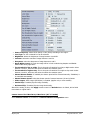
• Video with Flexible Extra System data: If Enabled, video data will contain Flexible Extra
Data from COM port.
• Video with user defined message: If Enabled, video data will contain the user-defined
data. (Reserved Field)
• Video with PPP status: If Enabled, video data will contain PPP connection status.
• Video with camera name: If Enabled, video data will contain the camera name.
• Video with server name: If Enabled, video data will contain the server name that you
defined.
• Video with IP address: If Enabled, video data will contain the IP address of the video server.
• Audio: Select if Audio function is to be used (applies to Primary Stream only). FlexWATCH
Server provides 2-way audio streaming by combining microphone input with video data. Users
can listen to the streamed audio on PC speakers.
• Frame Rate: For Primary Stream, this is the number of frames compressed in every second.
You can control the network traffic with this parameter. For Secondary Stream, it can be set to
manner of 1/2, 1/4, 1/8... of the primary stream.
• Image Size: Select the resolution of each channel’s video
• Encoding Standard: Select the compression method of each video, either M-JPEG or H.264
format. It is not allowed to set both channels to M-JPEG.
To save the setting, click Apply button.
Camera Configuration
On the lower part of Camera & Motion Configuration menu, select a channel to configure.
M4029-08
44
Seyeon Tech Co., Ltd
In the example shown below, Primary Stream is set to M-JPEG, and Secondary Stream set to H.264
for compression format. Enter detailed parameters of the camera selected here.
When the image sensor is VGA CMOS/CCD or 1.3M CMOS/CCD, there will be no Hue, Saturation,
Contrast, or Brightness setting items shown. Only with NTSC or PAL will those parameters be
configured.
• Camera Name: Enter the name of the channel in up to 21 alphanumeric or up to 10 Unicode
letters.
Image Quality Setup
Rate Control Mode: VBR (Variable Bit Rate)
Video frames are encoded with selected image
quality and GOP. Encoded frames have
different data size from each other.
H.264
Rate Control Mode: CBR (Constant Bit Rate)
Video frames are encoded with selected image
quality and GOP. Encoded frames have the
same data size as other frames. Due to the
constant bit rate, it has better stable
transmission performance.
M-JPEG
Low Compression
GOP Structure: Distance between IFrames. That is filled with P-frames.
Bit Rate Control: Total number of Bits
encoded per second. The higher Bit Rate,
the better image quality. Can be set
between 32kbps and 2Mbps.
GOP: Distance between I-Frames. That is
filled with P-frames.
Image Quality: one of 6 quality levels
(Low Compression / Highest / High
Normal / Low / Lowest)
Normal
Low
Lowest
Highest
Image Quality: one of 6 quality levels
(Low Compression / Highest / High
Normal / Low / Lowest)
High
In Image Quality level setup, select the left for higher image quality, but it requires higher network
bandwidth. Selecting the right requires lower network bandwidth, but gives decreased image quality.
After configuration is finished, click Apply button to save the setting. If you click Default button, the
entire configuration will be reset to the original values.
Camera Control for FW1173-MS, FW1173-FS, FW1174-MC, FW1175-MS, FW1175-FS,
FW1176-MS, FW1176-FS, FW1179-MV, FW1179-FS (All “-E” model)
Select Camera Control on the bottom of Camera & Motion Configuration menu.
M4029-08
45
Seyeon Tech Co., Ltd
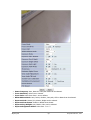
• Power Frequency: Select NTSC (60Hz) or PAL (50Hz) according to the region.
• Lens Type: DC Iris or Manual Iris can be selected.
• Brightness: Select the brightness of image between 0 and 256.
• Contrast: Select the contrast of image between 0 and 30.
• Sharpness: select the sharpness of image between 0 and 5.
• Day & Night Control: If used, the image will be in Color mode during daytime and Black&
White mode during night time.
• The threshold of day to night: This is the point of transition from Day to Night mode. Select
between 1 and 32, and lower the value the earlier the transition point.
• The threshold of night to day: This is the point of transition from night to day mode. Select
between 1 and 32, and lower the value the earlier the transition point.
• Manual Shutter Enable: If enabled, the shutter speed will be selected manually. If disabled, it
is controlled automatically.
• Manual shutter Speed: Select the shutter speed of camera between 1/30 and 1/24000.
• Video Output: Video output (NTSC/PAL) is enabled. (applies only on some models)
• Vertical flip: If enabled, flip the image vertically.
• Horizontal flip: If enabled, flip the image horizontally.
After all the setting is done, click Apply button to save it. If Default button is clicked, all the fields
return back to original value.
Camera Control for FW1170-VO, FW1174-VC (All “-E” model)
Select Camera Control on the bottom of Camera & Motion Configuration menu.
M4029-08
46
Seyeon Tech Co., Ltd
• Power Frequency: Select NTSC (60Hz) or PAL (50Hz) according to the region.
• Brightness: Select the brightness of image between 0 and 256.
• Contrast: Select the contrast of image between 0 and 30.
• Mirror Control: Mirror, Flip and Rotate image can be selected
• Environment: Indoor or outdoor can be selected according to the usage.
After all the setting is done, click Apply button to save it. If Default button is clicked, all the fields
return back to original value.
Camera Control for FW1177-FP (All “-E” model)
M4029-08
47
Seyeon Tech Co., Ltd
• Power Frequency: Auto, Manual or One-push mode can be selected.
• Focus Sensitivity: Select Low or Normal.
• Focus Limit: Select focus from 1.0cm to infinite.
• White Balance Mode: Auto, Indoor, Outdoor, One-push, ATW or Manual can be selected.
• Exposure Mode: Manual, Iris, Shutter, Bright can be selected.
• Exposure Slow Shutter: Enable or disable slow shutter.
• Exposure Day & Night: Auto, B&W or Color can be selected.
• Exposure Brightness Offset: Select from -7 to +7.
M4029-08
48
Seyeon Tech Co., Ltd
• Exposure Back Light: Enable or disable back light.
• Exposure WDR mode: Enable or disable WDR(Wide Dynamic Range) mode.
• Sharpness: Select the sharpness of image between 0 and 15.
• Maximum Digital Zoom: Select Off, x2, x4 or Max.
• View Angle Flip(Picture): Enable or disable flip.
• View Angle Tilt Limit: Select from -5 to 10.
• System Auto Calibration: Enable or disable auto calibration.
• Installation Environment: Select Normal or Desk-top.
• Preset Freeze: Enable or disable preset freeze.
• PTZ Speed: Select Slow, Medium or Fast.
After all the setting is done, click Apply button to save it. If Default button is clicked, all the fields
return back to original value.
Motion Detection
• Motion Detection: If enabled, Motion Detection feature is activated and user can configure the
areas where motion detection function will work. (this is only available in Primary Stream)
• Motion Sensitivity: Set the sensitivity of motion defined in Motion Detection Area. Select
between -100 and 100. 100 is the most sensitive.
After all the setting is done, click Apply button to save it. If Default button is clicked, all the fields
return back to original value.
5.3.2. Camera & Motion for FW3170/FW1173-DS/FW1175-DS/FW1176-DS/FW1177DE/FW1178-DP (All “-E” model)
M4029-08
49
Seyeon Tech Co., Ltd
This menu is used to set up the selection of video format, data added to video data, encoding speed,
audio control, image resolution, video quality, motion detection, and etc.
Note: The image size of Primary Stream is the maximum size of the Secondary Stream,
because Secondary Stream’s video soFlxwatche is the output of the Primary
Stream.
Note: For Dual Stream products, most of parameters are dependent on primary stream
value.
Click Camera & Motion on Device Configuration menu, then the following window will be displayed.
Configure the video data format and other information to be contained in it.
• Default Video Format: Select the video transmission format of the camera attached to
FlexWATCH Server. Select one from NTSC or PAL.
• Video with UART sensor Data: If Enabled, video data will contain UART sensor data from
COM port.
• Video with user defined message: If Enabled, video data will contain the user-defined data.
(Reserved Field)
• Video with PPP status: If Enabled, video data will contain PPP connection status.
• Video with camera name: If Enabled, video data will contain the camera name.
• Video with server name: If Enabled, video data will contain the server name that you
defined.
• Video with IP address: If Enabled, video data will contain the IP address of the video server.
• Audio: Select if Audio function is to be used (applies to Primary Stream only). FlexWATCH
Server provides 2-way audio streaming by combining microphone input with video data. Users
can listen to the streamed audio on PC speakers.
• Encoding Frame Rate (Per Channel): Compression speed every second. This attribute
applies to all the channels. You can control the server’s total traffic with this parameter.
M4029-08
50
Seyeon Tech Co., Ltd
• Image Size: Select the resolution of each channel’s video data.
• Encoding Standard: Select the compression method of each video, either M-JPEG or H.264.
Rate Control Mode: VBR (Variable Bit Rate)
Video frames are encoded with selected image
quality and GOP. Encoded frames have
different data size from each other.
H.264
Rate Control Mode: CBR (Constant Bit Rate)
Video frames are encoded with selected image
quality and GOP. Encoded frames have the
same data size as other frames. Due to the
constant bit rate, it has better stable
transmission performance.
M-JPEG
Image Quality: one of 6 quality levels
(Low Compression / Highest / High
Normal / Low / Lowest)
GOP Structure: Distance between IFrames. That is filled with P-frames.
Bit Rate Control: Total number of Bits
encoded per second. The higher Bit Rate,
the better image quality. Can be set
between 32kbps and 2Mbps.
GOP: Distance between I-Frames. That is
filled with P-frames.
Image Quality: one of 6 quality levels
(Low Compression / Highest / High
Normal / Low / Lowest)
Normal
Low
Lowest
-
Low Compression
Highest
High
Click Apply button to save the changes.
Camera Configuration
On the lower part of Camera & Motion Configuration menu, select a channel to configure.
Enter detailed parameters of the camera selected here.
M-JEPG
H.264
• Camera Name: Enter the name of the channel in up to 21 alphanumeric or up to 10 Unicode
letters.
M4029-08
51
Seyeon Tech Co., Ltd
Image Quality Setup
Rate Control Mode: VBR (Variable Bit Rate)
Video frames are encoded with selected image
quality and GOP. Encoded frames have
different data size from each other.
H.264
Rate Control Mode: CBR (Constant Bit Rate)
Video frames are encoded with selected image
quality and GOP. Encoded frames have the
same data size as other frames. Due to the
constant bit rate, it has better stable
transmission performance.
M-JPEG
Low
Compression
GOP Structure: Distance between IFrames. That is filled with P-frames.
Bit Rate Control: Total number of Bits
encoded per second. The higher Bit Rate,
the better image quality. Can be set
between 32kbps and 2Mbps.
GOP: Distance between I-Frames. That is
filled with P-frames.
Image Quality: one of 6 quality levels
(Low Compression / Highest / High
Normal / Low / Lowest)
Highest
Image Quality: one of 6 quality levels
(Low Compression / Highest / High
Normal / Low / Lowest)
High
Normal
Low
Lowest
In Image Quality level setup, selecting the left results in higher image quality, but requires higher
network bandwidth. Selecting the right requires lower network bandwidth, but gives decreased image
quality.
Camera Control
Click Camera Control on the bottom of Camera & Motion Configuration menu.
• Hue: Set the color of image between -100 and 100.
• Saturation: Set the intensity of the image between -100 and 100.
• Contrast: Set the contrast of the image between -100 and 100.
• Brightness: Set the brightness of the image between -100 and 100.
Motion Detection
Click Motion Detection on the bottom of Camera & Motion Configuration menu.
M4029-08
52
Seyeon Tech Co., Ltd
• Motion Sensitivity: This value sets how sensitively the motion detection works for the motion
detection functionality. It can be between –100 and 100 while 100 is the most sensitive.
• Motion Detection: This decided whether the Motion Detection is to be used. If Enable is
selected, you can set which part of the camera image the Motion Detection does functioning.
(Primary Stream only)
After configuration is finished, click Apply button to save the setting. If you click Default button, the
entire configuration will be reset to the original values.
5.3.3. Camera & Motion for FW3470/FW5470
This menu is used to set up the selection of video format, data added to video data, encoding speed,
audio control, image resolution, video quality, motion detection, and etc.
• Default Video Format: Video transmitting format of the camera attached to FlexWATCH Server.
Select one from NTSC or PAL.
• Video with UART sensor Data: If Enabled, video data will contain UART sensor data from
COM port.
• Video with user defined message: If Enabled, video data will contain the user-defined data.
M4029-08
53
Seyeon Tech Co., Ltd
(Reserved Field)
• Video with PPP status: If Enabled, video data will contain PPP connection status.
• Video with camera name: If Enabled, video data will contain the camera name.
• Video with server name: If Enabled, video data will contain the server name you defined.
• Video with IP address: If Enabled, video data will contain the IP address of the video server.
• Time Stamp: If Enabled, encoded video image will have the time display on it.
• Image Size: Select the resolution of each channel’s video data.
• Encoding Frame Rate (per channel): Video compression rate per second. You can control
the total network traffic of the server with this parameter.
• Encoding Standard: Select the compression method of each video, either M-JPEG or MPEG-4.
Click Apply button to save the changes.
Camera Configuration
On the lower part of Camera & Motion Configuration menu, select a channel you want to
configure. Then, enter the detailed parameters of the camera selected here.
M4029-08
54
Seyeon Tech Co., Ltd
• Camera Name: Enter the name of the channel in up to 21 alphanumeric or up to 10 Unicode
characters.
• Audio: Select if Audio function is to be used (applies to Primary Stream only) FlexWATCH Server
provides 2-way audio streaming by combining microphone input with video data. Users can listen
to the streamed audio on PC speakers.
• Video Input: Select to see camera’s connection status.
• Color Mode: Select if the image will be in Color or Black & White (Applies to Primary Stream
only)
Image Quality Setup
Rate Control Mode: VBR (Variable Bit Rate)
Video frames are encoded with selected image
quality and GOP. Encoded frames have
different data size from each other.
MPEG-4
M-JPEG
Rate Control Mode: CBR (Constant Bit Rate)
Video frames are encoded with selected image
quality and GOP. Encoded frames have the
same data size as other frames. Due to the
constant bit rate, it has better stable
transmission performance.
GOP Structure: Distance between IFrames. That is filled with P-frames.
Bit Rate Control: Total number of Bits
encoded per second. The higher Bit Rate,
the better image quality. Can be set
between 32kbps and 2Mbps.
GOP: Distance between I-Frames. That is
filled with P-frames.
Image Quality: one of 6 quality levels
(Low Compression / Highest / High
Normal / Low / Lowest)
-
Low Compression
Image Quality: one of 6 quality levels
(Low Compression / Highest / High
Normal / Low / Lowest)
Highest
High
Normal
Low
Lowest
In Image quality level setup, selecting the left results in higher image quality, but requires higher
network bandwidth. Selecting the right requires lower network bandwidth, but gives degraded image
M4029-08
55
Seyeon Tech Co., Ltd
quality.
• Hue: Set the color of image between -100 and 100 (applicable to Primary Stream only)
• Saturation: Set the intensity of the image between -100 and 100 (applicable to Primary Stream
only)
• Contrast: Set the contrast of the image between -100 and 100 (applicable to Primary Stream
only)
• Brightness: Set the brightness of the image between -100 and 100 (applicable to Primary
Stream only)
• Motion Sensitivity: This value sets how sensitively the motion detection works for the motion
detection functionality. It can be between –100 and 100 while 100 is the most sensitive.
• Motion Detection: This decided whether the Motion Detection is to be used. If Enable is
selected, you can set which part of the camera image the Motion Detection does functioning.
(applicable to Primary Stream only)
After configuration is finished, click Apply button to save the setting. If you click Default button, the
entire configuration will be reset to the original values.
5.3.4. Camera & Motion for FW3870/5870
This menu is used to set up the selection of video format, data added to video data, encryption of
video, and etc. Click Built-in Module 0 or Built-in Module 1 on Device Configuration menu, and
then click Camera & Motion.
Configure the video data format and other information to be contained in it.
• Default Video Format: Video transmitting format of the camera attached to FlexWATCH Server.
Select one from NTSC or PAL.
M4029-08
56
Seyeon Tech Co., Ltd
• Video with UART sensor Data: If Enabled, video data will contain UART sensor data from
COM port.
• Video with user defined message: If Enabled, video data will contain the user-defined data.
(Reserved Field)
• Video with PPP status: If Enabled, video data will contain PPP connection status.
• Video with camera name: If Enabled, video data will contain the camera name.
• Video with server name: If Enabled, video data will contain the server name you defined.
• Video with IP address: If Enabled, video data will contain the IP address of the video server.
• Time Stamp: If Enabled, encoded video image will have the time display on it.
• Image Size: Select the resolution of each channel’s video data.
• Encoding Frame Rate (per channel): Video compression rate per second. You can control
the total network traffic of the server with this parameter.
• Encoding Standard: Select the compression method of each video, either M-JPEG or H.264.
Click Apply button to save the changes. If required, click Built-in Module 1 on Device Configuration
menu to set up the other channel as well.
Camera Configuration
FW3870 and FW5870 have two modules, 8 channels respectively. Each channel represent the camera
attached to FW3870 or FW5870.
On the lower part of Module 0 > Camera & Motion Configuration menu, select a channel you
want to configure.
Enter the detailed parameters of the camera selected here.
M4029-08
57
Seyeon Tech Co., Ltd
• Camera Number: The number of the channel in use. Not changeable. (1 to 4)
• Camera Name: Enter the name of the channel in up to 21 alphanumeric or up to 10 Unicode
characters.
• Audio: Select if Audio function is to be used (applies to Primary Stream only). FlexWATCH
Server provides 2-way audio streaming by combining microphone input with video data. Users
can listen to the streamed audio on PC speakers.
• Video Input: Select to see camera’s connection status.
• Color Mode: Select if the image will be in Color or Black and White
Note: In M-JPEG mode, the Image Quality is locked at Normal.
Image Quality Setup
Rate Control Mode: VBR (Variable Bit Rate)
Video frames are encoded with selected image
quality and GOP. Encoded frames have
different data size from each other.
H.264
Rate Control Mode: CBR (Constant Bit Rate)
Video frames are encoded with selected image
quality and GOP. Encoded frames have the
same data size as other frames. Due to the
constant bit rate, it has better stable
transmission performance.
M4029-08
GOP Structure: Distance between IFrames. That is filled with P-frames.
Bit Rate Control: Total number of Bits
encoded per second. The higher Bit Rate,
the better image quality.
GOP: Distance between I-Frames. That is
filled with P-frames.
Image Quality: one of 6 quality levels
(Low Compression / Highest / High
Normal / Low / Lowest)
M-JPEG
Low Compression
Image Quality: one of 6 quality levels
(Low Compression / Highest / High
Normal / Low / Lowest)
Highest
High
Normal
58
Low
Lowest
Seyeon Tech Co., Ltd
In Image quality level setup, selecting the left results in higher image quality, but requires higher
network bandwidth. Selecting the right requires lower network bandwidth, but gives degraded image
quality.
• Hue: Set the color of image between -100 and 100.
• Saturation: Set the intensity of the image between -100 and 100.
• Contrast: Set the contrast of the image between -100 and 100.
• Brightness: Set the brightness of the image between -100 and 100.
• Motion Sensitivity: This value sets how sensitively the motion detection works for the motion
detection functionality. It can be between –100 and 100 while 100 is the most sensitive.
• Motion Detection: This decided whether the Motion Detection is to be used. If Enable is
selected, you can set which part of the camera image the Motion Detection does functioning.
After configuration is finished, click Apply button to save the setting. If required, click Built-in
Module 1 on Device Configuration menu to set up the other channel as well.
5.3.5. Camera Setting for FW5071/FW5072
When cameras are added through the network, you can set what data to be included, camera names,
image size, and image quality.
Click the name of the camera you added, which can be found at IP Devices Registration on Device
Configuration menu.
After selecting the camera, click Camera Setting.
Set the video data format and the information to be included in the data.
• Video with UART sensor Data: If Enabled, video data will contain UART sensor data from
COM port.
• Video with user defined message: If Enabled, video data will contain the user-defined data.
(Reserved Field)
• Video with camera name: If Enabled, video data will contain the camera name.
• Video with server name: If Enabled, video data will contain the server name you defined.
• Video with IP address: If Enabled, video data will contain the IP address of the video server.
Click Apply button to save the changes.
M4029-08
59
Seyeon Tech Co., Ltd
Camera Configuration
Each camera’s parameters can be defined in this section. Select a channel that you’d like to configure.
Set the information of the camera.
• Camera Name: Enter the name of the channel in up to 21 alphanumeric or up to 10 Unicode
characters.
• Image Size: Select the resolution of each channel’s video data. This attribute applies to all the
channels. (You may set the Image Size to what you did in IP Devices Registration.)
• Image Quality
Low Compression
Highest
High
Normal
Low
Lowest
In Image quality level setup, selecting the left results in higher image quality, but requires higher
network bandwidth. Selecting the right requires lower network bandwidth, but gives degraded image
quality.
After finishing the setting, click Apply button to save the changes. If you default button, every fields
will be filled with the default values.
5.3.6. Built-in Camera Control for FW1130/1131/1132/1173/1175
With this feature, you can send control signals to a camera when it supports functions such as AGC,
ELC, AWB, etc. The OSD control window has four buttons of Up, Down, Left, Right, and Enter
button.
On the center is the Enter button, and when it’s pressed it goes to Menu Mode so that you can see
the status of the menu. Moving on the menu items is done by Up and Down buttons, and the value
change is done by Left and Right buttons.
SETUP Menu
Function
Description
LENS
MANUAL / DC / VIDEO
IRIS Control type of the lens mounted
SHUTTER
ESC / MANUAL / FLK
WHITE BAL.
ATW / AWC / MANUAL
BACKLIGHT
OFF / LOW / MIDDLE / HIGH
MANUAL : 1/60(50) - 1/120,000 sec, x2 - x128
ATW: 1,800 10,500°K *AWC: ONE PUSH
MANUAL: Adjustable between Red and Blue.
Backlight compensation
AGC
OFF / LOW / MIDDLE / HIGH
Brightness can be adjusted.(1 - 70)
DNR
OFF / LOW / MIDDLE / HIGH
DNR is not functional if AGC is OFF.
SENS-UP
OFF / AUTO
SENS-UP is not functional if AGC is OFF.
SPECIAL
(* Refer to the table below)
-
M4029-08
60
Seyeon Tech Co., Ltd
EXIT
Exit from Menu Mode and save settings.
Special Menu
Function
Description
CAMERA ID
(Name of the camera)
Use up to 15 Alphanumeric and space
COLOR
AUTO / ON
AUTO: Automatic switch of Day & Night Mode
(Day-time: Color Mode; Night-time: B/W mode)
ON: Operate in COLOR mode always.
SYNC
INT / LL
LL: Adjustable between 0 - 359º
Trigger Signal: Auto Sensing.
Motion
Detection
OFF / ON
ON: Define 4 adjustable positions and sizes.
When any motion is detected, it displays MOTION
DETECTED on the screen.
PRIVACY
OFF / ON
ON: Define 4 positions, sizes, contrasts.
MIRROR
OFF / ON
Mirroring (Horizontal Image reversing)
SHARPNESS
OFF / ON
Adjustable between 0 - 31.
RESET
Reload the factory default condition.
RETURN
Return to SETUP menu after savingsettings.
5.4.
DI (Sensor Input) / DO (Alarm Output)
Select DI/DO from Device Configuration menu to configure Sensor Input and Alarm Output. After
the setting up, select DI Status/DO Control on Device Configuration menu to configure the
behavior of those Input and Output ports.
DI/DO Setup
DI/DO Control
DI/DO functionality can be set to either Normal Open or Normal Closed type as follows.
• Normal Open Type: Normal is OPEN, and goes CLOSED when triggered by an event.
• Normal Close Type: Normal is CLOSED, and goes OPEN when triggered by an event.
Note: Make sure the type of the sensor and use it correctly to the type. If a Sensor Input
is not used, it must be set to Normal Open Type to avoid a false input.
5.4.1. DI/DO for FW3450/FW5470
There are 4 serial Input ports and 4 output ports in FW3450 and FW5450. A good example of the
Input and Output usage is, an external sensor can be connected to the Input port, and a warning
light is triggered by the Output port.
DI/DO Setup
M4029-08
61
Seyeon Tech Co., Ltd
Each Input and Output port can be assigned unique name respectively, so that you can easily
distinguish every Input and Output ports from others by those names. This can be very useful in case
of managing multiple sites with separate FlexWATCH Servers, where you can quickly and correctly
identify which Sensor Input is detected or determines which Alarm Output needs to be activated.
You can define Sensor Input Name and Alarm Output Name as you want, which should be up to
31 alphanumeric or up to 15 Unicode characters.
DI/DO Control
These models have 4 output ports and they act like a push button. When you click On button, it
works like the push button pressed. When you click Off button, it works like the push button is
released.
With DI (Sensor Input) Status, you can find out the status of the Alarm Input port. If the
checkbox of Check (On) is displayed as checked, that means the alarm is activated. If not checked,
that means no alarm is activated.
M4029-08
62
Seyeon Tech Co., Ltd
5.4.2. DI/DO for FW3870/FW5870
There are 8 serial Input ports and 8 output ports in FW3850 and FW5850 models. A good example of
the Input and Output usage is, an external sensor can be connected to the Input port, and a warning
light is triggered by the Output port.
DI/DO Setup
Each Input and Output port can be assigned unique name respectively, so that you can easily
distinguish every Input and Output ports from others by those names. This can be very useful in case
of managing multiple sites with separate FlexWATCH Servers, where you can quickly and correctly
identify which Sensor Input is detected or determines which Alarm Output needs to be activated.
You can define Sensor Input Name and Alarm Output Name as you want, which should be up to
31 alphanumeric or up to 15 Unicode characters. After assigning names, click Apply button to take
effect.
DI/DO Control
FW3850 and FW5850 have 8 output ports and they act like a push button. When you click On button,
it is essentially like the push button is pressed. When you click Off button, it is like the push button is
not pressed.
FW3850 and FW5850 have 2 built-in Module respectively, and each Built-in Module has 4 Alarm
Outputs. The status of Sensor Input can be monitored through DI. When the checkbox is marked,
that means the Alarm is activated. When it’s not marked, then the Alarm is not activated.
M4029-08
63
Seyeon Tech Co., Ltd
5.4.3. DI/DO for FW3170/FW1170-VO/FW1173-DS/FW1173-MS/FW1173-FS/FW1175DS/FW1175-MS/FW1175-FS/FW1176-DS/FW1176-MS/FW1176-FS/FW1177DE/FW1177-FP/FW1178-DP (All “-E” model)
DI/DO Setup
You can define Sensor Input Name and Alarm Output Name as you want, which should be up to
31 alphanumeric or up to 15 Unicode characters.
DI/DO Control
These FlexWATCH models have 1 Alarm output port and they act like a push button. When you click
On button, it is essentially like the push button pressed. When you click Off button, it is like the push
button not pressed.
The status of Sensor Input can be monitored through DI. When the checkbox is marked, that means
the Alarm is activated. When it’s not marked, then the Alarm is not activated.
5.4.4. DI/DO for FW5071/FW5072
M4029-08
64
Seyeon Tech Co., Ltd
DI/DO Setup
You can define Sensor Input Name and Alarm Output Name as you want, which should be up to
31 alphanumeric or up to 15 Unicode characters. After entering the names of Input and Output, click
Apply button. (* In this model, it is not allowed to select the type of Sensor Input / Alarm Output)
DI/DO Control
These two FlexWATCH models have n Alarm output port and they act like a push button. When you
click On button, it is essentially like the push button pressed. When you click Off button, it is like the
push button not pressed.
The status of Sensor Input can be monitored through DI. When the checkbox is marked, that means
the Alarm is activated. When it’s not marked, then the Alarm is not activated.
M4029-08
65
Seyeon Tech Co., Ltd
6.
Advanced Configuration
FlexWATCH can be configured to start and stop certain pre-defined services by scheduling, event, or
conditions. It also has ISENS feature, which is a way of integrating FlexWATCH with CMS software.
You can set up the advanced services in Advanced Configuration menu.
There are two types of advanced service, one is Buffered Service and the other is Periodic
Service. In Buffering Service, a series of images are continuously being stored in a buffer memory of
server for a certain period of time. When the server is triggered by an event or schedule, the images
or alarm status just before and after the event/schedule are reported to you by email or buffered FTP
services.
In Periodic Service, only the image, alarm/sensor status after an event/schedule is reported to you
upon the server is triggered.
M4029-08
66
Seyeon Tech Co., Ltd
6.1.
Advanced Services
Pre-Alarm buffer size and buffering speed can be defined here.
• Pre-Alarm Buffer Size: You can set the buffer size which will store the images before event.
The unit is in frame, and each channel can be set with different values. The total number of
frames for Pre-Alarm Buffer and Post-Alarm Buffer is limited to 10 frames.
• Pre-Alarm Speed: You can set the buffering speed. If it’s set to Fastest, the server will store
images as fast as it can. Each cannel can be set with different values.
This configuration applies to E-mail and FTP (Buffered), and click Save button to apply changes.
• E-mail: Set up Email Service configuration
• FTP (Buffered): Set up FTP (Buffered) Service configuration
• FTP (Periodic): Set up FTP (Periodic) Service configuration
• Sensor Notification: Set up configuration such as CGI by notification
• Alarm Output: Set up Alarm Output (DO Control) configuration
6.1.1. E-mail Service Configuration
Email configuration is set up here for Alarm in case any event occurs.
M4029-08
67
Seyeon Tech Co., Ltd
Item
Description
Camera 1~2 (max 4)
Select a channel to be configured for email notification
Service
Select Enable in order to use this service
SMTP server address
Enter SMTP server’s address for sending email.
Authentication Login
Select Enable if SMTP server requires ID and password
User ID
Enter User ID to log in to SMTP server
Password
Enter Password to log in to SMTP server
Sender
Enter email address of the sender
1st Recipient
Enter the email address of the first recipient
2nd Recipient
Enter the email address of the second recipient
3rd Recipient
Enter the email address of the third recipient
Click Save button to apply the change. If you don’t want to change, click Back button.
E-mail Service Setup for Each Channel
For each channel, the following items can be configured for email service: Condition, Post-Alarm
Buffer Size, and Post-Alarm speed. The content of text message and display style of DI value can be
configured as well.
M4029-08
68
Seyeon Tech Co., Ltd
Item
Description
Condition 1 ~ Condition 3
Select a condition for Email service to be activated.
Pre-Alarm Buffer Size
The Buffer size assigned for Pre-Alarm.
Check Video buffer
Click this link to go to Advanced Services for buffer setup.
Pre-Alarm Images
The number of image frames to store before Alarm
Post-Alarm Images
The number of image frames to store after Alarm
Pre-Alarm Speed
This field shows the speed of Pre-Alarm. Configuration can be done in
Advances Services page.
Post-Alarm Speed
Select the speed of Post-Alarm. Fastest is the highest value.
Subject
Subject of the E-mail message to send.
1
Content of the first line in the email message.
2
Content of the second line in the email message.
3
Content of the third line in the email message.
4
Content of the fourth line in the email message
Select the format for the Event or DI data to email.
NONE: Don’t Send, INT: Decimal,
HEX: Hexadecimal,
BIN: Binary,
IPA: IP Address,
EVT: Name of Event
After finishing setup, click Save button to apply. If you don’t want to change, click Back button.
Value Format
Condition, Schedule & Event Configuration
M4029-08
69
Seyeon Tech Co., Ltd
If you click on a Condition link, the Advanced Service windows is displayed as shown below.
Alarm Service is activated only when the conditions in Advanced Services are met.
Item
Description
Service
This shows what service this condition is for.
Module ID
Module ID for current setup
Camera ID
Channel ID for current setup
Enable / Disable
Select Enable to use Condition, otherwise select Disable.
Always
This Condition applies all the time. (Schedule or Event is not usable)
Schedule Only
Use Week, Time, and Date in Condition parameter. If none of
weekdays is set, it is activated every day.
Event Only
It is activated only when any of the following events occurs.
(Sensor, Motion Detection, Camera Connection, Server Booting)
To save the setting, click Save button. If you want to cancel it, click Back.
M4029-08
70
Seyeon Tech Co., Ltd
6.1.2. FTP (Buffered) Service Configuration
Item
Description
Camera 1 - Camera 4
Select which channel to set up for FTP (Buffered).
Service
Select Enable to use the FTP (Buffered) service. Otherwise select Disable.
Server Address
FTP Server Address.
Base Directory Name
The directory in FTP server where the data will be uploaded.
(You should make the directory in the FTP server before using the service.)
Base File Name
The base file name of the data to be uploaded in FTP server.
User ID
Enter a User ID to log in to FTP server.
Password
Enter the Password for the user ID to log in to FTP server
FTP Control Port
Port number for FTP server (Normally 21 is used)
Date Description Mode
Select Date Display Style (e.g. 20090228)
Connection Mode
Select connection mode for FTP server
Server Name
If Directory Name is checked, new directory is created with server name.
If File Name is checked, new file is created with server name.
Weekday
If Directory Name is checked, new directory name is created with weekday.
If File Name is checked, new file name is created with weekday.
Month
If Directory Name is checked, new directory name is created with month.
If File Name is checked, new file name is created with month.
M4029-08
71
Seyeon Tech Co., Ltd
Day
If Directory Name is checked, new directory name is created with day.
If File Name is checked, new file name is created with day.
Hour
If Directory Name is checked, new directory name is created with hour.
If File Name is checked, new file name is created with hour.
Minute
If checked, new file name is created with minute.
Sec
If checked, new file name is created with second.
Sequence
If checked, new files are created starting from 0, with increment of 1.
If Directory Name is checked, new directory is created with camera number.
If File Name is checked, new file is created with camera number.
To create a directory with the options shown above, click Make Directory button. After finishing the
Camera Number
configuration, click Save button to apply the change and continue to the next page. Clicking Back
button will cancel the changes and go back to the previous page. (This service is available only in MJPEG mode.)
FTP (Buffered) Service Configuration at Camera 1
Item
Description
Condition 1 ~ Condition
3
Select a condition for FTP (Buffered) service to be activated. Up to 3
conditions can be set.
Pre-Alarm Buffer Size
The Buffer size assigned for Pre-Alarm.
Check Video buffer
Click this link to go to Advanced Services for video buffer setup.
Pre-Alarm Images
The number of image frames to store before Alarm.
Post-Alarm Images
The number of image frames to store after Alarm.
Pre-Alarm Speed
This field shows the speed of Pre-Alarm. Configuration can be done in
Advances Services page.
Post-Alarm Speed
Select the speed of Post-Alarm. Fastest is the highest value.
After finishing setup, click Save button to apply. If you don’t want to change, click Back button.
M4029-08
72
Seyeon Tech Co., Ltd
6.1.3. FTP (Periodic) Service Configuration
Item
Description
Camera 1 - Camera 4
Select which channel to set up for FTP (Periodic) service
Service
Select Enable to use the FTP (Periodic) service. Otherwise select Disable.
Server Address
FTP Server Address.
Base Directory Name
The directory in FTP server where the data will be uploaded.
(You should make the directory in the FTP server before using the service.)
Base File Name
The base file name of the data to be uploaded in FTP server.
User ID
Enter a User ID to log in to FTP server.
Password
Enter the Password for the user ID to log in to FTP server
Sequence Modulo
Maximum number used in sequential file name
FTP Control Port
Port number for FTP server (Normally 21 is used)
Date Description Mode
Select Date Display Style (e.g. 20090228)
Connection Mode
Select connection mode for FTP server
Overwrite
If checked, new file overwrites the existing file with the same name.
Server Name
If Directory Name is checked, new directory is created with server name.
If File Name is checked, new file is created with server name.
M4029-08
73
Seyeon Tech Co., Ltd
If Directory Name is checked, new directory name is created with
weekday.
If File Name is checked, new file name is created with weekday.
If Directory Name is checked, new directory name is created with month.
If File Name is checked, new file name is created with month.
If Directory Name is checked, new directory name is created with day.
If File Name is checked, new file name is created with day.
If Directory Name is checked, new directory name is created with hour.
If File Name is checked, new file name is created with hour.
Weekday
Month
Day
Hour
Minute
If checked, new file name is created with minute.
Sec
If checked, new file name is created with second.
Sequence
If checked, new files are created starting from 0, with increment of 1.
Camera Number
If Directory Name is checked, new directory is created with camera
number.
If File Name is checked, new file is created with camera number.
To create a directory with the options shown above, click Make Directory button. After finishing the
configuration, click Save button to apply the change and continue to the next page. Clicking Back
button will cancel the changes and go back to the previous page. (This service is available only in MJPEG mode.)
FTP (Periodic) Service Configuration for each channel
Item
Description
Condition 1 ~ Condition 3
Select a condition for FTP (Periodic) service to be activated. Up to 3
conditions can be set respectively.
Alarm Speed
Select the speed of images to send in FTP(Periodic) service
After finishing setup, click Save button to apply. If you don’t want to change, click Back button.
M4029-08
74
Seyeon Tech Co., Ltd
6.1.4. Sensor Notification Service Configuration
Item
Description
Input 1 - Input 4
Select which input to set up for Sensor Notification Service
Service
Select Enable to use Sensor Notification. Otherwise select Disable.
Service Mode
Select network mode for CGI. Select one among HTTP, TCP, or UDP.
Main IP address
Enter IP address to use in CGI or other functions
Aux1 ~ Aux 3 IP address
Enter 3 more addresses to use in CGI or other functions if needed.
Port
Enter port number for CGI or other functions. Default is 80.
CGI Path or
Alarm Common Message
Enter CGI Path for CGI or other functions.
User ID
Enter User ID to log in.
Password
Enter Password for the User ID to log in.
After finishing the configuration, click Save button to apply the change and continue to the next page.
Clicking Back button will cancel the changes and go back to the previous page.
M4029-08
75
Seyeon Tech Co., Ltd
6.1.5. Sensor Notification Service Configuration for Each Input
Item
Description
CGI Name or Alarm Port Message
Enter the contents of CGI when it is used.
Click Save button to save the change. Clicking Back button will cancel the change and go back to
previous page.
6.1.6. Alarm Output Service Configuration
Category
Contents
Output 1 – Output 4
Select the output port to configure for Alarm Output Service.
Service
Select Enable to use the service, otherwise select Disable.
After finishing the configuration, click Save button to apply the change and continue to the next page.
Clicking Back button will cancel the changes and go back to the previous page.
M4029-08
76
Seyeon Tech Co., Ltd
6.1.7. Alarm Output Service Configuration for each Output
Item
Description
Condition 1 - Condition 3
Select a condition to configure Alarm Output Service. Up to 3 conditions
can be set respectively.
Alarm Output Duration
Select how long the Alarm Output signal is maintained. Unit is in second.
M4029-08
77
Seyeon Tech Co., Ltd
7.
Recording Configuration
It is possible to record and search the video data sent from camera if the
FlexWATCH Server is equipped with a hard disk drive. Recording
configuration is available only when a hard drive is up and running in the
server. You can format the hard drive, check the information of the drive,
and set the recording conditions of motion detection and event.
Some versions of FlexWATCH network cameras (FW1170-VO/FW1173DS/FW1173-MS/FW1173-FS/FW1174-VC/FW1174-MC/FW1175-DS/FW1175MS/FW1175-FS/FW1176-DS/FW1176-MS/FW1176-FS) have microSD slots on the back. Those models
can record video if microSD card is present in the slot, which supports 1GB to 32GB.
7.1.
HDD Configuration
If the HDD is not installed yet, turn off the FlexWATCH Server by using the power switch located on
back or front panel. Install the hard drive in the FlexWATCH Server, and turn the power back on. Now
on your PC’s web browser, connect the FlexWATCH Server with a proper IP address, and enter the
server as admin.
Click Recording Configuration.
Note: Before attaching a hard disk drive, make sure the FlexWATCH Server is turned off.
Otherwise, the hard drive may get defected. Also check if the hard drive you’re
installing is in the list of usable hard drive since an unlisted hard drive may not
function properly.
Click HDD Information to see whether it is in a formatted condition.
If HDD Information window displays all the fields as -None-, that means the hard drive is not in a
formatted condition. To start formatting, click Back button to go back to the previous menu, and
then click HDD Status & Format.
The list of hard drives will be displayed with the format status. Click on the one you’d like to format.
M4029-08
78
Seyeon Tech Co., Ltd
If you put check mark on Check Bad Block option, it’ll take much longer time to complete the
formatting process. In case of installing a new hard drive, it’s not necessary to use that option.
Click Partition and Format button, then a confirmation window will be displayed. Click OK button
to proceed formatting, otherwise click Cancel button. The progress of formatting will be displayed as
below.
Note: If an abnormal termination is happened during the formatting process, it is possible
for the hard drive to be defected. Make sure to complete the process properly.
When formatting is finished, a notification window is displayed. Click OK button.
M4029-08
79
Seyeon Tech Co., Ltd
Now you will see the HDD Status & Format window, and the status of 1st HDD has been changed
to Formatted. If there’re more HDD’s newly installed, go ahead with formatting them. After
completing all the hard drive’s formatting, click Reboot button.
Reboot process will take about 30 seconds. Then with your PC’s web browser, open the Admin Page
of the FlexWATCH Server, and check HDD Information on Recording Configuration menu.
If you want to use RAID 1 feature, two hard drives are required in the system. It is strongly
recommended to use the same sized drives. With two drives in the system, you will see the HDD
mode configuration window will be shown as below. You have choice of Normal and RAID1. If you
choose Normal, the two hard drives will store different data and the total amount of storage space
will be the combined capacity of them. If you choose RAID1, there will be only one hard drive seen
on the system and the total amount of storage space will be the capacity of smaller drive.
When using RAID1 feature, if either one of the hard drives fails you will still be able to record and
search video data without any problem. To replace the failed hard drive, it is required to turn the
power off and replace it with a new one. Then turn the power back on, enter the HDD Mode page,
choose Data Recovery menu, select the new hard drive, and click Recovery. By doing that
procedure, RAID1 feature will start functioning again. If HDD Mode is set to Normal, Data Recovery
menu is not shown on the window.
M4029-08
80
Seyeon Tech Co., Ltd
7.2.
microSD Configuration
If a microSD card (SD card) is not present in the slot already, turn off the FlexWATCH network
camera before inserting a SD card. Make sure to turn the power on after inserting the SD card. Open
a web browser, type in the IP address of the FlexWATCH network camera. Log in as admin, and run
Recording Configuration.
Note: Be sure to turn off the device before installing a SD card. Otherwise, the SD card
may become defective. Always check the recommended type of SD card because
non-conforming SD cards can cause abnormal behavior of the system.
Enter Recording Configuration menu, then click the SD Information to find out the SD card’s format
information.
If entire SD Information is shown as -None-, that means the SD card is not formatted. In that case,
click the Back button followed by clicking SD Status & Format.
M4029-08
81
Seyeon Tech Co., Ltd
Now you will see the list of SD cards available and whether they are formatted or not. To perform
formatting the unformatted one, click the SD card.
Then the following window will be displayed.
Click the Partition and Format button, then a pop-up window will be shown to confirm the
formatting. Click the OK button to proceed, or click the Cancel button to abort the formatting.
Note: If the program is terminated during the format process, the SD card may be
damaged. To avoid this problem, make sure to close the program in the right
manner and check the SD card.
M4029-08
82
Seyeon Tech Co., Ltd
After formatting is finished, the following window will appear informing it. Click the OK button.
On SD Status & Format window, you will be able to see that the 1ST SD is shown formatted. After
formatting SD card is finished, click the Reboot button to restart the system.
After about 30 seconds, the system will be rebooted. You will be able to see the following information
when you log in to the Admin web page of the FlexWATCH server.
7.3.
Recording Configuration for FW5050/5071/5450/5850 &
FW1170/1173/1175/1176 with microSD Slot
Each camera can be configured for recording option in this section. Configuration items include
motion detection recording, 24-hour continuous recording, event-driven recording, and etc. If other
vendor’s products are added in the previous IP Devices Registration section, those cameras’ video
can be also recorded in your device.
You can find out the list of servers with recording capability by clicking Recording Configuration.
For example, you will see 12 channels from the list of VS Module ID (IP Devices) after adding two
FW3450 devices in IP Devices Registration of FW5450. That means, FW5450 can record the video
sent from other remote cameras, as well as the four local cameras attached.
M4029-08
83
Seyeon Tech Co., Ltd
Below is an example of configuring the motion detection-triggered recording for FW5450 model. It
starts by clicking Recording Configuration.
It displays the information of the recording-capable servers such as VS Module ID (IP Devices),
Server Name, Server IP Address, Service Port Number, Vendor, Camera Name, and Record ability. To
configure, select a camera according to your need.
Below is the Recording Configuration screen when Camera 1 is selected from Module ID (IP
Devices) 0, which is attached to the FW5450 device.
Click on Camera 1, and it will display the screen for detailed configuration such as recording speed,
camera name, Pre- and Post-alarm image speed. After configuring them properly, click the Save
button to save the change.
M4029-08
84
Seyeon Tech Co., Ltd
Item
Description
Condition 1~4
Set the conditions for recording
Graphs for Time, Day of week,
Alarm, Motion, Camera Connection
Graphic displays of conditions for recording
Recording Service
Click Enable to record the video. Click Disable otherwise.
Server Module ID
Camera Number
Server ID number of the added VS Module ID (IP Devices).
Camera number to select.
The name of the camera selected. Use up to 31
Camera Name
alphanumeric or 15 Unicode characters.
Recording speed before Event. Valid only when Recording
Pre-Recording Speed
condition is set to Always or Schedule.
The number of frames stored before Event. Up to 5 frames.
Pre-Alarm Count
Valid only for Event-Driven Recording.
Recording speed after Event. Valid only when Recording
Post-Recording Speed
condition is set to Event-Driven Recording.
The number of frames stored after Event. Up to 5 frames.
Post-Alarm Count
Valid only for Event-Driven Recording.
Up to 4 different recording conditions can be set per camera. All the conditions are checked by OR
logic, so it will start recording when at least one of the conditions is met. To set a condition, click
Condition 1, then Condition setup screen will be displayed.
M4029-08
85
Seyeon Tech Co., Ltd
Category
Select Mode
Schedule
Item
Always
Schedule Only
Event Only
Schedule and Event
Week
Time
Date
Alarm Sensor
Event
Motion Detection
M4029-08
Description
Recording is enabled all the time.
Recording is done by configured schedule.
Recording is controlled by configured event.
Recording is controlled by both schedule and event.
Set day of week
Set time
Set date
Each of 1, 2, 3, 4 refers to the sensor number, and
checked when Event-Driven Recording is selected.
If all the four sensors are checked together, recording is
enabled only when all four sensor are activated.
Each of 1, 2, 3, 4 refers to the sensor number, and
checked when Motion Detection Recording is selected.
If all the four sensors are checked together, recording is
enabled only when all four sensor are activated.
When Hardware motion detection is used, you should set
the detection area in Camera & Motion section.
Camera Connected
Recording is enabled when camera signal is detected.
Camera Disconnected
Recording is enabled when camera signal is not detected.
86
Seyeon Tech Co., Ltd
Below is an example of configuring the recording condition, which means “Video is recorded if Alarm
is activated or Motion is detected, on Saturday and Sunday every week.” If time condition is not
specified, it is taken as setting 24 hours. If date is not specified, it is taken as setting all the months
and weeks. Click the Back button if you want to return to previous page without saving. Click the
Save button to save the change and return to previous page.
The graph displayed below means “Video is recorded if alarm is activated on Saturday and Sunday.”
You need to select Enable on Recording Service field for recording to be made by recording
condition setup. If you want to prevent recording from starting even though recording conditions are
configure, select it as Disable. It is possible to set the number of video frames to be recorded by
setting up a recording condition. You can configure it as shown below.
M4029-08
87
Seyeon Tech Co., Ltd
Example 1) Recording Condition: Always, Schedule
•
Pre-Recording Speed:
1 fps
•
Pre-Alarm Count:
5
•
Post-Recording Speed: 10 fps
•
Post-Alarm Count:
•
Since the recording condition is Always and Schedule, Pre-Recording Speed is in effect. So the
recording speed is 1 fps. Other values don’t affect the recording.
5
Example 2) Recording Condition: Motion, Sensor
•
Pre-Recording Speed:
1 fps
•
Pre-Alarm Count:
5
•
Post-Recording Speed: 10 fps
•
Post-Alarm Count:
•
Post-Recording Speed is in effect. So the recording speed is 10 fps when Motion is detected.
Also, Pre-Recording Speed is in effect, so image is stored by Pre-Alarm Count setting. So 5
images will be recorded before Motion is detected (speed: 1 image per second). After Motion
Detection (or Sensor) is over, Post-Recording Speed becomes in effect now, so only 5 images
out of 10 will be stored afterwards. That means that the images captured until 0.5 second
after Post-Alarm images are stored.
5
If there are two recording conditions configured, it can start recording when at least one condition is
valid. After configuration is finished, click the Save button to apply the change and return to previous
screen.
M4029-08
88
Seyeon Tech Co., Ltd
Now you will notice that the Recording Configuration is made. If the video is already being recorded,
the status will display Recording. You need to click the Apply button in this case. If recording
conditions are configured properly and video is not being recorded at the moment, you need to click
the Record button to start recording.
Once recording has been started, the Status field will change to Recording. From that point on,
when the conditions meet the setup value in recording condition, the video will be recorded to the
HDD.
M4029-08
89
Seyeon Tech Co., Ltd
Note: Record button will become Stop button after pressing. If you want stop recording,
click the Stop button again.
7.4.
View Recording Profile
When it’s needed to check recording configurations which have been made to each camera, it may
take quite some time to go through the menu tree. In this case, you can get the overview of the
recording configuration by clicking View Recording Profile on the menu.
To view the recording profile, click Recording Profile. It will display a pop-up window that shows
the recording configuration in one screen.
7.5.
Recording Mode
In this part, you can decide which action to take in case the HDD’s capacity becomes full during
recording video. To configure, click Recording Mode on the menu. The following will be displayed.
Now you are to choose the action between two options. If you want the FlexWATCH Server to keep
recording without interruption, select Circulation. In this setting, the oldest file in HDD will be
deleted first to make space for new video. If you want the FlexWATCH Server to stop recording and
M4029-08
90
Seyeon Tech Co., Ltd
let you to replace the HDD, click Pause at full and then select Pause at Full.
•
Circulation: The base file size for video is 630 Mbytes in HDD. So every time the HDD is out
of space, it will delete the oldest 630 Mbytes file to make space.
•
Pause at full: When the HDD is out of space, it will stop recording and display STOP status.
The capacity information of a HDD can be sent to you by email, so you can be aware of the
HDD capacity information before it’s full.
You can set a time limit on how long the recorded video will be kept in the hard drive by putting a
check on Restrict Duration. If chosen to use, a time setting menu will be enabled to enter in days.
The default is 90 days and it can be changed between 1 and 3650. For instance, if it’s set to 3 days,
only the video since the 3 days ago will be kept.
7.6.
HDD Status Report
If it is configured here, the capacity information of HDD can be sent by email. This feature is very
useful when Recording Mode is set to Pause at full, so that you can prevent a service interruption
by full HDD.
Click HDD Status Report on Recording Configuration menu. Set the condition of HDD status for
sending email, and Date/Time when email is sent.
Disk Full Notification
Periodic Notification
Day & Time
HDD Error Notification
HDD Error Beep Sound
Select Enable to use this feature.
Select Enable if you want to receive the HDD capacity information on
specific Day of week and Time.
Set the Day of week and Time you want to receive email notification.
(Above Example: Receiving HDD capacity information at 3 pm every
Monday and Wednesday)
Select Enable if you want to receive a notification upon HDD Error.
Select Enable if you want to sound Beep upon HDD Error.
Now enter the email addresses to receive the email and the contents of the notification.
M4029-08
91
Seyeon Tech Co., Ltd
SMTP Server
Authentication Login
User ID
Password
Sender
1st Recipient
2nd Recipient
3rd Recipient
User Defined Message
7.7.
IP address of the server for email service.
Select Enable if the SMTP server requires user authentication.
User ID for authentication login
Password for the User ID
Email address of sender
Email addresses of the recipients (up to 3 persons).
Contents of the message to add in the notification.
Clear Recording Configuration
This feature is useful when there are configurations for multiple cameras and you want to clear them
all. It’d take quite a time to delete them one by one. You can clear all the contents of Recording
Configuration in a single step.
Click Clear Recording Config on Recording Configuration menu. Click Clear button, and a
confirmation window will be displayed as below. Click OK button, then all the Recording Configuration
data will be deleted from the server.
7.8.
Delete Recorded Data
All the stored video data will be deleted with this feature. Click Delete Recorded Data on Recording
Configuration menu. The following will be displayed. Select the HDD to be deleted, and click Delete
button. A confirmation window will be displayed as below. Click OK button to delete all the stored
video data.
M4029-08
92
Seyeon Tech Co., Ltd
M4029-08
93
Seyeon Tech Co., Ltd
8.
Utilities
In Utilities part of the Admin menu, you can view the system log file, save the changed value during the
configuration, reboot, restore the factory default condition, and update the system.
8.1.
System Log
System log file provides you the information about when and who access the contents of FlexWATCH
Server such as HTTP file or CGI programs. In each line, log data consists of date, time, category,
soFlxwatche IP address, user ID logged in.
Day of Week
8.2.
Month
Day
Hour:Minute:Second
Year
Category
IP Address
User ID
Save Configuration
After setting up FlexWATCH Server, it is recommended to make sure by saving the changes in Flash
Memory in the system. To save all the changes made during configuration, first click on Save
M4029-07
94
Seyeon Tech Co., Ltd
FlexWATCH Admin User’s Manual
Configuration on Utilities menu. The confirmation screen will be displayed as shown below. Click Save
Configuration button to finalize the action, otherwise click Back button to cancel it.
In some FlexWATCH models which automatically save the configured contents, Save Configuration
button will not be displayed.
8.3.
Reboot
It is recommended to reboot the system after making changes and saving the configuration. To reboot,
click Reboot on Utilities menu. A confirmation screen will be displayed as shown Click Save
Configuration button, otherwise click Back button to cancel the rebooting.
The second confirmation screen will be shown. This is only to confirm closing of web browser that
FlexWATCH Server is on. Click OK button to close the web browser and reboot right away. If you click
Cancel, the web browser is still open, but you will not be able to access the FlexWATCH Server until the
rebooting is finished.
8.4.
Factory Default
Whenever it is required to restore the configuration of Camera setup to factory default condition, you can
do it here. Network configuration is not affected by this action.
Click Factory Default on Utilities menu. A confirmation screen will be displayed as shown Click Factory
Default button, otherwise click Back button to cancel it. The second confirmation screen will appear. Click
OK button to restore the factory default condition right away. If you click Cancel, web browser will go
back to the previous screen without any change made.
M4029-08
95
Seyeon Tech Co., Ltd
FlexWATCH Admin User’s Manual
8.5.
System Update
FlexWATCH Server’s system program and data are stored in Flash memory, and it consists of Kernel Image,
RAM Disk Image, System Image, and Web Image. In order to update the system of the server, you should
have proper image files ready in your PC.
Click System Update on Utilities menu, then the following window will be displayed. From the Start
buttons displayed, choose the one that meets your needs.
•
All (Firmware, RAM disk, System, Web) Update: Update all four system images.
•
System and Web Update: Only System and Web images are to be updated.
•
Web Only Update: Only Web image is to be updated.
Up-to-date system files can be downloaded in Support page of Seyeon Tech’s homepages at
http://www.flexwatch.com. After the update is done, it is required to reboot the server.
M4029-08
96
Seyeon Tech Co., Ltd
FlexWATCH Admin User’s Manual
1.1.1. All (Kernel, RAM disk, System, Web) Update
Click the Start button next to All (Firmware, RAM disk, System, Web) Update item on the menu, and
a confirmation window will appear. Click OK button to proceed the update, otherwise click Cancel.
Note: If your web browser’s pop-up blocker is enabled, your PC many not display the
confirmation window above. In that case, the pop-up blocking feature of the web
browser should be disabled for system update to be completed.
In the next window, enter the location of the Firmware Image file to update with. You can use the Browse
button to navigate the directories in your PC to find the file. Once the image file is selected, click Next
button to proceed. You can cancel the update by clicking Skip button.
Now you can check the file name and the size in the new window. If you want to go back to the previous
stage, click the Previous button. Click the Next button to update the firmware right away and proceed to
next stage. If you want to stop the update process, click the Cancel button.
M4029-08
97
Seyeon Tech Co., Ltd
FlexWATCH Admin User’s Manual
The next window is for locating the RAM Disk Update file.
Go through the same steps as in Firmware Update, and do the same in update process for System and
Web Update files.
After all the update processes pare finished, the window for Factory Default is displayed. If there was no
problem in the entire update processes and you want to continue, click Next button. If you’re not sure
about the system update, you can restore the Factory Default condition by clicking Factory Default
button.
Now the final confirmation window will appear. Click Reboot button and the system will reboot.
1.1.2. System and Web Update
Click the Start button next to System and Web Update item on the menu, and a confirmation window
will appear. Click OK button to proceed the update, otherwise click Cancel.
Go through the same steps as in All Update process (Kernel and RAM Disk updates are not made here).
After update is done, click Reboot to start the system over.
1.1.3. Web Only Update
Click the Start button next to Web Only Update item on the menu, and a confirmation window will
appear. Click OK button to proceed the update, otherwise click Cancel. The rest of the process is the
same as in All Update part. After update is done, click Reboot to start the system over.
1.1.4. PTZ Device Driver Update
When adding a new PTZ model that doesn’t have a proper driver found in FlexWATCH Server, it is required
to install a driver for the PTZ function. The name of the file used in update process is PTZModel.bin.
Click the Start button next to PTZ Device Driver Update on the menu, and a confirmation window will
appear. Click OK button to proceed the update, otherwise click Cancel. The rest of the update process is
M4029-08
98
Seyeon Tech Co., Ltd
FlexWATCH Admin User’s Manual
the same as in All Update part.
It displays the window that requests to enter the location of the PTZ Device Image file. The upper right
corner of the window shows the progress of current update.
Note: If a new PTZModel.bin file needs to be made, contact Seyeon Tech.
Using Browse button, locate the PtzModel.bin file from your PC.
Note: If your web browser’s pop-up blocker is enabled, the PC many not display the
confirmation window above. In that case, the pop-up blocking feature of the web
browser should be disabled for system update to be completed.
Click Next button to continue with the file. If Skip button is clicked, it will go to the next step without
updating PTZ Device Image. If Next button was clicked in the previous step, you’ll see the window
displaying the file name and size.
Now the update process is finished and the window for rebooting will be displayed. Click Reboot button to
start the server over.
M4029-08
99
Seyeon Tech Co., Ltd
FlexWATCH Admin User’s Manual
1.1.5. Sensor Device Driver Update
When adding a new Sensor device that doesn’t have a proper driver found in FlexWATCH Server, it is
required to install a driver for it. The name of the file used in update process is SensorModel.bin.
Click the Start button next to Sensor Device Driver Update on the menu, and a confirmation window
will be shown. Click OK button to proceed the update, otherwise click Cancel. The rest of the update
process is the same as in PTZ Device Driver Update part.
Note: If a new SensorModel.bin file needs to be made, please contact Seyeon Tech.
1.1.6. Flexible Extra system
Flexible Extra system is an integrated system combining FlexWATCH® Server’s video with external devices.
Examples of the external devices can be entry control equipment, POS terminal, intelligent video analyzer,
GPS terminal, dust density monitor, license plate recognition system, and so on.
The files required for updates can be different in each case, but usually consists of a system file and a
configure file.
Click the Start button next to Flexible Extra System on the menu, and a confirmation window will
appear. Click OK button to proceed the update, otherwise click Cancel.
In the next window, enter the location of the System Image file to update with. You can use the Browse
button to navigate the directories in your PC to find the file.
Once a System image file is selected, click Next button to proceed. If you click Skip, you will skip this step,
and move to the next step. If you click Go to Config Edit button, it will go to the stage where you can
edit the configuration file.
Now you can check the file name and the size in the new window. If you want to go back to the previous
stage, click Previous button. Click Next button to update the System Image right away and proceed to
next stage. If you want to stop the update process, click Cancel button.
M4029-08
100
Seyeon Tech Co., Ltd
FlexWATCH Admin User’s Manual
Now the window to locate the Config Image file is displayed. Select a file after clicking Browse button.
Click Next button to move to the next stage. If Previous button is clicked, it will go back to the file
selection step. If Skip button is clicked, it will go to the next step without updating the file.
Check the file name and the size of Config Image file. If Previous button is clicked, it’ll go back to start of
file locating stage. If Next button is clicked, the update process will be done and go back to the next stage.
If you want to stop the update, click Cancel button.
After finishing all the update process, it displays a window for editing the configuration file.
If you click Edit button, now you can edit the Config file after clicking Edit button which is found on the
right of the file name.
M4029-08
101
Seyeon Tech Co., Ltd
FlexWATCH Admin User’s Manual
Click Save button to save the Config file. Click Close button to close the editing window.
If you click Next button, a window for rebooting is displayed. Click Reboot button, and the system will
start over.
M4029-08
102
Seyeon Tech Co., Ltd