1
34
Settings
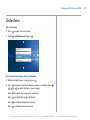
Sleep setup
Set your BT eFrame 1000 to switch on and off at specific times.
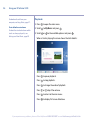
1. Press
press
to display the main menu, scroll
.
2. Scroll
to Time and Date and press
3. Scroll
to Sleep Setup and press
4. To switch sleep function on, press
Enable Sleep.
to Settings and
.
.
or
to tick the box
5. Press
and
to highlight the Wake Up or Shut Down hour or
minute boxes then press
or
to set the time.
6. When you have set the time, press
menu level.
7. Press
/
/
/
to return to the previous
to select a character and press
8. When the name is complete scroll to
on the remote.
.
on the screen and press
9. Press
to return to the main menu. After 30 seconds the slide
show will begin.
If you experience any problems, please call the Helpline on 0808 100 9889* or email [email protected]