1
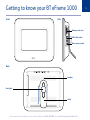
Getting to know your BT eFrame 1000
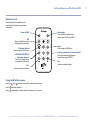
Remote control
Please remove the protective tab
covering the battery compartment
before use.
Power On/Off
ABC
Press to select functions
displayed on the screen.
Slideshow Button
Press to go to ‘My Photo’.
UP/DOWN/LEFT/RIGHT
(navigation buttons)
Press to navigate to the
menu option you want.
Vol Decrease volume button.
Information
Press to display information
about your BT eFrame 1000.
Music
Press to go to ‘My Music’.
Battery compartment cover (on back)
Pull out to replace the battery.
Use battery type CR2025.
Vol+
Increase volume button.
Using the BT eFrame menu
Use the
and
buttons to scroll up and down the menu.
Press
to select options.
Press
repeatedly to return to the main menu at any time.
If you experience any problems, please call the Helpline on 0808 100 9889* or email [email protected]
7