1
Netcomm Wireless
NB16WV Set-up Guide
Getting to Know your Device
The table below describes the LED lights on the front panel of your Netcomm
Wireless device and their functions.
Icon
LED Activity
Description
Power
Off
The modem is powered off.
Blue
The modem is powered on and operating normally.
Blue Flashing
The modem is starting up.
Off
No ADSL configuration is present.
Blue
The modem is connected to the Internet via an ADSL service.
Blue Flashing
The modem is attempting to connect to a ADSL service.
Off
No 3G configuration present (or there isn’t a 3G USB modem
plugged in).
Front Panel
Red
3G USB - SIM Error.
Red Flashing
3G connection failed - retrying.
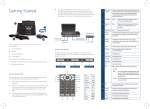
The front panel consists of 11 LED lights.
Blue
The modem is connected to the Internet via a 3G service.
Blue Flashing
The modem is attempting to connect to the 3G service.
Off
No Internet configuration is present.
Red
The modem is connected via a 3G service.
Red Flashing
Data is being sent or received via the 3G service.
Blue
The modem is connected via an ADSL service.
Blue Flashing
Data is being sent or received via an ADSL service.
Purple
The modem is connected via an Ethernet WAN service.
Purple
Flashing
Data is being sent or received via the Ethernet WAN service.
Off
No device is connected to the Ethernet LAN port.
Blue
A device is connected to the Ethernet LAN port.
The Netcomm Wireless NB16WV ADSL2+ VoIP Wireless Modem Router has
been set up to plug and play.
We recommend Microsoft® Windows 7, XP, Vista, or MAC OS as the minimum
Operating System requirements. Ideally, your computer should be less than five
years old and of a reasonable specification to get the most out of the Internet.
It is important to ensure your computer is up to date with the latest operating
system and any relevant anti-virus and firewall / Internet protection software.
ADSL
3G
www
Power
Supply
ADSL
Light
3G
Light
Ethernet
www
WAN Wi-Fi™ VoIP
Light LAN Ports 1-4
LAN 1-4
Back Panel
The back panel consists of port connections and also the Power (on/off) button.
Blue Flashing
Data is being sent or received via the Ethernet LAN port.
WAN
Off
No device is connected to the Ethernet WAN port.
Blue
A device is connected to the Ethernet WAN port.
Wi-Fi™
Off
Wi-Fi™ is disabled on the modem.
Blue
Wi-Fi™ is enabled.
Blue Flashing
The modem is waiting for a WPS connection.
Off
No VoIP service is configured.
Blue
VoIP service is configured on this modem.
Blue Flashing
The modem is attempting to connect to the configured
VoIP service.
VoIP
Power Power USB WPS
Supply (on/off)
4
Ethernet LAN
WAN ADSL VoIP
5