1
English
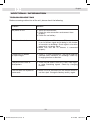
REMOTE
CONTROL
���������������
■ �To�����������������������������������������������������������������
use the remote control, press the power button to turn on the TV-tuner.
�� ������
�
�
����
�
�
���
������
�
�����
����
�
����
��
�
�����
����
�
�
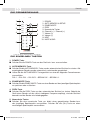
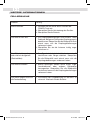
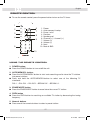
��1. �����
Power
��2. �����������
Auto memory & setup
��3. �����������
Erase / write
��4. ��������
Previous
��5. ����������
Number pad
Channel (5) / channel (6)
��6. �����������������������������
Volume (+)
��7. ����������
Volume (–)
��8. ����������
Next
��9. ����
10.
Mute & SND
��� ����
��
������������������������
USING THE REMOTE CONTROL
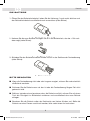
1.
■
2.
■
■
3.
■
4.
■
������������������������������������������������������������������
��������������������
POWER-button:
�Press
������������������
the POWER-button to turn on/off the unit.
�����������������������
AUTO/MEMORY- button:
� ���������������
Press the AUTO/MEMORY-button to start auto searching and to store the TV stations
�������������������������������������
into preset stations.
Press and hold the AUTO/MEMORY-button to select one of the following TV
� ������������
standards:
�������������������������������������������������������������������
PAL-I
➝ PAL-D/K ➝ PAL-B/G ➝ SECAM D/K ➝ SECAM L/L
�������������������������
����������������������������������������������������������������
ERASE/WRITE-button
��������������������������������������������������
Press the ERASE/WRITE-button to erase/store the current TV station.
�
PREV-button
Press the PREV-button to searching an available TV station by decreasing the tuning
frequency.
5. Numeric buttons
■ Press one of the numeric buttons to select a preset station.
17
ZE-TVA Manual D+E neu.indd 17
02.12.2005 19:09:47 Uhr