1
ECTACO Partner® PW800
User Manual
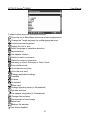
Use shortcut keys (shortcuts for toolbar buttons, where available,
are shown in their corresponding tool tips) / Input accented and
+key
special characters (in models without the
key)
Switch language or translation direction
Input accented and special characters – please refer to the
Keyboard section of the online manual (see page 23)
Execute
,
,
Move cursor or highlight / Scroll lines
,
Page by screen / Switch Main Menu sections
,
Enter space
Display and Main Menu
®
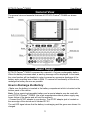
ECTACO Partner PW800 features touch screen (320 x 240 pixels) with a windowsdriven graphical interface. The Main Menu consists of four sections, which visually
organize access to the ECTACO Partner® PW800 applications.
Note: Tapping screen items is preferably done with the supplied pointing device called
the stylus, which, when not in use, is kept in a special slot at the base of the device's
case (see General View). As an on-board help to the user, a short toolbar button
description (tool tip) appears when an on-screen button is being touched.
Main Menu
• To access the Main Menu, turn the device on, then press
on the keyboard,
or tap
on the screen and select the Desktop item in the appeared menu. Tapping
the Dictionaries, Exercises, Extras, or Setup items in that menu will bring you to the
corresponding section.
• If you are using a model with more than one language pair, go to the Main Menu and
then tap
on the toolbar to change the Target language.
• Use the Dictionaries section to access Main Dictionary, WordNet Dictionary,
Phrasebook, SAT 200, and SAT 5000.
• Use the Exercises section to access Flash Cards, Pockets, Spell It, Translation Test,
Dictionary Setup, and Hangman1.
• Use the Extras section to access Media Player, Calculator, Conversion, and World
Time.
• Use the Setup section to access Pen Calibration, Settings, User Manual, and About.
Note: To disable the Slang lock function in the Setup section, please use this
password: showslan.
1
Available in some models.
5