1
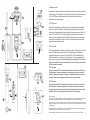
Operating the system
19
6
Because this is a frequency agile system, the receiver and transmitter must be on the same
channel number. To change the channel number, use the tip of the provided tool and press
the UP or DOWN button to the desired channel. Make sure both the receiver and
transmitter are on the same channel.
4
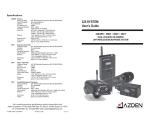
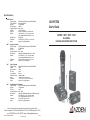
320UPR Receiver
3
21
20
9
18
17
7
8
5
After installing new batteries, mount the receiver to your video camera with the supplied
shoe mount or hook & loop fastener. Select one of the supplied cables and connect the
output cable to the receiver and to the microphone input on the video camera. Switch Ch.1
and/or Ch.2 of the 320UPR to “ON” and the battery level indicator(s) should come on. If
they do not, check the batteries. When the 320UPR receives a signal from the transmitter
the reception level indicator will come on. If it does not, make sure both the receiver and
transmitters are on matching channels.
30BT Transmitter
Plug in the supplied lapel microphone and clip it to your subject. The microphone should be
placed 4-12 inches from your subject’s mouth. Clip the transmitter to a belt using the
supplied belt-clip or place it in a pocket. Switch the 30BT to “ON” and the battery level
indicator should come on. If it does not, check the battery. Have someone speak into the
microphone as you monitor the sound through the receiver’s phone output. If the sound is
distorted lower the MIC input level on the transmitter. If there is not enough volume raise the
MIC input level on the transmitter.
16
1
2
12
30XT Transmitter
Switch the transmitter to “ON” and the battery level indicator should come on. If it does not,
check the battery. Have someone speak into the microphone as you monitor the sound
through the camera’s monitor output. If the sound is distorted lower the level control on the
transmitter. If there is not enough gain raise the level control on the transmitter.
11
27
25
24
+
13
23
23
15
Belt Clip
-
22
14
+
30HT Transmitter
Switch the transmitter to “ON” and the battery level indicator should come on. If it does not,
check the battery. Have someone speak into the microphone as you monitor the sound
through the camera’s monitor output. If the sound is distorted lower the level control on the
transmitter. If there is not enough gain raise the level control on the transmitter.
Important information
Licensing of this, or any Azden wireless equipment is the user’s responsibility. The ability to receive a license depends largely on the
user’s classification, application and frequency. Contact the appropriate agency (FCC in the US) for further information.
These devices comply with Part 15 of the FCC Rules. Operation is subject to the following two conditions: (1) These devices may not
cause harmful interference, and (2) These devices must accept any interference received, including interference that may cause
undesired operation.
10
26
NOTE: The manufacturer is not responsible for any radio or TV interference caused by unauthorized modifications to this equipment.
Such modifications could void the user's authority to operate the equipment.
These devices and their antenna(s) must not be co-located or operated in conjunction with any other antenna or transmitter.
5