1
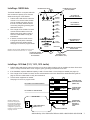
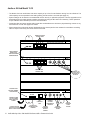
1 - WHITE/GREEN
2 - WHITE/ORANGE
3 - BLUE
4 - WHITE/BLUE
5 - ORANGE
6 - GREEN
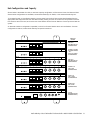
Using Cable Adjust for Long Cat 5 Cable Runs
For a Cat 5 cable run with total length over 100 feet, use the following guidelines: Set cable length on the receiving end
of the cable run in increments of 100 feet (1 = 100 to 199 feet, 2 = 200 to 299, etc.). For 1-way video set only the length
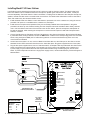
1 - GREEN
control on the 1501. For 2-way video set the length controls on both the 1520 and 1502. 2 - ORANGE
3 - WHITE/BLUE
4 - BLUE
5 - WHITE/ORANGE
6 - WHITE/GREEN
RJ-45 plug with pins facing up and clip facing away.
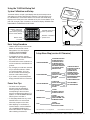
Cat 5 Cable Fabrication
Cat 5e or Cat 6 is UTP (Unshielded
Twisted Pair) cable that can be
used to connect Series 1500
components. Terminate the ends
of each Cat 5e/6 cable with RJ-45
modular plugs using the EIA 568B
pinout (paired 1-2, 3-6, 4-5, and
7-8). Pre-made network cables may
also be used for shorter runs. TEST
all cables (including pre-made) with
a network cable tester.
1
2
3
4
5
6
7
8
Cat 5e/6
1
2
3
4
5
6
7
8
RJ-45 Plug
Pin 1
WHITE / ORANGE
ORANGE
WHITE / GREEN
BLUE
WHITE / BLUE
GREEN
WHITE / BROWN
BROWN
WHITE / ORANGE
ORANGE
WHITE / GREEN
BLUE
WHITE / BLUE
GREEN
WHITE / BROWN
BROWN
Clip is pointed
away from you.
CABLES ARE WIRED THE SAME ON BOTH ENDS (NOT CROSSED OVER).
Using Traffic Sensors
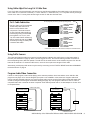
The 1520 Lane Station provides a connection for Audio Authority’s Model 1547 traffic sensor on the bottom edge of
the case (see illustration on page 8). When a vehicle triggers the 1547, the Counter Station generates a call tone for
the corresponding lane to alert the operator. The call tone for the traffic sensor can be a distinct ring tone from the call
button at the same lane. To extend a traffic sensor, use an in-line coupler and a length of Cat 5 cable.
Alternatively, a third party traffic sensor may be used by connecting it to the TRAFFIC SENSE terminal and COMMON
terminal as shown on page 8.
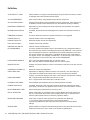
Program Audio/Video Connection
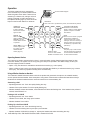
If audio or video program content will be playing at the customer positions when lane stations are on HOLD or idle,
plug the source player or PC into the Program Input ports on the 1509SD or 1510 series hub. Program audio level
may be manually adjusted at the hub. Any lane’s program audio may be turned off during idle periods (still heard while
on HOLD) using the 1550 Program Audio Abate setting (see page 16). If the program video source is a PC, either a
composite video card or external converter is required. Audio Authority Model 1361 is an ideal adapter to convert VGA
to composite video.
DVD PLAYER
(COMPOSITE VIDEO)
COMPOSITE VIDEO
PC
(VGA OUTPUT)
VGA
AUDIO
LEVEL
CONTROL
1361
AUDIO
COMPOSITE VIDEO
Audio Authority® Series 1500 Installer’s Reference Guide • 800-322-8346 • 859-233-4599
9