1
Setting Temperature Setpoint
The Nightscape camera can be cooled to approximately 20°C below the ambient temperature. For best results set the temperature setpoint to 20°C below ambient. For
example, if the outside temperature is 15°C (60°F) then the ideal sensor temperature
setting should be approximately -5°C (a difference of 20°C).
If after a few minutes, the setpoint stabilizes at the desired temperature (as shown in
the Temp. field), you can continue to drop the setpoint down in 1°C increments until it
can no longer stabilize. Then go back and increase the setpoint by 0.5°C. This should
represent the lowest temperature that the sensor can reach for the given outside air
temperature. Note: If after several (5-10) minutes, the setpoint can not be reached, it
will automatically reset to the lowest temp that can reached. A pop-up box will
appear indicating the temperature.
Technical Specifications
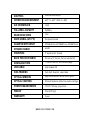
Imaging Sensor
Kodak KAI-10100 Color Sensor
Number of Active Pixels
10.7 MP (3760 (H) x 2840 (V))
Imaging Sensor Size
17.9 mm x 13.5 mm (22.5 mm diagonal)
Pixel Size
4.75µm square
Exposure Range
.001 sec to 24 hrs (2x2, 4x4 binning)
.01 sec to 24 hrs (1x1 binning)
Thermoelectric Cooling
Yes (regulated TEC with fans)
Software Compatibility
AstroFX, MaxImDL (with ASCOM drivers
included on AstroFX CD)
Cooling Range
20C° below ambient
www.celestron.com