1
Crestron C2N-CBD-TS/C2N-CBF-T
Cameo Keypads
Ambient Light Sensor Operation
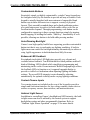
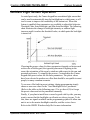
As noted previously, the Cameo keypad has an ambient light sensor that
can be used to automatically turn the backlight on in a dark room, or off
in a lit room to improve the readability of the button text. When this
feature is enabled, three parameters are available to adjust this behavior:
Threshold, Max Auto Backlight, and Min Auto Backlight. The following
chart illustrates the change in backlight intensity as ambient light
increases until it reaches the threshold value, at which point the backlight
is turned off.
Choosing the proper values for these parameters depends on factors such
as the color of the keypad, the type and placement of lighting in the
room, the orientation of the room’s windows with respect to the sun, and
personal preference. To simplify the process, Crestron ships the Cameo
keypad with preset values for the three parameters. The preset values
have been selected to produce an effect that should be acceptable to most
people, in many common scenarios.
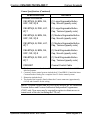
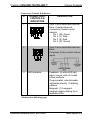
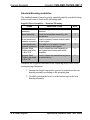
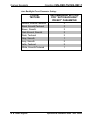
To use one of the built-in preset settings, during programming simply
choose a non-zero value for the "Auto Backlight Preset" parameter.
(Refer to the table on the following page.) Use a value of (0) to forego
the preset values and set the parameters manually.
Finally, if you plan to install two or more keypads side-by-side, you may
want to ensure that the backlights on all units are always in sync. To do
this, there are signals available on the programming symbol to allow one
unit to act as the master backlight controller, and the rest as slaves.
Refer to the SIMPL Windows help file for more information.
Operations & Installation Guide - DOC. 6603D
Cameo Keypads • 25