1
34
19
BLUETOOTH
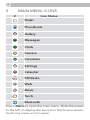
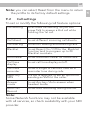
From the main menu screens, touch the Bluetooth
icon
to open the Bluetooth menu:
Bluetooth
to power the Bluetooth On / Off
Visibility
to make the Bluetooth visible or not to
other Bluetooth devices
My device
to search for new Bluetooth devices
and see previously paired devices
Search audio
device
to search for audio devices and pair.
My name
to change the name of your handset
seen by other Bluetooth devices
Advanced
to set the Audio path, the storage
location for any downloads and check
the Bluetooth address
Note:
The Bluetooth must be turned on and visible to link
with other devices, and the Audio path must be set
to “Forward to Bluetooth headset” if you want to
make calls via the Bluetooth link.
20
SAFETY AND PRECAUTIONS
When using your telephone, basic safety
precautions should always be followed to reduce
the risk of fire, electric shock and injury, including
the following:
1. Switch off the phone in the vicinity of chemical
plants, gas stations and other locations
containing explosive objects.
2. When driving, if you have to make or receive a
call, please use a hands free calling device (to be
purchased separately) to improve safety. Please