1
28
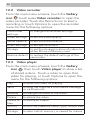
12.2 Video recorder
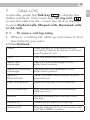
From the main menu screens, touch the Gallery
icon
touch press Video recorder to open the
video recorder. Touch the Record icon to start a
recording or touch Options to open the recorder
menu for the following options:
Camcorder
settings
to change the recorder settings
Video settings
to set the Video quality
White balance
to set the white balance
Effect settings
to set special effects
Storage
to set the storage location of videos to
either Phone or Memory card
Restore default to restore the default settings of the
camcorder
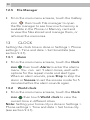
12.3 Video player
From the main menu screens, touch the Gallery
icon
then touch Video player to show a list
of stored videos . Touch a video to open that
video for playing, or touch Options to open the
menu for the following options:
Play
to open the video for playing
Send
to send the video as a multimedia message
or via Bluetooth
Rename
to change the name of the video
Delete
to delete the video
Delete all
files
to delete all videos
Sort by
to sort the videos by name, type, time or size
Storage
to select which memory is viewed for videos