1
It is not necessary to unlock the keys to answer the call.
5. Using MENU
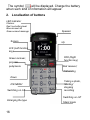
To enter the MENU in standby mode press left function
key.
To navigate the MENU use UP and DOWN keys.
To confirm the selected function press left function key
(LFK).
To return to the previous MENU (return), press right
function key (RFK). To enter the standby mode, press red
receiver.
6. Phonebook
6.1
Saving contacts
You may save a new contact in one out of three ways:
1. In standby mode enter the number, select
„Options” (left function key), then „Save in the
phonebook”, select whether you want to save the
contact in the phone or on SIM card and enter the
name of the contact, press “Done” (right function
key)
2. You may save the number from the list of missed
and answered calls. In order to do this in standby
mode press green receiver, select the number,
you want to save and press „Options” (LFK).
25