1
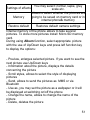
full,
icon will flash. Delete messages from inbox, to
solve the problem.
9.1
Writing and sending SMS-es
1. Enter MENU->Messages->Write a message>SMS, to
open the message editor.
2. Write your message.
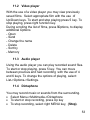
· Changing the method of entering the text: To
change the method of entering the text (digits, small or
capital letters) press „#” key, if you want to write a
symbol press „ ”.
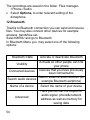
3. Sending the message: Press left function key to
enter options, select „Send to” and select whether you
want to enter the number manually or select from the
contacts. Select the number and press OK. If you
want to send SMS to many persons, you can add the
next numbers. To send the message, press „Options”
and then „Send”.
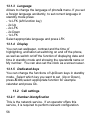
4. Saving the message: To save already written
message press left function key,
and then select „Save”. The message will be saved
in Drafts. You may set that sent messages will be
saved automatically, in order to do this enter MENU>Messages->Settings->SMS->Save own.
40