1
Software
Crestron SIMPL Windows
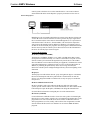
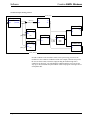
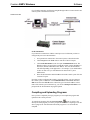
Retriggerable One Shot Example: automatic power down
Touchpanel
OR
fb115
fb116
fb117
fb118
fb119
press115
press116
press117
press118
press119
i1
i2
i3
i4
i5
fb120
fb121
press120
press121
i6
i7
fb122
fb123
fb124
fb125
press122
press123
press124
press125
i8
i9
i10
Retriggerable One Shot
out
out
out*
trig
trig*
reset
pulse_time
System_Active
3.00.00.00s
Buffer
One Shot
0
trig
trig*
out
out*
reset
pulse_time
1
enable
in1
in2
out1
out2
Screen_Up
in3
out3
Lights_Off
Vproj_Off
0.5s
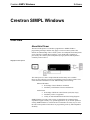
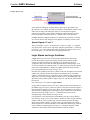
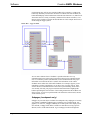
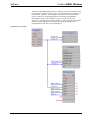
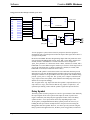
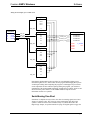
You can program a system to detect inactivity and power down the equipment
automatically after a specified period of time has elapsed. The figure shown above is
a program to do just this.
Recall from the SIMPL Windows Programming chapter that time parameters can be
expressed in the HH.MM.SS.XXs format, where: HH = hours, MM = minutes, SS =
seconds, and XX = hundredths of a second. Thus in the above example the
‘pulse_time’ parameter of "3.00.00.00s" means 3 hours, 0 minutes, 0 seconds, and 0
hundredths of a second. When using this notation you can leave out the larger units if
you are not using them, thus "3.00.00s" would mean 3 minutes, 0 seconds, and 0
hundredths of a second (it would NOT mean 3 hours).
Note that an OR symbol is used to detect when a relevant button has been pressed,
and each press will cause the Retriggerable One Shot symbol to be retriggered, thus
starting the countdown over again. When 3 hours have passed with no buttons being
pressed, ‘system_active’ will go low. The ‘system_active’ output is routed into the
‘trig*’ input of a One Shot symbol, which will detect the falling edge of the signal
and activate its output accordingly.
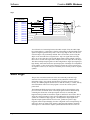
The "0" signal on the ‘trig’ input of the One Shot symbol is required whenever you
only want to use ‘trig*’, due to the fact that the ‘trig’ input is a required (i.e., not
optional) input. Placing a 0 here tells the symbol to ignore this input at all times.
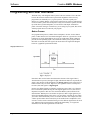
Delay Symbol
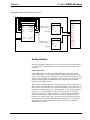
The Delay symbol is used to postpone an event for a given amount of time. Basically
the output signals will be exact replicas of the inputs (in terms of positive and
negative transitions), but delayed by the appropriate amount of time. The Delay
symbol also has a ‘reset’ input, which cancels any impending output events.
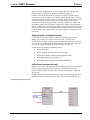
At first glance you might think that the Delay symbol presents an easier way of
building the auto-power-down example shown in the previous section using the
Retriggerable One Shot symbol. However, two factors prevent you from using the
Delay symbol in this application. First, the Delay is not retriggerable, but instead it
54 • Crestron SIMPL Windows
Primer – DOC. 6253