1
CONTROLLING
THE CAMERA
*Control
Disclaimers
The Camera can be controlled with the Canon WL-V5 IR Remote
Controller or through RS-232 using VISCA control protocols.
Vaddio’s unique approach to camera control takes advantage of the
VISCA control allowing the WallVIEW 50i PTZ HideAway (with the
Canon VC-C50i internal) to respond flawlessly to many mainstream
controllers/joysticks with built-in Sony VISCA control Protocol.
The IR signals transmitted by the Canon IR Remote are intercepted by Vaddio circuitry and are
translated to RS-232 codes that the Canon VC-C50i camera can understand. Furthermore, the
VISCA control codes sent to the camera are also translated into RS-232 that the Canon VC-C50i
understands. The Canon VC-C50i can accept either RS-232 control or IR codes for operation, but
not both at the same time. Again, Vaddio’s approach only uses RS-232 communication to control the
camera through the translation of both the VISCA protocol and Canon IR into RS-232 so both the IR
and RS-232 can be used simultaneously.
When using the WallVIEW 50i PTZ HideAway with an external Codec (Polycom®, TANDBERG®
etc…), the codecs typically control the cameras directly using VISCA RS-232 commands if no
external control system is used. However, these codecs don’t have the ability to command the
WallVIEW 50i PTZ HideAway camera to open and close since the codecs don’t have the ability to
communicate the VISCA RS-232 commands of CAMERA ON and CAMERA OFF. These codes are
not programmed into the codecs. While the codecs can control the pan, tilt and zoom functions of the
WallVIEW 50i PTZ HideAway camera, the camera will remain open at all times, essentially defeating
the purpose of the HideAway motorized feature. Therefore, it is recommended that the WallVIEW
50i PTZ HideAway be used with the IR Remote it is shipped with, Vaddio ControlVIEW Xtreme or
ProductionVIEW, the Vaddio/Sony Joystick bundle or an external control system (i.e.
Crestron®/AMX®) or any system that can communicate the VISCA RS-232 ON/OFF commands. If
FEC (Far End Camera) control is required in the customer’s configuration, take the camera RS-232
out from the codec into the programmable control system, intercept the Near and Far end
pan/tilt/zoom camera commands from the codec and forward these commands to the WallVIEW 50i
PTZ HideAway and then simply add an ON/OFF button for the camera on the control system panel.
With any language, not all commands are specifically translatable from one manufacturer to another.
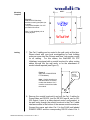
The Canon WL-V5 IR Remote Controller controls the following functions when used with a WallVIEW
50i PTZ HideAway (see Figure 10).
IR Control
Commands
Figure 10:
The active Canon WL-V5 IR Remote control commands
are as follows:
1) Power on/off
a. On = lowers camera door
b. Off = Homes the camera and closes the
camera door
2) Brightness:
Up/Down
3) Zoom:
Tele (in)/Wide (out)
4) Pan:
Left, Right, Up, Down
5) Home:
Home/Centered Position
6) Set/OK:
For setting camera presets
7) Cancel:
Not Used
8) AF:
Auto Focus On
9) MF:
Manual Focus On
∞ Lengthens the focal distance
Shortens the focal distance
10) Keypad:
0 through 9 for assigning presets,
* and # not used
11) On Screen:
Not used
12) Fn:
Not used
13) ID:
Not used
14) MENU:
Not used
WallVIEW 50i HideAway – Document 341-141 Rev. C
Page 8 of 14