1
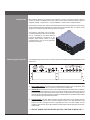
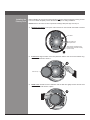
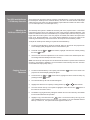
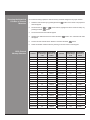
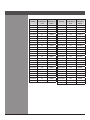
Quick Setup Guide DCX-500i / DCX-1000i / DCX-1500i Projectors with WC-Pro Scaler Preliminary Table of Contents Introduction............................................................................................................ 1 Connecting the Projector....................................................................................... 1 Installing the Primary Lens.................................................................................... 2 Connecting the Scaler........................................................................................... 3 The Projector's Channel Memories....................................................................... 3 The GPIO and VariScope 2.35 Memory Structure................................................ 4 Adjusting the VariScope Lens System................................................................... 4 Copying Channel Memories.................................................................................. 4 Changing the Numerical Location of Channel Memories...................................... 5 GPIO Channel Memory Structure......................................................................... 5 i Wolf Cinema Quick Setup Guide Introduction Wolf Cinema’s DCX line of projectors are designed to work in conjunction with the WC-Pro Scaler. The Scaler is calibrated at the factory and is to be used to route the variety of inputs it supports; 6 HDMI, 1 Component, 1 Component/RGB, 1 S-Video and 1 Composite Video. Each projector is ships with 10 preset Channel Memories, which are programmed at the factory. These Channel Memories represent 10 aspect ratios per each Scaler input, 5 of which can be assigned to control the optional VariScope 2.35 Lens system. The Projector and Scaler can be remotely controlled separately by RS-232 or the scaler can be controlled by the GPIO (General Purpose Input/Output) connection of the projector, which has the scalers 10 inputs programmed into every 10 of the projectors 99 channel memories. Connecting the Projector The following steps are to be done once the projector is installed, per the specifications of the sales order. Iso - Front Right View 1. DVI to HDMI adapter: Connect the DVI to HDMI adapter to INPUT 2 on the projector. (DVI input). This adapter will allow connection to the scaler via HDMI cable. 2. GPIO Output: This allows connection to the Scaler’s GPIO input via serial cable. In addition, the GPIO connection allows the projector to switch the Scaler’s inputs when the projectors corresponding Channel Memories are changed. When a VariScope 2.35 is being used you will need the provided GPIO adapter. Connect the GPIO Adapter to the GPIO output located on the projectors input panel via serial cable. Side - Left View 3. Connect Power: Use the approved North American-rated power cord supplied with the projector. Plug the power cord to the AC receptacle located on the right hand side of the projector and the 3-pronged end into a grounded AC outlet. The input voltage must be capable of 100-240 VAC for the DCX-500/DCX-1000 models and 200-240 VAC for the DCX1500 models. *** DO NOT POWER THE PROJECTOR ON UNTIL THE LENS IS INSTALLED *** 1 Wolf Cinema Quick Setup Guide Installing the Primary Lens Before installing any lens, be sure the projector is off. If the projector has been running, be sure to let it cool down completely. Ensure the front lens cap is on during installation. NOTE: Remove the small rear lens cap before installing!! Keep the large front cap on. 1. Electrical Connector: Line up the male connector on the lens with the female connector on the slide assembly. Lens release Lens retainer ring Projection Lens* Male connector assembly (on lens) Female floating connector assembly (on lens mount) 2. Insert Lens: Align the Tabs on the lens plate lock with the slots on the lens retainer ring. The lens should slide in about ½”. Front lens cap 3. Rotate Lens: Rotate the lens clockwise until the tabs are tightly secured and the lens release button locks the lens in place. Wolf Cinema Quick Setup Guide 2 Connecting the Scaler 1. Connect all sources to the inputs of the scaler. 2. Connect a HDMI cable from the video output on the scaler to input 2(DVI) in the projector. 3. Connect power to the AC input using the provided power cable. The scaler will automatically turn on. If a Red LED is shown on the right side of the front panel, the Scaler is receiving AC power but no signal is detected. If a Blue LED is shown, the Scaler is receiving AC power and a good video signal is being detected. No LED indicates there is no AC power within the scaler. RS-232 GPIO Component 1 Y B-Y R-Y Sync H 1 V 2 Video Y The Projector Channel Memories S-Video Output Service B-Y R-Y Component 2 / RGBHV HDMI 1 HDMI 2 HDMI 3 HDMI 4 HDMI 5 Video / Audio Audio IR Control AC Input 110-240V, 50/60Hz All projectors come with 10 Channel Memories that are pre-set for the scalers inputs, the VariScope lens feature and VariScope 2.35 Anamorphic lens configurations; all based on the installation specifications supplied by the dealer. Once the 10 Channel Memories are calibrated at the installation, those channel memories can be copied to the remaining empty Channel Memory slots (11-99). See the entire Channel Memory chart at end of this Quick Setup Guide. Channel Memory Setup Channel 01 HDMI 1 1.78 Channel 02 HDMI 1 1.85 Channel 03 HDMI 1 2.20 Channel 04 HDMI 1 2.35 Channel 05 HDMI 1 2.40 Channel 06 HDMI 1 2.35a Channel 07 HDMI 1 2.40a Channel 08 HDMI 1 2.60a Channel 09 HDMI 1 2.67a Channel 10 HDMI 1 2.70a 3 Wolf Cinema Quick Setup Guide The GPIO and VariScope 2.35 Memory Structure The Projector has 99 channel memory locations. Channel Memory 1-5 are to be used without the Anamorphic VariScope 2.35. Channels Memory 6-10 are to be used with the Anamorphic VariScope 2.35. Every block of 10 Channel Memory inputs will be structured in the same manor. (1-5 no anamorphic lens, 6-10 anamorphic lens.) Adjusting the VariScope Lens System The VariScope lens system is enabled at the factory with in the projectors menu . This feature memorizes the Zoom and Focus settings for each of the projectors Channel Memories. This allows the calibrator to set each Channel Memory for a specific aspect ratio when using constant height with their screen system. Once the projector is installed, this feature will require some touch up for Channel Memories 1-10. Those Channel Memories can then be copied to the remaining Channel Memory slots as discussed in the Projector Channel Memory section. To adjust the VariScope lens setting for a particular Channel Memory: 1. To select a Channel Memory, press the “Channel” button on the remote. The projectors On Screen Display (OSD) will appear with the Channel Memory list. 2. Scroll with the Up or the Enter button. Down buttons; highlight and select the channel pressing 3. Use the Zoom and Focus adjustments on the remote to achieve the desired aspect ratio. The settings will automatically be stored in memory. (Note: The VariScope Lens System must be selected for this feature to operate and is enabled at the factory. If the feature is disabled, it can be re-enabled in the Geometry and Color sub-menu located within the Display Setup menu.) Copying Channel Memories 1. To select a Channel Memory to be copied, press the Menu projectors On Screen Display (OSD) will appear. 2. Scroll with the Up pressing the Enter or button. Menu button on the remote. The Down buttons; highlight and select “Channel Setup” by 3. The Channel Memory list from the OSD will appear. 4. Highlight the channel to be copied by scrolling with the Up or Down buttons. 5. Once the channel memory to be copied is highlighted, select the Function the bottom of the remote control. Func button at 6. The OSD for copying the memory will appear. Please use care not to select any of the delete functions associated with this operation. 7. Highlight “Copy” and select the Enter button: The channel memory will copy to the next available channel memory slot plus one. For example, if the next available Channel Memory is channel 11, the copied channel will appear at channel 12. Wolf Cinema Quick Setup Guide 4 Changing the Numerical Location of Channel Memories As a channel is being copied, the channel memory should be assigned to its proper location. 1. Select the channel memory by pressing the Menu OSD will appear. 2. Scroll with the Up pressing the Enter or button. Menu button on the remote. The projectors Down buttons; highlight and select “Channel Setup” by 3. The channel list from the OSD will appear. 4. Highlight the desired channel and select the Enter will appear. button. The “Channel Edit” OSD 5. Scroll to the 2nd slot that shows “Number” and select the Enter button. 6. Select the desired number location by entering it onto the remote control keypad. GPIO Channel Memory Structure Channel GPIO Control to VariScope 2.35 Input/GPIO Selection at Scaler Channel GPIO Control to VariScope 2.35 Input/GPIO Selection at Scaler Channel 01 No HDMI 1 Channel 24 No HDMI 3 Channel 02 No HDMI 1 Channel 25 No HDMI 3 Channel 03 No HDMI 1 Channel 26 Yes HDMI 3 Channel 04 No HDMI 1 Channel 27 Yes HDMI 3 Channel 05 No HDMI 1 Channel 28 Yes HDMI 3 Channel 06 Yes HDMI 1 Channel 29 Yes HDMI 3 Channel 07 Yes HDMI 1 Channel 30 Yes HDMI 3 Channel 08 Yes HDMI 1 Channel 31 No HDMI 4 Channel 09 Yes HDMI 1 Channel 32 No HDMI 4 Channel 10 Yes HDMI 1 Channel 33 No HDMI 4 Channel 11 No HDMI 2 Channel 34 No HDMI 4 Channel 12 No HDMI 2 Channel 35 No HDMI 4 Channel 13 No HDMI 2 Channel 36 Yes HDMI 4 Channel 14 No HDMI 2 Channel 37 Yes HDMI 4 Channel 15 No HDMI 2 Channel 38 Yes HDMI 4 Channel 16 Yes HDMI 2 Channel 39 Yes HDMI 4 Channel 17 Yes HDMI 2 Channel 40 Yes HDMI 4 Channel 18 Yes HDMI 2 Channel 41 No HDMI 5 Channel 19 Yes HDMI 2 Channel 42 No HDMI 5 Channel 20 Yes HDMI 2 Channel 43 No HDMI 5 Channel 21 No HDMI 3 Channel 44 No HDMI 5 Channel 22 No HDMI 3 Channel 45 No HDMI 5 Channel 23 No HDMI 3 Channel 46 Yes HDMI 5 5 Wolf Cinema Quick Setup Guide Wolf Cinema Quick Setup Guide Channel GPIO Control to VariScope 2.35 Input/GPIO Selection at Scaler Channel GPIO Control to VariScope 2.35 Input/GPIO Selection at Scaler Channel 47 Yes HDMI 5 Channel 73 No COMP 2 Channel 48 Yes HDMI 5 Channel 74 No COMP 2 Channel 49 Yes HDMI 5 Channel 75 No COMP 2 Channel 50 Yes HDMI 5 Channel 76 Yes COMP 2 Channel 51 No HDMI 6 Channel 77 Yes COMP 2 Channel 52 No HDMI 6 Channel 78 Yes COMP 2 Channel 53 No HDMI 6 Channel 79 Yes COMP 2 Channel 54 No HDMI 6 Channel 80 Yes COMP 2 Channel 55 No HDMI 6 Channel 81 No SVIDEO Channel 56 Yes HDMI 6 Channel 82 No SVIDEO Channel 57 Yes HDMI 6 Channel 83 No SVIDEO Channel 58 Yes HDMI 6 Channel 84 No SVIDEO Channel 59 Yes HDMI 6 Channel 85 No SVIDEO Channel 60 Yes HDMI 6 Channel 86 Yes SVIDEO Channel 61 No COMP 1 Channel 87 Yes SVIDEO Channel 62 No COMP 1 Channel 88 Yes SVIDEO Channel 63 No COMP 1 Channel 89 Yes SVIDEO Channel 64 No COMP 1 Channel 90 Yes SVIDEO Channel 65 No COMP 1 Channel 91 No VIDEO Channel 66 Yes COMP 1 Channel 92 No VIDEO Channel 67 Yes COMP 1 Channel 93 No VIDEO Channel 68 Yes COMP 1 Channel 94 No VIDEO Channel 69 Yes COMP 1 Channel 95 No VIDEO Channel 70 Yes COMP 1 Channel 96 Yes VIDEO Channel 71 No COMP 2 Channel 97 Yes VIDEO Channel 72 No COMP 2 Channel 98 Yes VIDEO Channel 99 Yes VIDEO 6 Wolf Cinema . 2431 Fifth Street . Berkeley . CA 94710 . Ph: 510.843.4500 . Fax: 510.843.7120 . www.wolfcinema.com