1
RDL-2000
4.4.3
Installation Guidelines
Disconnecting the Ethernet Cable
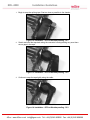
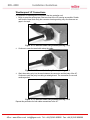
The RJ-45 connector is recessed within the RDL-2000 chassis. To disconnect the
Ethernet cable from the RDL-2000, you must use a small flat blade screwdriver or similar
tool release the locking tab located in the chassis recess.
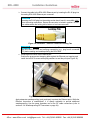
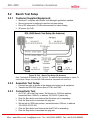
1. Use a small flat blade screwdriver or similar tool to carefully depress the locking tab
on the Ethernet plug.
2. Maintain pressure on the tab and use only a light pull (two fingers) to remove the
Ethernet plug from the socket. The cable must be pulled straight out the port or the
connector may be caught on the chassis metal housing.
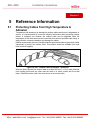
Ethernet Cable Removal
Use of excessive force when removing the Ethernet cable will damage the RJ-45
connector and the RDL-2000 printed circuit board.
If the weatherproofing grommet has been installed, care must be taken to avoid
excessive strain on the RJ-45 connector when moving the grommet to gain access the
release pin on the connector. Be sure to push the Ethernet cable through the grommet
hole as the grommet is moved away from the RDL-2000 port.
70-00144-01-01
Proprietary Redline Communications © 2011
Page 30 of 52
March 9, 2011
4Gon www.4Gon.co.uk [email protected] Tel: +44 (0)1245 808295 Fax: +44 (0)1245 808299