1
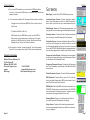
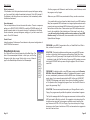
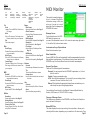
Sequence Paramter Editing
Sequence Parameter Editing
This screen contains all
the available sequence
parameters and track parameters.
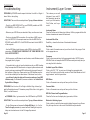
Tempo
Place the Text bar over the
display box, type number.
The parameter will automatically adjust for you,
or you may press Enter to
enact the change.
Loop Enable
Cluck check box to toggle
between “On” and “Off”
MIDI Clock Status
Cluck “Internal” or “MIDI” radio button (you might find this usually set to MIDI
because of the auto-change by the Sequencer Control Box)
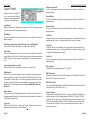
Click
Cluck check box to toggle between “On”, “Off” and Record”
Note Values
Cluck to toggle between acceptable note values; wraps around
Cluck Volume
Place the Text bar over the display box, type number. The parameter will automatically adjust for you, or you may press Enter to enact the change.
Click Pan
Place the Text bar over the display box, type number. The parameter will automatically adjust for you, or you may press Enter to enact the change.
Click Out
Cluck on Command arrow and you will see your list of choices. Cluck on the
appropriate one.
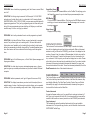
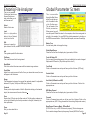
Effects Panel
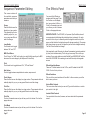
The Effects Panel
You can edit the Effects parameters with this page. Place
the Text bar over the display
box, type number, hit Enter, or
Cluck on Command arrow and
you will see your list of choices.
Cluck on the appropriate one.
IMPORTANT NOTE: The EPS/ASR, in it’s present Sys-Ex abilities, doesn’t
communicate what effect algorithm is attached to an instrument. Our workaround for this is for you to manually select the algorithm and the top of the
page, and the labels for the display boxes will change accordingly. The parameter values shown are correct; the algorithm just has to be changed manually.
The Disk File will reflect that change.
Also importantly noted, Ensoniq only allows 9 parameters (randomly selected
by them) to be edited remotely. This is why you see many N/A on other parameters. Some nasty deletions include BusMix3 and MIXMOD AMT with the
basic HALL REVERB. We’re seeking to work with Ensoniq to allow greater
access.
Effects Algorithm Names
There are 13 effects loaded into the 16-Plus, and 50 loaded into the ASR10/88. Cluck on this to pick one.
Effects Variations
Pick one of four preset variations of the effect. In future versions you will be
able to save your own.
Active Effect Controls
This is an active effect control you can edit. Type into the text box or use the
spin control to the right.
Inactive Effect Controls
You cannot alter this control; however, we have noted what the parameter
name it.
Click Mode
Cluck on Command arrow and you will see your list of choices. Cluck on the
appropriate one.
Page 37
Page 13