1
Understanding LED Signals
LEDs on the Brooktrout Fax Board
LEDs on the Mounting Bracket
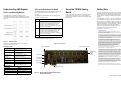
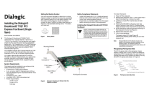
The LEDs on the board provide information about the
status of the board. To locate these LEDs, see
Figure 5.
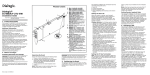
The LEDs on the mounting bracket provide
information about the status of the different systems
on the board. To identify and locate these LEDs, see
Figure 4.
The following table describes how the LEDs on the
board provide information:
LED
Meaning
DSP0
Displays the status for DSP0 that supports the
four ports on the A connector (RJ-45). After
the firmware is loaded and during normal
execution, this LED blinks about every
second. If the LED is not blinking, the DSP0
firmware is not running.
RJ-45 Connector A
Using the TR1034 Analog
Board
Getting Help
Once you have installed the TR1034 Analog board,
install and configure your fax or voice software
application according to instructions included with
the software.
Channel LEDs
Board Status LED
Power
www.dialogic.com/support/
Copyright and Legal Notice
Copyright © 2006-2008] Dialogic Corporation. All Rights Reserved. You may not
reproduce this document in whole or in part without permission in writing from Dialogic
Corporation at the address provided below.
All contents of this document are subject to change without notice and do not represent a
commitment on the part of Dialogic Corporation or its subsidiaries. Reasonable effort is
made to ensure the accuracy of the information contained in the document. However, due
to ongoing product improvements and revisions, Dialogic Corporation and its subsidiaries
do not warrant the accuracy of this information and cannot accept responsibility for errors
or omissions that may be contained in this document.
Steady green indicates good board power.
* DSP1 and its associated LED are only loaded
on the 8-channel version of the board.
INFORMATION IN THIS DOCUMENT IS PROVIDED IN CONNECTION WITH
DIALOGIC® PRODUCTS. NO LICENSE, EXPRESS OR IMPLIED, BY ESTOPPEL OR
OTHERWISE, TO ANY INTELLECTUAL PROPERTY RIGHTS IS GRANTED BY THIS
DOCUMENT. EXCEPT AS EXPLICITLY SET FORTH BELOW OR AS PROVIDED IN A
SIGNED AGREEMENT BETWEEN YOU AND DIALOGIC, DIALOGIC ASSUMES NO
LIABILITY WHATSOEVER, AND DIALOGIC DISCLAIMS ANY EXPRESS OR IMPLIED
WARRANTY, RELATING TO SALE AND/OR USE OF DIALOGIC PRODUCTS
INCLUDING LIABILITY OR WARRANTIES RELATING TO FITNESS FOR A
PARTICULAR PURPOSE, MERCHANTABILITY, OR INFRINGEMENT OF ANY
INTELLECTUAL PROPERTY RIGHT OF A THIRD PARTY.
Figure 4. End Panel LEDs
Eight-channel Board
The following tables describe how the end panel
LEDs provide information:
Board Status LED
Board Status LED
Meaning
Flashing yellow
(1.5 second rate)
Steady red
Board is powered up and is
passing self-test checks.
Board is powered up, but the
self-test has failed.
Board is powered up and is
downloading firmware.
Firmware is downloaded, and the
board is in service.
Board is hung, needs to be reset.
Board has failed, needs to be reset.
Board has no power, or board is
hung and needs to be reset.
Flashing yellow
and green
Flashing green
(1 second rate)
Solid green
Flickering red
Off
Channel LEDs
Channel LEDs
Module Number Switch
Mounting Bracket
Dialogic products are not intended for use in medical, life saving, life sustaining, critical
control or safety systems, or in nuclear facility applications.
Board LEDs
(DSP0,
DSP1,
Power
Connector A
Connector B
(8-channel only)
This equipment contains no user serviceable parts and
is not intended for repair by unauthorized personnel.
If you experience problems with the TR1034 Analog
board, please use the web site below for repair or
warranty information. If the equipment is causing
harm to the telephone network, the telephone
company might request that you disconnect the
equipment until the problem is resolved.
DSP1* Displays the status for DSP1 that supports the
four ports on the B connector (RJ-45). After
the firmware is loaded and during normal
execution, this LED blinks about every
second. If the LED is not blinking, the DSP1
firmware is not running.
RJ-45 Connector B
Dialogic provides technical support for customers
who have purchased hardware or software products
from Dialogic. If you purchased products from a
reseller, please contact that reseller for technical
support.
It is possible that the use or implementation of any one of the concepts, applications, or
ideas described in this document, in marketing collateral produced by or on web pages
maintained by Dialogic Corporation or its subsidiaries may infringe one or more patents or
other intellectual property rights owned by third parties. Dialogic Corporation or its
subsidiaries do not provide any intellectual property licenses with the sale of Dialogic
products other than a license to use such product in accordance with intellectual property
owned or validly licensed by Dialogic Corporation or its subsidiaries. More detailed
information about such intellectual property is available from Dialogic Corporation's legal
department at 9800 Cavendish Blvd., 5th Floor, Montreal, Quebec, Canada H4M 2V9.
The software referred to in this document is provided under a Software License
Agreement. Refer to the Software License Agreement for complete details governing the
use of the software.
Dialogic Corporation encourages all users of its products to procure all necessary
intellectual property licenses required to implement any concepts or applications and does
not condone or encourage any intellectual property infringement and disclaims any
responsibility related thereto. These intellectual property licenses may differ from country
to country and it is the responsibility of those who develop the concepts or applications to
be aware of and comply with different national license requirements.
Channel LEDs
Board Status
LED
Dialogic, Dialogic Pro, Brooktrout, Cantata, SnowShore, Eicon, Eicon Networks,
Eiconcard, Diva, SIPcontrol, Diva ISDN, TruFax, Realblocs, Realcomm 100, NetAccess,
PCI Express Connector
Meaning
Off
Channel is on hook.
Flashing at 0.5 second rate Channel is off hook.
Flashing at Ring Cadence* Incoming ring signal.
* Ring Cadence varies country by country.
Figure 5. Dialogic® Brooktrout® TR1034 Analog PCI
Express Series Board
Dialogic Corporation © 2004–2008