1
SightLine Applications Command and Control
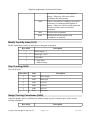
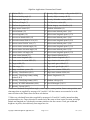
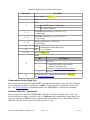
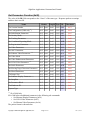
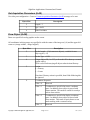
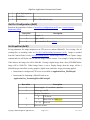
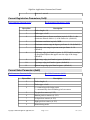
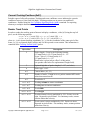
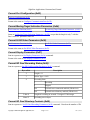
Stop Selected Track (0x3C)
Command the system to stop the currently selected track.
Byte offset
Value
Description
2
0x02
Packet length
3
0x3C
Packet type
4
0x43
Checksum
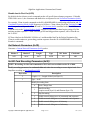
Command Pass-through (0x3D)
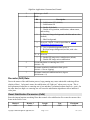
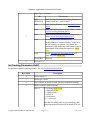
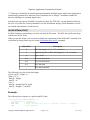
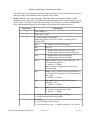
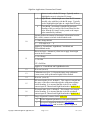
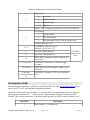
Outputs data payload to the port specified. Use Configure Communication Port (0x3E) to setup the
inbound and outbound physical ports.
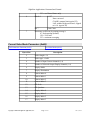
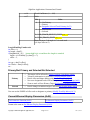
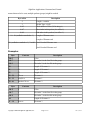
Byte offset
Description
2
Length = 3 + payload length
3
Type = 0x3D
4
Destination Port ID (see below)
5 – 5 + Payload
Length
Payload
Minimum 1 byte
Maximum 80 bytes
NOTE: actual payload length can be anywhere between 1 and 80 bytes.
NOTE: no assumptions are made on terminating characters such as carriage return (0x0D), line feed
(0x0A), or null (0x00)
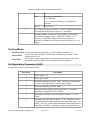
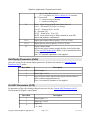
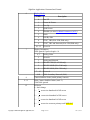
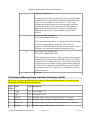
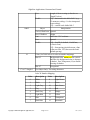
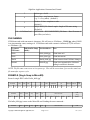
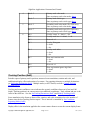
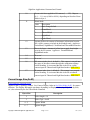
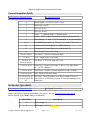
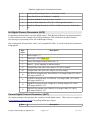
Port ID
NOTE: See Hardware specific ICD to see which ports your hardware currently support.
Port ID
0
1
2
3
4
11
Description
Serial Port 0
Serial Port 1
Ethernet Port
Reserved
Serial Port 2
SD Card log file. Start, stop and name this file with Set SD
Card Recording Parameters (0x1E)
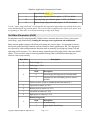
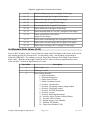
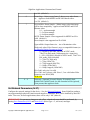
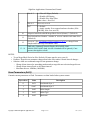
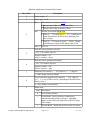
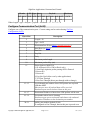
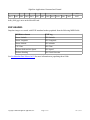
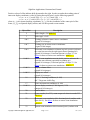
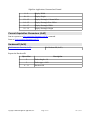
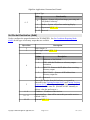
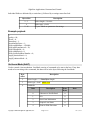
Example:
Send a 5 byte payload “HELLO” to serial port 1.
Copyright © 2014-2015 SightLine Applications, Inc.
Page 61 of 95
Jan 15, 2015