1
Gigaset S45 / SWZ PTT-en / Internet / OVERVIEW.fm / 02.06.2006
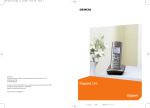
Handset at a glance
Handset at a glance
15
Ð
V
1
2
INT 1
10.05.05
INT
09:45
SMS
3
14
13
4
7
12
5
11
10
6
8
9
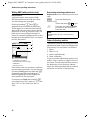
1 Display in idle status
2 Charge status of the batteries
= e V U (flat to full)
= flashes: batteries almost flat
e V U flashes: batteries charging
3 Display keys (page 9)
4 Message key
Access to calls and message lists;
Flashes: new message or new call.
5 End call key, On/Off key
End call, cancel function, go back one menu
level (press briefly), back to idle status (press
and hold), activate/deactivate handset
(press and hold in idle status)
6 Hash key
Confer (Flash) (press and hold),
Toggle between upper/lower case and digits
7 « Swisscom Voice Portal » key
8 Connection socket for headset
9 Microphone
10 Star key
Ringtones on/off (press and hold),
Open table of special characters
11 Key 1
Select network mailbox (press and hold)
12 Talk key
Answer a call, open last number redial list
(press briefly), start dialling (press and hold)
13 Handsfree key
Switch between earpiece and handsfree
mode;
Lights up: handsfree activated;
Flashes: incoming call
14 Control key (page 8)
15 Signal strength
Ð i Ñ Ò (high to low)
| flashes: no reception
Note:
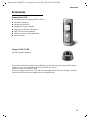
Illustration of a handset on a base station with
SMS functionality.
1