1
Gigaset S45 / SWZ PTT-en / Internet / start_guide_time.fm / 02.06.2006
Making calls
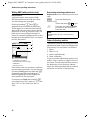
Changing the base station
If your handset is registered to more than
one base station, you can set it to a particular base station or to the base station
that has the best reception (Best Base ).
v ¢ Ð ¢ Handset ¢ Select Base
s
Select one of the registered
base stations or Best Base and
press §OK§.
Making calls
Making an external call
External calls are calls using the public telephone network.
~ c Enter the number and press
the talk key.
Or:
c ~ Press and hold the talk key
c and then enter the
number.
You can cancel the dialling operation with
the end call key a.
You are shown the duration of the call
while the call is in progress.
Notes:
– Dialling using the directory or last number
redial list (page 12) saves time re-entering
numbers .
Ending a call
a
Press the end call key.
Answering a call
The handset indicates an incoming call in
three ways: by ringing, by a display on the
screen and by the flashing handsfree
key d.
You can accept the call by:
¤ Pressing the talk key c.
¤ Pressing the handsfree key d.
If the handset is in the charging cradle and
the Auto Answer function is activated
(page 15), the handset will take a call
automatically when you lift it out of the
cradle.
If the ringtone is intrusive, press the display key §Silence§. You can take the call so
long as it is displayed on the screen.
Handsfree operation
In handsfree mode instead of holding the
handset to your ear you can put it down
e.g. on the table in front of you to allow
others to participate in the call.
Activating/deactivating handsfree
Activating while dialling
~d
¤
Enter the number and press
the handsfree key.
You should inform your caller before
you use the handsfree function so that
they know someone else is listening.
Switching between earpiece and
handsfree mode
d
Press the handsfree key.
During a call and when listening to the
answering machine (depending on the
base station), switch handsfree on or off.
If you wish to place the handset in the
charging cradle during a call:
¤ Press and hold the handsfree key d
while placing the handset in the base
station. If handsfree key d does not
light up, press the key again.
For how to adjust the volume, see
page 15.
7