1
1. Overview
9. Troubleshooting Guide
Tel No 1
B
C
A
Problem
The unit will not dial out.
Cause
Number incorrectly dialled
Action
Check the telephone number you are calling has been entered correctly.
Cause
If the SD1+ is connected to a PABX system you may require a pause after
dialling the first digit.
Action
Program a pause in the telephone number (see “Operating Instructions”). If this
does not solve the problem the SD1+ must be connected to a direct
telephone line.
Cause
Incorrect telephone line connections.
Action
Check the connections to the telephone line (see section 7).
Problem
When the unit calls the recipient they can't acknowledge the unit by pressing
the number [8] button.
Cause
Incorrect acknowledgement procedure.
Action
Instruct the recipient in the correct procedure (see Operating Instructions).
Cause
Incorrectly connected to the telephone socket.
Action
Check that all three connections are correctly connected (see section 7).
Cause
Incompatible telephone.
Action
Call the recipient and ask them to press the number [8] button on their
telephone for 1 second. If you hear anything other than a 1 second tone, their
telephone is not capable of acknowledging the SD1+.
Problem
The recipient can't acknowledge the unit with a mobile telephone.
Cause
Weak reception or incompatible telephone.
Action
Mobile telephones will only work correctly if they are used in an area where the
reception is good.
Problem
The SD1+ will not trigger from the alarm panel.
Cause
Incorrect polarity setting.
Action
Check the jumper-link is set to the correct position (see section 5).
Cause
Incorrect trigger voltage.
Action
Measure trigger voltage and check connections ( see section 6).
Telephone
Tel No 2
1
2
3
4
5
6
7
8
9
Tel No 3
0
Speech Dialler
BT Line
Control Panel
Tel No 4
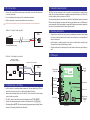
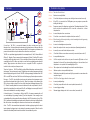
Connections: The SD1+ is connected between the alarm control panel and the
telephone line. It behaves like another extension to the telephone and does not affect its
normal operation or that of any other extension fitted. The unit requires no batteries as its
power and mains fail back-up are derived from the alarm control panel.
The SD1+ accepts three trigger inputs which in our example are; A - Fire, B - Personal Attack
(PA) and C - Burglary. These correspond to the messages (A, B and C) that the SD1+ sends
out and should be recorded as such. If the control panel does not have a fire monitoring
capability then the SD1+ will accept a direct connection from a suitable smoke alarm (as
above). Trigger inputs can be selected as +ve or -ve applied. The SD1+ may also be
included in the control panel tamper circuit.
Telephone Numbers: The SD1+ will dial up to four different telephone numbers and play
its message. The numbers may be up to 24 digits long and are simply programmed using
the text display and keypad on the unit. The SD1+ also supports pager numbers. Note: The
SD1+ must NOT be used to call the Police via the Emergency Services phone numbers.
Messages: The SD1+ has a built-in microphone and speaker so that messages can be
recorded and replayed directly from the unit. When the outgoing call is answered the
SD1+ plays a common phrase (0) and one of the three alarm messages (phrases A, B or
C). Phrase 0 normally states the name and address of the site and phrases A, B and C
relate to the inputs from the control panel (Fire, PA, and Burglary in our example). A total of
40 seconds is available for recording messages.
Acknowledgement: On receiving a call from the SD1+ the person answering the call
can acknowledge it by pressing number [8] on their telephone. If the message is not
acknowledged then it is repeated four times after which the SD1+ abandons the call. The
SD1+ has several acknowledgement options which allows the unit to stop dialling after the
first call has been acknowledged or when two or three have been acknowledged.
Abort: The SD1+ has several abort options which include applying a signal to the abort
input, restoring the trigger input or by entering the operators passcode. When the unit is
aborted it immediately shuts down and returns to its normal standby mode.