1
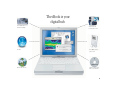
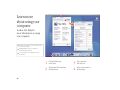
Your iBook at a glance
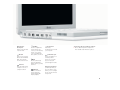
Your computer has these built-in features:
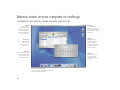
Volume and
brightness controls
Adjust sound volume and
screen brightness.
Two built-in
stereo speakers
Listen to music, movies,
games, and multimedia.
Optional AirPort
wireless Internet
and networking
(underneath keyboard)
Using the optional
AirPort Card, you can
connect to the Internet,
use email, share files,
play network games, and
more—without any
wires to hold you down.
Sleep indicator light
Pulsating light indicates
that the computer
is in sleep.
2
Built-in microphone
Record sound or control
your computer with
spoken commands.
® Power button
Turn your computer on,
put it to sleep, or shut it
down.
Media Eject (F12) key
Press and hold to eject
a CD or DVD or to open
the optical drive tray.
¯
Power adapter
connector
Plug in the power adapter
(included) to recharge your
iBook’s battery.
Optical disc drive
Install and run software
or listen to music CDs.
Play DVD videos if you
have the DVD/CD-RW
or Combo drive, or
create your own CDs if
you have the CD-RW or
combo drive.