1
Accessing 800xA via OLE DB
GET_HISTORY(OBJECT=[Control Structure]MB300 Test Network/Extended
Process Objects x/MB300 AI/AIC4_1; ASPECT=Control Connection;
PROPERTY=VALUE; LOG=OPC_5s_5h; FROM=HOUR; TO=NOW)
GET_HISTORY(OBJECT=[Control Structure]MB300 Test Network.Extended
Process Objects x.MB300 AI.AIC4_1; ASPECT=Control Connection;
PROPERTY=VALUE; LOG=OPC_5s_5h; FROM=HOUR; TO=NOW)
These paths are fairly long but it is possible to shorting them down. You can just
give the name of the structure and the name of the Object itself, which gives the
following command line:
GET_HISTORY(OBJECT=[Control Structure]AIC4_1; ASPECT=Control
Connection; PROPERTY=VALUE; LOG=OPC_5s_5h; FROM=HOUR;
TO=NOW)
The simplest way of stating the names of the objects is just to give the name of the
Object.
GET_HISTORY(OBJECT=AIC4_1; ASPECT=Control Connection;
PROPERTY=VALUE; LOG=OPC_5s_5h; FROM=HOUR; TO=NOW)
This is the slowest way you can state the objects. The program must search through
the whole structure until it finds the object.
The drawback is that it can only be one object with that name in the system. If there
is more than one object the program will use the first one that it finds.
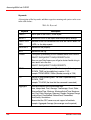
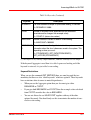
As mentioned in the section about keywords you can use different optional
keywords. Here are examples on how you can use these keywords. The first two
examples just show the two different ways you can give the mandatory ones. All
names and values are excluded.
GET_HISTORY(OBJECT= ; ASPECT= ; PROPERTY= ;LOG= ; FROM= ;TO= )
GET_HISTORY(ITEMID= ; FROM= ;TO= )
The following examples are just showing different combinations for the first
alternative but you can also apply them to them ITEMID alternative. You can
restrict the maximal number of values you want back.
GET_HISTORY(OBJECT= ; ASPECT= ; PROPERTY= ;LOG= ; FROM= ;TO=
;MAXCOUNT= )
3BDS011222-510 B
477