1
2701126 Rev.3
Operation
Running the daily program
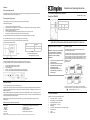
Once the daily programmes have been set for each zone (see programming—setting the daily program) turn the dial to the Auto position.
The heaters in each zone will function as per the programme
Installation and Operating Instructions
4 Zone Wall Mounted MBS Controller
Model No. RXMBS4
November 2007 _ Issue 3
Overriding the daily program
When the programmer is in Auto mode, the setting of each zone can be temporarily overridden.
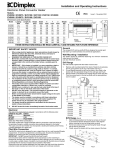
Dimensions (mm)
With the dial in the Auto position:
Height
Width
Depth
120
85
31
1.
2.
3.
4.
5.
6.
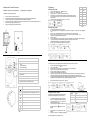
Press the ‘OK’ button, the bar(s) above zone 1 will flash.
Change the status of zone 1 by pressing the ‘+’ and ‘-’ buttons. Zone 1 will change between 1 and 4 bars (see Fig.11 and Table 5)
Press ‘OK’ to confirm, the bar(s) for zone 2 will flash.
Repeat the above steps for zone 3 and 4.
If you do not wish to change the status of a particular zone, simply press ‘OK’ to move to the next zone
Pressing the ‘OK’ button for zone 4 will return the screen to the normal ‘AUTO’ display.
If no button is pressed in the override mode for 30 seconds the screen will automatically return to the ‘AUTO’ display.
NB—The override function for each zone will
end at the beginning of the next program
To override all zones to the same mode, turn the mode selector switch to the relevant symbol.
See Fig.5 and Table 2 on page 2 for details.
THESE INSTRUCTIONS SHOULD BE READ AND RETA INED FOR FUTURE USE
Mode
No.of bars
Comfort / On
4
Setback / Off / Frost protection
1
Table 5
Fig.11
NB—The above table depends upon
the configuration chosen (see page 3)
IMPORTANT SAFETY ADVICE
WARNING—This product must be installed
by a competent person or electrician in
conjunction with the current IEE Wiring
Regulations and relevant Building
Regulations
Absence mode (Holiday)
The RXPW4 incorporates a timed absence mode for when properties are vacant for a period of time
(e.g. holidays). All heaters in all zones will provide a frost protection temperature for a set period of time.
1.
2.
3.
4.
5.
Turn the mode selector switch to the ‘AUTO’ position.
Press and hold the ‘OK’ button for about 5 seconds.
‘Ab01’ will be displayed.
Press the ‘+’ and ‘-’ buttons for the amount of days you are away (up to 99 days).
At the end of the timed absence the controller will revert back to its original program.
x
x
x
DO NOT cover or obstruct the air inlet
or air outlet vents
DO NOT recess the unit in to a wall,
as this will cause overheating and
potentially be a fire risk
DO NOT install the unit in the
immediate vicinity of a bathroom or
swimming pool
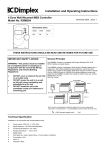
General Principle
The RXMBS4 controller is compatible with Dimplex DuoHeat, EPX, EVS,
RPXN, Calidou and Apollo heaters.
The RXMBS4 controller is designed to allow control of Dimplex heaters from a
single point. Mains Borne Signalling uses standard live, neutral and earth
wiring to carry a signal to each heater. Each heater requires a receiver cassette
(Part no. RX9913 or part no. RX03002 for DuoHeat radiators) to receive the
signal from the RXMBS4 controller and change the heater mode. (e.g. comfort,
background or on, off)
(See Fig.1 below)
Fig. 12
After Sales Service
Your product is guaranteed for two years from the date of purchase.
Within this period, we undertake to repair or exchange this product free of charge (subject to availability) provided it has been installed and
operated in accordance with these instructions. Your rights under this guarantee are additional to your statutory rights, which in turn are not
affected by this guarantee.
= 240V domestic supply circuit
Should you require after sales service you should contact our customer services help desk on 0870 727 0101. It would assist us if you can
quote the model number, date of purchase, and nature of the fault at the time of your call. The customer services help desk will also be able
to advise you should you need to purchase any spares.
Technical Specification
Please do not return a faulty product to us in the first instance as this may result in loss or damage and delay in providing you with a
satisfactory service.
x
x
x
x
x
x
x
x
x
Please retain your receipt as proof of purchase.
Dimplex UK Ltd
Millbrook House
Grange Drive
Hedge End
Southampton
SO30 2DF
Customer Help Line
Tel: (0870) 727 0101 (8am-6pm Mon-Fri; 8:30am-1pm Sat.)
Fax: (0870) 727 0102
E-mail: [email protected]
Web-site: www.dimplex.com
Republic of Ireland Tel: 01 842 4833
[C] Dimplex UK Limited
All rights reserved. Material contained in this publication may not be reproduced in whole or part, without prior permission in writing from Dimplex UK Limited.
Installation in an environment with normal pollution levels
Power supply—230V~AC, +/- 10%, 50Hz
Signal frequency—132,5 KHz FSK Modulation
Functioning temperature—0 to +40ºC
Storage temperature— -10ºC to 70ºC
Digital display
Clock back up in case of power failure—4 hours (approx.) Capacitor
Consumption—4VA
Class—II
Protection—IP30
Fig.1