1
fSTOP Wireless V2-1 BarTech Receiver Manual
30-Dec-13
3.8. Setting LIMITS
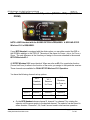
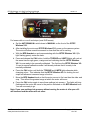
The LIMITS button is used to limit the travel of the motor between 2 user defined positions.
When the limits are set the position of the focus knob on the BFD Handset is recalculated
to the corresponding position between the 2 limits set by the user, i.e. fully clockwise will
move the motor to one limit and fully counterclockwise will move to the other limit.
a. When the LIMITS light is off no limits are set. With the BFD Handset
communicating with the fSTOP Wireless V2-1 and the motor calibrated, position the
motor at the first limit you would like to set using the BFD Handset knob.
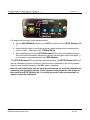
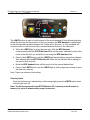
b. Press in the LIMITS button until the LIMITS light starts blinking orange then release.
This indicates that the fSTOP Wireless V2-1 has set the first limit and is waiting for
the second limit to be set.
c. Move the BFD Handset knob until the motor is at the second desired limit.
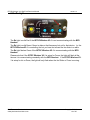
d. Press in the LIMITS button until the LIMITS light is solid orange then release to save
the limits into memory.
Note: There is a minimum Limit setting.
Clearing Limits
Once the limits are set, indicated by a solid orange light, press the LIMITS button down
until the light turns off.
Note: The limits are stored in the fSTOP Wireless V2-1 memory and will remain in
memory for up to 45 minutes after power is removed.
PLC Electronic Solutions Ltd.
www.plcelectronicsolutions.com
Copyright © 2013
12 of 20