1
fSTOP Wireless V2-1 BarTech Receiver Manual
30-Dec-13
3. fSTOP Wireless V2-1 BarTech Receiver Setup
3.1. Power
The fSTOP Wireless V2-1 can use anything between 8 – 30 volts and incorporates
internal voltage up conversion, so no matter the input voltage you will always get a fast
response on the motor.
Your power source must be able to source up to 3.0 Amps otherwise motor performance
will suffer.
3.2. Single fSTOP Wireless V2-1 Operation
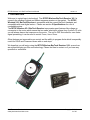
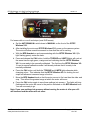
a. On the BFD Handset choose one channel from 0 to 7 by rotating the selector until
the arrow points to the desired channel. The selector can be turned in either
direction.
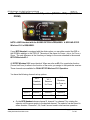
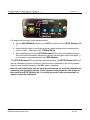
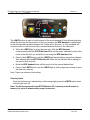
b. Using the CHAN switch on the fSTOP Wireless V2-1 select the same channel you
chose above by rotating center selector with a small tool until the arrow points to the
desired channel. The selector can be turned in either direction.
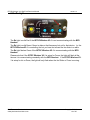
a. The focus wheel on the BFD Handset now controls the fSTOP Wireless V2-1. The
Rx light on the fSTOP Wireless V2-1 will rapidly flash green to indicate received
data.
As a general rule, you can further reduce the potential for video transmitter interference by
choosing the channel with the highest number.
PLC Electronic Solutions Ltd.
www.plcelectronicsolutions.com
Copyright © 2013
6 of 20