1
Buttons and Functions
/
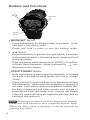
MODE/SET
STR/STP/
RESET
MODE/SET Button
- Press momentarily to change modes; to proceed to the
next item in the setting mode.
- Press and hold to enter or exit the setting mode.
/ Button
- Press momentarily to activate the night light for 3 seconds;
to decrease the digits in the setting mode (press and hold
to change it fast).
.
- Press and hold to switch alarm sound ON/OFF in Time/Date
or Heart Rate/Stopwatch Mode (indicated by
icon
displaying on the screen).
STR/STP/RESET Button
- Press momentarily to start or stop the stopwatch; to increase
the digits in the setting mode (press and hold to change
it fast).
- Press and hold to clear the data of the stopwatch in Heart
Rate/Stopwatch Mode when the stopwatch is stopped. If
not clear, it will add up when the stopwatch restarts (But
the data of stopwatch and other records, such as time in/
below/above heart rate target zone, calories and fitness
index will saved until they are replaced with new data by
starting a new workout.).
.
Note: All buttons produce one short beep when pressed.
Press and hold operation also produces another beep.
When the daily alarm is beeping, it can be silenced by
pressing any button.
6