1
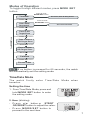
Modes of Operation
To toggle through different modes, press MODE /SET
button.
Time/Date
Press MODE/SET button
Heart Rate/
Stopwatch
Press & Hold
MODE/SET button
Set Time, Date & Daily Alarm
Press & Hold
MODE/SET button
Set Personal Data
Press MODE/SET button
Press MODE/SET button
Time in HR
Target Zone
Press MODE/SET button
Time in above
HR Target Zone
Press MODE/SET button
Time in below
HR Target Zone
Press MODE/SET button
Calories
Press MODE/SET button
Fitness Index
Note: If no button is pressed for 60 seconds, the watch
will automatically exit the setting mode.
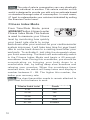
Time/Date Mode
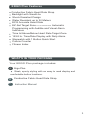
The watch firstly enter Time/Date Mode when
turned on.
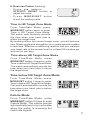
Setting the time
1. From Time/Date Mode, press and
hold MODE /SET button to enter
the setting mode.
2. Hour (blinking)
- Press /
button or STR/ST
OP/RESET button to adjust the value.
- P r e s s M O D E / S E T button to
proceed to the next item.
7