1
Silent Operating Mode
Dip switch #4 on the receiver allows you to set the console to either stay silent
or emit audible warnings. In Silent Mode, the console does not beep to indicate
problems such as low battery or poor reception. The factory sets Silent Mode
off as the default so that the console will warn you when problems occur.
When Silent Mode is OFF:
✦ Triple Beep Warns of Transmitter Battery Problem
A triple beep every 10 minutes indicates that the transmitter battery is
extremely low on power. If you hear a triple beep, replace the transmitter
battery as soon as possible to prevent possible loss of data.
✦ Double Beep Warns of Data Reception Problem
A double beep indicates that the SensorLink has not received data for at
least 30 minutes.
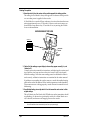
Dip switch #4 on the console’s receiver controls Silent Mode (see figure below).
RECEIVER DEFAULT SETTINGS
UNIT ID
SILENT MODE ON
ON
1 2 3 4
SILENT MODE OFF
(Audible Warnings ON)
You can set your console to Silent Mode on or off. If you were to power up
your console with dip switch #4 in the “OFF” position (as shown above),
Silent Mode would be off and audible warnings would be on. On the other
hand, if you were to power up your console with the dip switch in the “ON”
position (not shown), Silent Mode would be on and audible warnings off.
The key is the position of dip switch #4 when you power up the console. Flipping the dip switch without repowering up the console will take you in and out
of Test Mode (see below for details), but will not change the Silent Mode setting.
Test Mode
To test signal reception at any point, simply flip the receiver’s dip switch #4 to
the opposite position from where it was when the console powered up. (You
will hear a periodic beep about every 2.5 seconds if the transmitter is within
range of the receiver and is also set to Test Mode.)
Therefore, to set the console’s operating mode (Silent Mode on or off), flip dip
switch #4 to the appropriate side and then repower the console. Then, to place
the receiver in Test Mode, simply flip the dip switch to the opposite side.
Configuring Transmitter/Receiver Pair
Page 3