1
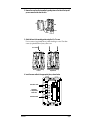
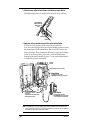
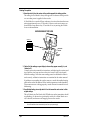
5. Gather the sensor cables and secure them to the cable tie lug using a cable tie.
When tightening the cable tie, make sure the cables are on top of the lug.
When tightening
cable tie, make sure
cables are on top
of lug.
Cable Tie Lug
Cable Tie
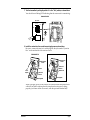
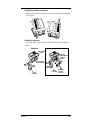
6. Apply power to the transmitter using one of the options indicated below.
If you have a solar-powered system, connect the gel cell battery.
If you have a non-solar-powered system, decide whether you want to install
the power adapter OR the lithium battery (the two will NOT work in tandem or as backup). Davis recommends the battery to ensure power during
storms. If used as the primary power source, one fresh lithium battery
should provide about six months of service. Use two fresh lithium batteries
to double life (second is not provided).
SensorLink
Transmitter
2nd Lithium Battery (optional, not provided)
Lithium Battery
* Provided with non-solar systems
* RECOMMENDED - reliable power during storms
Gel Cell Battery
Power
Plug
* Provided with solar systems
* Rechargeable
* Recommended for solar-powered stations
* Reliable power during storms
Power Adapter
* Provided with non-solar systems
* NOT RECOMMENDED for use during storms power outages will disrupt data collection
Note: This illustration (as well as the following one) shows the transmitter mounted inside a Davis
Multi-Purpose Shelter (#7728). The Multi-Purpose Shelter is not required, but the transmitter
does need to be mounted in weatherproof location.
Page 6
SensorLink™