1
Section 2: Using the WinDGS Utilities
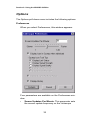
Network type (Ad Hoc Mode)
This mode is used to set up a small, temporary network
between two or more computers. For example, you
might set up an ad hoc network between computers in
a conference room so users can share information in a
meeting.
Constant Awake Mode (CAM)
Constant Awake Mode is the normal mode for desktop
machines or other machines where power consumption
is not an issue. It keeps the radio powered up continuously so there is little latency for responding to
messages. This mode is recommended for devices
where high availability is desired.
Power Save Mode
Power Save Mode is recommended for devices where
power consumption is a major concern, such as small
battery powered devices. If the client node is powered
from an AC line, PSP should not be used. Power Save
Mode causes the Access Point to buffer incoming messages. The Aironet 4800B Series Wireless LAN
Adapter must wake up periodically and poll the Access
Point to see if there are any buffered messages waiting.
The PC Card can request each message and then go
back to sleep.
Fast Power Save Mode
Fast Power Save Mode (Fast PSP Mode) switches
between PSP and CAM based on network traffic. When
retrieving a high number of packets, Fast PSP Mode
will switch to CAM to retrieve the packets. Once the
packets are retrieved, it switches back to PSP.
Maximum Power Save Mode
Maximum Power Save Mode (Max PSP Mode) can only
be used in conjunction with PSP or Fast PSP
Modes.This mode allows the Aironet 4800B Series
22