1
5
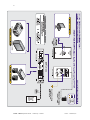
Configuration B - Single CAT5 Link: RGBHV Video + Mono Audio with Local Power
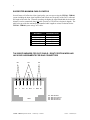
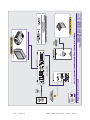
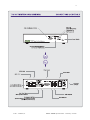
for TPT101 - (See Application Diagram B on page 10 and Control / Connector Diagrams on
Pages 13 & 14)
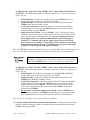
TPT101 Switches: Set the Power switch on the rear of the TPT101 to LOCAL.
Set the Audio switch on the rear of the TPT101 to MONO.
TPR101 Switches: Set the Link A Mode switch (located on the left rear of the
TPR101) to the MONO AUDIO position.
CAT5 Cable Connection: Connect one end of the CAT5 cable to the LINK A
VIDEO Output Port on the rear of the TPT101, and the other end to the LINK A
Input Port on the rear of the TPR101.
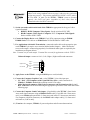
Apply Power to the TPT101 - using the IN9206 15 VDC; 1A local power supply
(included). The correct polarity is silk-screened next to the power connector (2-pin
captive screw terminal) on the back of the unit. Be extra careful to connect the
power supply positive wire (with the red heat shrink) to the TPT101 power
connector’s (+) terminal, and the power supply negative wire to the TPT101
power connector’s (-) terminal. Connecting the power with the reverse polarity
may permanently damage the unit! If in doubt, measure the power cable with a
voltmeter to verify the positive and negative terminals.
Note: The TPT101 Transmitter automatically powers up when the input cable is attached and powers
down when the cable is removed (the Auto Power LED on the front of the unit will illuminate).
When extending the DC power cable for distances of 50’ or more, use an
18-gauge to 22-gauge power cable (thinner cables may cause problems).
The INLINE IN8500-2P power cable is well suited for this application.
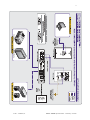
Configuration C - Dual CAT5 Link: RGBHV Video + Stereo Audio with Remote Power
for TPT101 - (See Application Diagram C on page 11 and Control / Connector Diagrams on
Pages 13 & 14)
TPT101 Switch: Set the Power switch on the rear of the TPT101 to REMOTE.
Set the Audio switch on the rear of the TPT101 to STEREO.
TPR101 Switches: Set the Link A Mode switch (located on the left rear of the
TPR101) to the REMOTE POWER position.
CAT5 Cable Connection: Connect one end of the first CAT5 cable to the LINK A
VIDEO Output Port on the rear of the TPT101, and the other end to the LINK A
Input Port on the rear of the TPR101. Repeat the process again for the second
CAT5 cable, connecting the LINK B connector on the TPT101 to the LINK B
connector on the TPR101.
Do not connect a local power supply to the TPT101. When the TPR101 power
switch is in the ON position, the TPT101 automatically powers up when the input
cable is attached (the Auto Power LED on the front of the unit will illuminate).
Note: Always test your cable(s) prior to any permanent installation.
4.) Carefully Attach the TPT101 Transmitter to the Outlet Box - making sure that none of the
cables are pinched or damaged. Make sure that the GND screw terminal on the back of the
TPT101 is properly grounded.
© 2003 - EXTRON, Inc.
TPT101 / TPR101 Operation Manual - Preliminary 8/18/2003