1
Contents
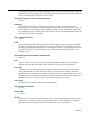
About This Guide
Introducing the Enterasys Networks Mobility System................................................................................... xxxiii
Documentation ............................................................................................................................................. xxxiv
Planning, Configuration, and Deployment ............................................................................................. xxxiv
Installation ............................................................................................................................................. xxxiv
Configuration and Management ............................................................................................................ xxxiv
Safety and Advisory Notices ................................................................................................................. xxxiv
Text and Syntax Conventions ................................................................................................................ xxxv
Getting Help................................................................................................................................................... xxxv
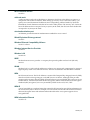
Chapter 1: Using the Command-Line Interface
CLI Conventions .............................................................................................................................................. 1-1
Command Prompts.......................................................................................................................................... 1-2
Syntax Notation......................................................................................................................................... 1-2
Text Entry Conventions and Allowed Characters...................................................................................... 1-2
MAC Address Notation.............................................................................................................................. 1-3
IP Address and Mask Notation.................................................................................................................. 1-3
Subnet Masks..................................................................................................................................... 1-3
Wildcard Masks .................................................................................................................................. 1-3
User Globs, MAC Address Globs, and VLAN Globs................................................................................. 1-4
User Globs.......................................................................................................................................... 1-4
MAC Address Globs ........................................................................................................................... 1-5
VLAN Globs........................................................................................................................................ 1-5
Matching Order for Globs ................................................................................................................... 1-5
Port Lists ................................................................................................................................................... 1-6
Virtual LAN Identification........................................................................................................................... 1-6
Command-Line Editing .................................................................................................................................... 1-7
Keyboard Shortcuts................................................................................................................................... 1-7
History Buffer ............................................................................................................................................ 1-7
Tabs .......................................................................................................................................................... 1-7
Single-Asterisk (*) Wildcard Character...................................................................................................... 1-8
Double-Asterisk (**) Wildcard Characters ................................................................................................. 1-8
Using CLI Help ................................................................................................................................................ 1-8
Understanding Command Descriptions........................................................................................................... 1-9
Chapter 2: RoamAbout Switch Set Up Methods
Overview.......................................................................................................................................................... 2-1
Quick Starts............................................................................................................................................... 2-1
RoamAbout Switch Manager .................................................................................................................... 2-2
CLI............................................................................................................................................................. 2-2
WebView ................................................................................................................................................... 2-2
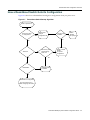
How a RoamAbout Switch Gets its Configuration ........................................................................................... 2-3
CLI quickstart Command ................................................................................................................................. 2-4
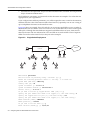
Quickstart Example ................................................................................................................................... 2-5
Remote Configuration...................................................................................................................................... 2-7
Opening the QuickStart Network Plan in RASM.............................................................................................. 2-8
ix