1
New Service Information Text Formats and Graphics
The Service Information is getting a new
look in 2014. When referring to some repair
procedures, technicians will notice better
graphics and more direct text information
along with a reduction in the number of
links to removal procedures. The implementation of these graphics and text will start
with the 2014 model year, and there will
be a mix of the new and old styles as new
procedures are written.
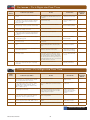
An X in brackets indicates the
number of parts
New Graphics
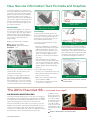
Newly developed graphics are replacing
the current line style graphics in some service procedures. The new, larger shaded
graphics feature a more realistic image
with better part and background definition.
The callouts are captured inside the
graphic image.
Graphics will feature three shadings:
Part – darkest grey shading
Background – lighter grey shading
Fasteners – red
Graphics and text can be magnified
without any loss in resolution.
Text Strings
Text strings are being introduced in the
Service Information procedures in an effort
to increase consistency and commonize
global phrases. The text strings are common, predefined, fixed phrases.
Two styles of text strings will be used in
service information:
•Sentence Text Strings are used when
frequently used procedure steps require
additional explanation. They are complete sentences that contain the necessary elements to describe an action or
a fact. For example: [Apply grease to
the fastener, otherwise the threads will
strip out.]
Text string usage is currently being implemented for Mechanical Service Information
only. Electrical Service Information text
string usage is still under development and
will be implemented in the future. Both text
string styles may appear in the same service procedure along with free flow text.
•Chained (Component) Text Strings
contain a component name and an action
verb. They are used when little explanation is required to complete the step. For
example: [Engine Control Module ][»]
[Remove ]
The part is now colored dark gray and
fasteners are colored red.
The use of color on fasteners will help them
stand out, while still being able to print
clearly in black and white.
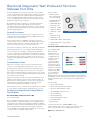
The @ symbol means “from the”
or “to the”
In a procedure with text strings:
The higher resolution graphics also have
better graphic quality when magnified.
When viewing the Service Information on
Internet Explorer 8 or 9, use the % button
in the bottom right corner to increase text
size without distorting the graphic quality.
•A chevron (») is followed by the action verb
•An X in brackets indicates the number of
parts to remove/install
•RPO codes or optional equipment are
shown in brackets {RPO}
•An @ symbol is used where “from the”
or “to the” was used before.
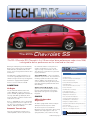
The 2014 Chevrolet SS –
PRE-DELIVERY INSPECTION (PDI)
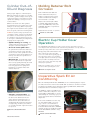
The factory-installed shipping spacers in the front coil springs provide additional clearance during vehicle transportation and MUST
be removed when performing the PDI. With the vehicle on a hoist,
remove the shipping spacer and repeat for the other side.
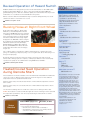
The factory-installed rear disc brake rotor protection covers also
MUST be removed when performing the PDI. With the vehicle on
a hoist, rotate the wheel while at the same time pulling the torn
end of the cover away from the disc brake rotor and wheel. Ensure
that all material is removed and repeat for the other side.
More concise new style text
Thanks to Bob Scherer, Kevin Jakobiak
and Peter Allen
continued from page 2
In addition, check
the tire air pressure
during PDI. The pressures are set higher
for shipping. The tires
pressure should be
set at 36 lbs. Refer
to the Tire and Loading Information Label
near the driver’s door
latch.
Remove the spacer in the front springs.
Thanks to Brad Thacher and Sherman Dixon
December 2013
3