1
TCP/IP Configuration
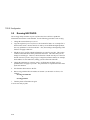
Message “Can't connect with the server.”
This error message has two possible causes:
• The NIC's IP address has changed but the entry in the arp cache has not been
updated. Delete the entry in the arp cache and then run nsconfig.
• A connection was aborted without closing the channel. When you start a new
session, you get this message because the channel is still busy. Turn the printer off
and then on again to deallocate the channel.
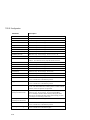
Message: “Nsconfig: Couldn’t write Subnet Mask to socket.”
This error message has four possible causes:
• Broken or unplugged cable. Inspect cable and plug in or replace.
• The NIC is either hung, has crashed, or is slow. Reset the card.
• Packets are being corrupted by an intervening node (between the network
interface card and the workstation). Check for any failing intervening hosts.
• An attempt to communicate with the NIC is unsuccessful because TCP/IP has
been disabled or TCP/IP on the NIC has crashed but other installed protocols are up
and running.
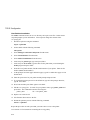
Take the following steps:
1. Ensure that the NIC is actually running TCP/IP.
2. Ping to determine if the NIC can be reached via IP.
3. Determine if other NIC protocols are working.
4. Reset the NIC.
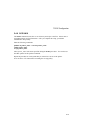
Message: “Nsconfig: Couldn’t read Acknowledgment from socket.”
The handshake from the NIC was never received. Supply the correct Netmask value,
FF.0.0.0 or FF.FF.0.0 or FF.FF.FF0, for nicprint.conf.
Message: “Nsconfig: Error on server end.”
The receiver handshake was not acknowledged. Supply the correct Netmask value,
FF.0.0.0 or FF.FF.0.0 or FF.FF.FF0, for nicprint.conf.
Message: “Nsconfig: Error reading Acknowledgment from server.”
The host cannot accept the server handshake, that is, the host received a response from
the NIC but the value is unexpected.
5-21